PTO44
BLCD Monitor Message
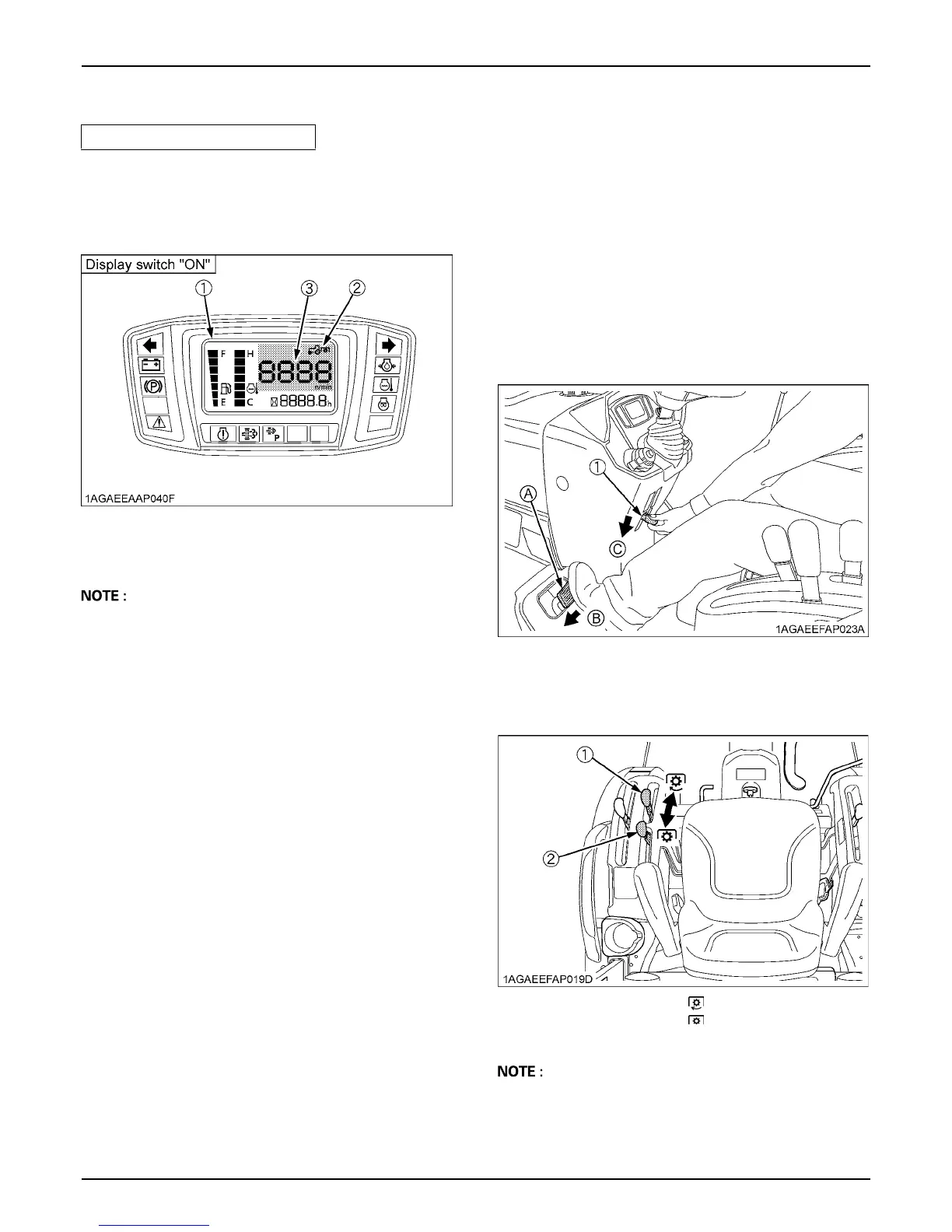
1. The PTO rpm can be checked in the LCD monitor.
(See "LCD MONITOR" in "OPERATING THE
TRACTOR" section.)
A With the PTO in the "ON" position, a numeric value is
displayed on the LCD monitor even if the PTO shaft is
not turning.
BStationary PTO
To park the tractor and use the PTO system (for chipper
or pump, for example), start the PTO system in the
following steps.
1. Apply the parking brake and place blocks at the tires.
2. Make sure the shift levers are at NEUTRAL, and start
the engine.
3. Set the PTO select lever to rear only position. [B2650/
B3350 only]
4. Set the PTO clutch lever to engage "ON".
5. Set the engine speed to provide recommended rear
PTO speed.
6. Get off the tractor.
A If the PTO system is engaged and you stand up from
the seat and release the parking brake, the engine
stops automatically after standing up.
Model [B2650/B3350/B3350SU]
(1) LCD monitor
(2) PTO indicator
(3) PTO speed
(1) Parking brake lever (A) Interlock the brake pedals
(B) "DEPRESS"
(C) "PULL DOWN"
(1) PTO clutch lever
(2) PTO select lever
[B2650/B3350 only]
"ON"
"OFF"



 To Next Page