31PTO
BLCD Monitor Message
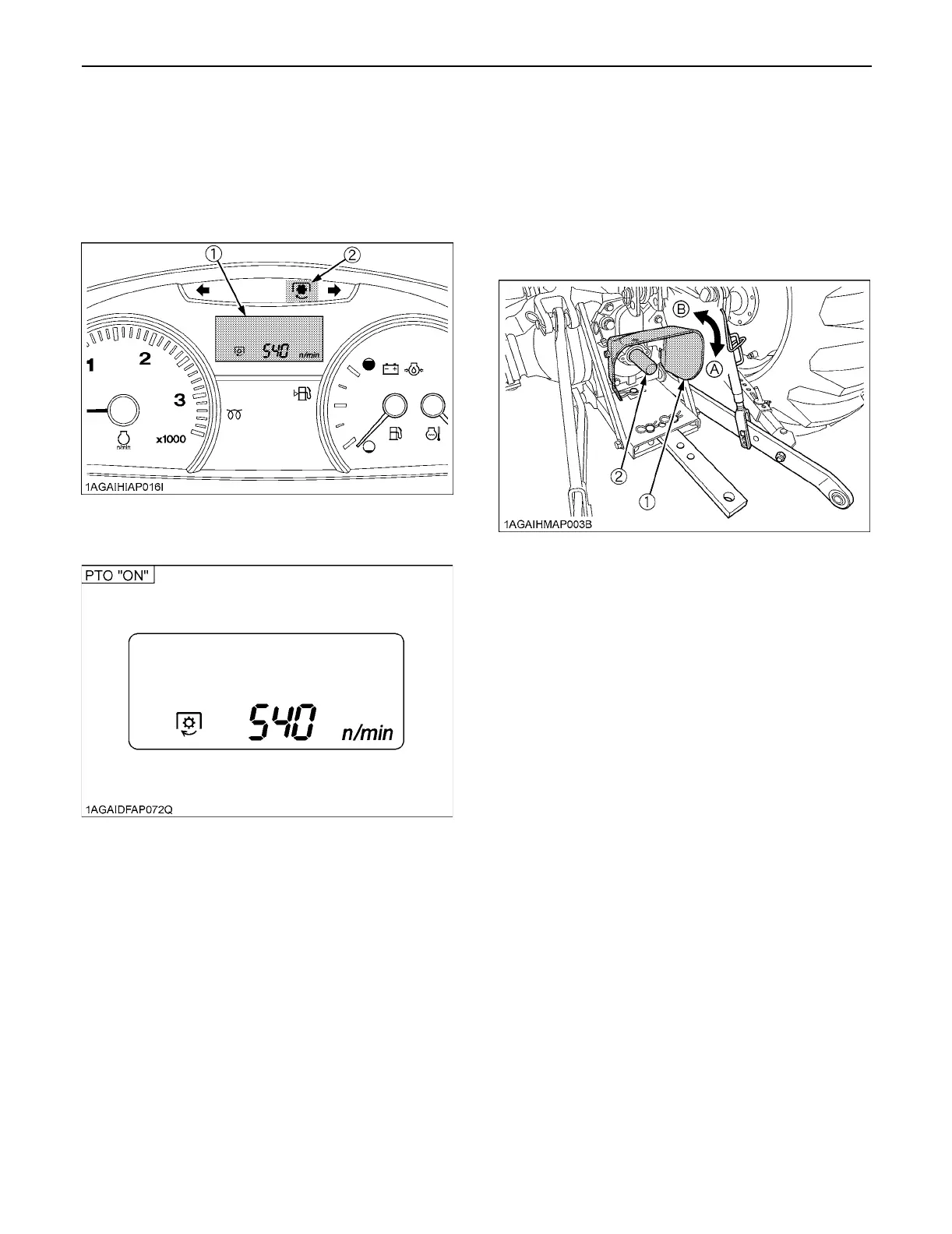
1. The PTO rpm can be checked in the LCD monitor.
(See "PTO TACHOMETER / HOURMETER" in
"OPERATING THE TRACTOR" section.)
2. When the PTO system gets engaged (ON), the
indicator lights up.
BPTO Shaft Cover and Shaft Cap
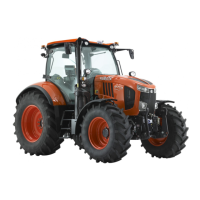
Keep the PTO shaft cover in place at all times. Replace
the PTO shaft cap when the PTO is not in use. Before
connecting or disconnecting a drive shaft to PTO shaft, be
sure engine is "OFF". Raise up the PTO shaft cover.
Afterward be sure to return the PTO shaft cover to the
"NORMAL POSITION".
(1) LCD monitor
(2) PTO clutch indicator
(1) PTO shaft cover
(2) PTO shaft cap
(A) "NORMAL POSITION"
(B) "RAISED POSITION"


 To Next Page