Product Overview (Cont.)
Button Function / Options
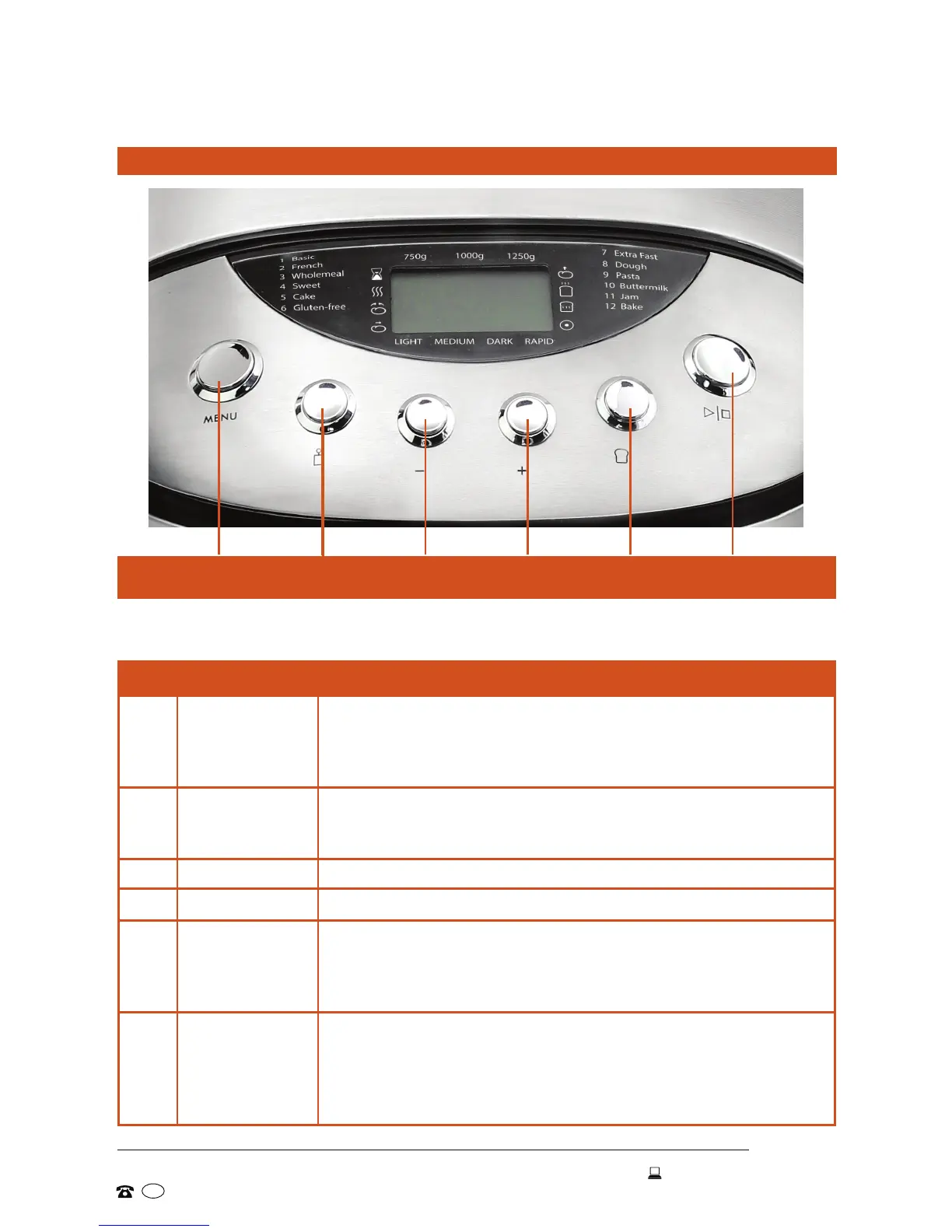
11 MENU Press to select the baking program:
1-Basic, 2-French, 3-Wholemeal, 4-Sweet, 5-Cake,
6-Gluten-free, 7-Extra Fast, 8-Dough, 9-Pasta,
10-Buttermilk, 11-Jam, 12-Bake.
12 LOAF WEIGHT Press to select the loaf size/weight: 750g, 1000g, 1250g
(available for programs 1, 2, 3, 4). Loaf weight determines
baking time.
13 TIMER - Press to set the delay time (decrease) -- see page 22.
14 TIMER + Press to set the delay time (increase) -- see page 22.
15 CRUST
COLOUR
Press to select the crust colour: Light, Medium or Dark
(for programs 1, 2 and 3), or select Rapid to accelerate the
kneading and rising process and reduce the total program
time by approximately one hour.
16 START/STOP • Press to start the program. The machine will emit a short
sound signal, the two dots in the time index will ash and
the countdown will start. Other buttons are now inactive.
• Press and hold to stop the program; the appliance will
sound a short signal and stop the program.
MENU LOAF TIMER TIMER CRUST START/
WEIGHT - + COLOUR STOP
Every time you press a button, the machine will acknowledge receipt of the
signal with a short beep.
Control panel buttons


 To Next Page