EasyManua.ls Logo

Kurzweil KP-80 - User Manual

Kurzweil KP-80
28 pages
Print Icon
To Next Page IconTo Next Page
Loading...
KP-80
0
5
25
75
95
100
KP 80_Manual_Rev A
Question and Answer IconNeed help?

Do you have a question about the Kurzweil KP-80 and is the answer not in the manual?

Overview

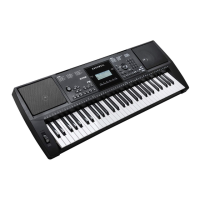
The Kurzweil KP-80 is a 61-key electronic keyboard designed for a wide range of musical applications, from practice and learning to performance and recording. It features a multi-functional LCD display and a comprehensive set of controls for easy navigation and sound manipulation.

Function Description:

The KP-80 serves as a versatile musical instrument, offering a rich array of voices, styles, and songs to inspire creativity. Its core functions include:

  • Voice Selection: The instrument boasts 300 voices, including 3 drum kits, allowing users to explore a diverse palette of sounds. Voices can be selected individually or layered in a "Dual" mode for richer textures.
  • Style Accompaniment: With 200 preset styles across various musical genres, the KP-80 provides automatic accompaniment to enhance performances. Styles include intro/ending sections, fill-ins, and auto bass chord (A.B.C.) functionality.
  • Song Playback and Lesson Mode: The keyboard contains 100 demo songs for listening pleasure. It also features a "Lesson Mode" with three different practice methods (time value training, note correction training, melody off) and a grading system to help users track their progress.
  • Recording and Playback: Users can record their performances (up to 500 notes) and play them back, making it a useful tool for practice and composition.
  • MIDI Functions: The KP-80 is MIDI-compatible, allowing it to connect with computers and other MIDI devices via a USB interface. This enables the instrument to transmit and receive MIDI messages, expanding its capabilities for music production and control of external hardware.
  • Performance Controls: Dedicated controls for tempo, sustain, touch sensitivity, pitch bend, DSP effects, transpose, and octave adjustments provide expressive control over the sound.

Important Technical Specifications:

  • Keyboard: 61 keys
  • Display: Multi-functional LCD
  • Polyphony: 32 notes
  • Voices: 300 (including 3 drum kits)
  • Styles: 200
  • Songs: 100
  • Demo Songs: 100
  • Tempo Range: 30-280 BPM
  • Registration Memory: 4 settings
  • Control Buttons: Power on/off, ACC.Vol+/-, Tempo+/-, ChordDict, Lesson, L/R Part, DSP, Style, Voice, Song, Memory, M1-M4, O.T.S., Dual, Sustain, Touch, Metro, Octave+/-, Transpose+/-, +, -
  • Accompaniment Control: Start/Stop, Sync Start, Intro/Ending, Fill A, Fill B, Fade In/Out, A.B.C.
  • Record Function: Record, Play
  • Connectors: DC IN, AUX.OUT, Phones, USB, MIC IN, Sustain
  • Power Supply: DC IN (can also be powered by 6 AA batteries)
  • Speaker: 4Ω 10W + 10W
  • Dimensions: 955 x 360 x 145mm
  • Weight: 4.75Kg (without batteries)

Usage Features:

  • Master Volume: A dedicated knob allows for easy adjustment of the overall volume.
  • Sync Start: This feature enables the style accompaniment to begin automatically when a key is pressed, either for rhythm tracks (A.B.C. off) or all tracks (A.B.C. on).
  • Fade In/Out: Provides smooth transitions for starting or ending a style, with the accompaniment volume gradually increasing or decreasing over 8 seconds.
  • Accompaniment Volume: Separate controls allow for adjusting the volume of the auto accompaniment, ranging from 0 (no sound) to 31 (maximum).
  • Tempo Adjustment: The tempo of styles and songs can be easily changed using dedicated buttons or the data dial, with a range of 30 to 280 BPM.
  • Auto Bass Chord (A.B.C.): This intelligent feature automatically generates chords based on the keys played in the left-hand range, simplifying accompaniment. It also includes a "Split Point Set" for defining the chord recognition area.
  • Single Finger/Multi Finger Modes: The KP-80 supports both single finger and multi-finger chord recognition, catering to different playing styles and skill levels.
  • One Touch Setting (O.T.S.): This convenient feature allows users to instantly recall all auto accompaniment-related settings, including voice selection and digital effects, with a single button press. There are four memory slots (M1-M4) for storing and recalling custom settings.
  • Chord Dictionary: A built-in chord dictionary helps users learn how to play various chords by displaying the chord type, root, and staff position.
  • Metronome: A metronome with adjustable beat values (0 to 9) assists with timing and rhythm practice.
  • Pitch Bend Wheel: Allows for expressive bending of notes up or down.
  • DSP Effect: A digital signal processing effect can be turned on or off to add depth and character to the sound.
  • Transpose and Octave: These functions allow for shifting the overall pitch of the instrument or the keyboard-played voices (R1, R2) in semitone or octave increments, respectively.
  • Headphone Jack: A standard stereo headphone jack allows for private practice, automatically muting the internal speakers when in use.
  • Microphone Input: An external microphone can be connected for singing along or recording vocals.
  • Sustain Pedal Input: An optional footswitch can be connected to control sustain, providing a more natural playing experience.

Maintenance Features:

  • Cleaning: The instrument should be cleaned only with a soft, dry cloth. Harsh chemicals like paint thinners, solvents, cleaning fluids, or chemical-impregnated wiping cloths should be avoided to prevent damage.
  • Battery Care: When using batteries, it's important not to mix old and new batteries, always use the same types, and remove them if the unit will not be used for an extended period.
  • Power Adaptor Usage: Always connect the designated AC adaptor to an AC outlet of the correct voltage. Unplug the adaptor when not in use or during electrical storms.
  • Handling: Avoid applying excessive force to switches and controls. Prevent foreign objects (paper, metallic items) from entering the instrument. If this occurs, unplug the AC adaptor and seek professional service.
  • Location: To prevent deformation, discoloration, or damage, avoid exposing the instrument to direct sunlight, extreme temperatures or humidity, excessive dust or dirt, strong vibrations or shocks, or close proximity to magnetic fields.
  • Interference: Keep radios and televisions at a suitable distance to prevent reception interference.
  • Moving the Instrument: Disconnect all cables before moving the instrument to prevent damage.
  • Troubleshooting Guide: The manual includes a troubleshooting section to address common issues like "pop" sounds, no sound, mobile phone noise, and accompaniment not playing, offering possible causes and solutions.

Kurzweil KP-80 Specifications

General IconGeneral
BrandKurzweil
ModelKP-80
CategorySynthesizer
LanguageEnglish

Related product manuals