kustom.com
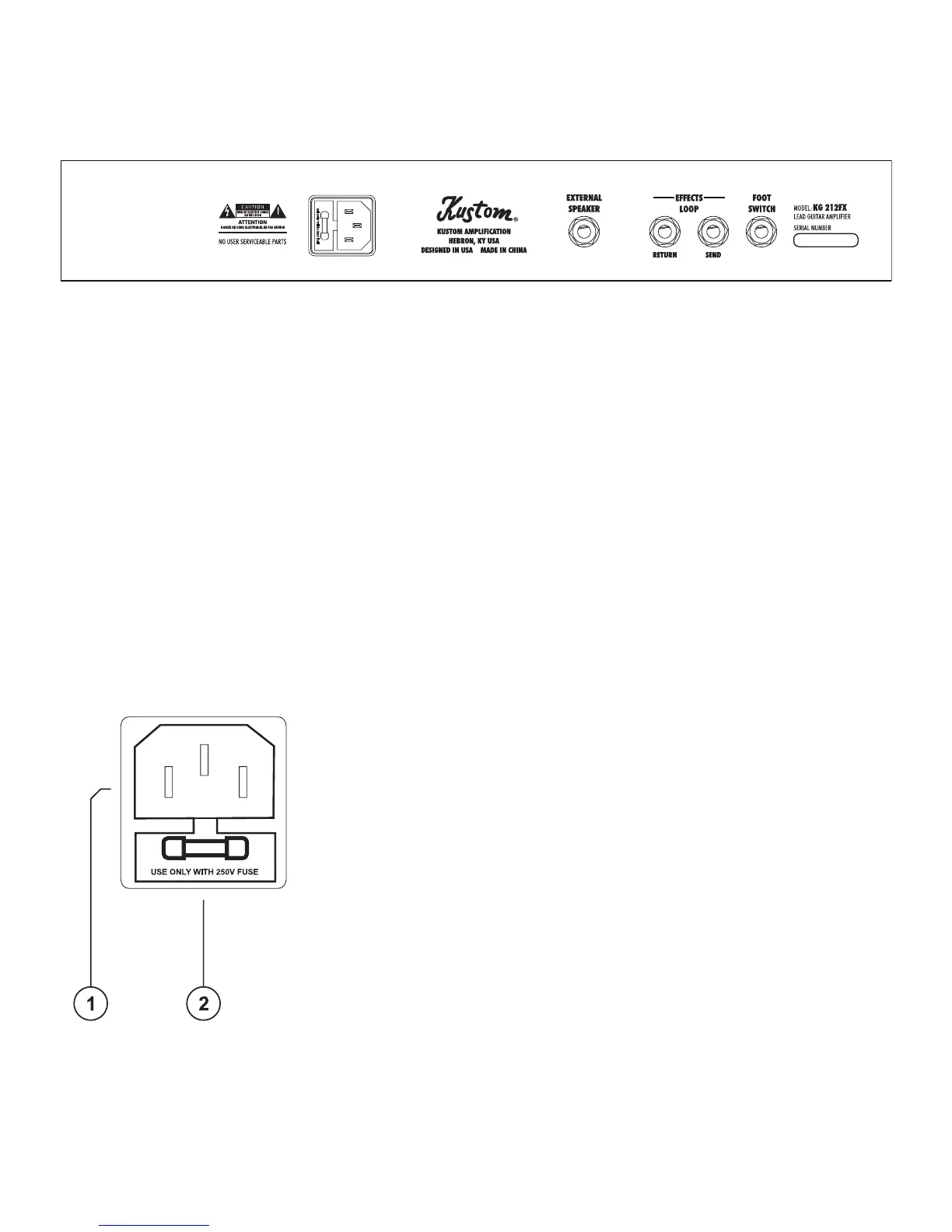
External Speaker: This is a two-conductor, ¼-inch external speaker jack. (Note: This jack is wired in series with the
amp’s internal speakers. Therefore, the internal speakers still function when an external speaker cabinet is added. For
this reason, there is no minimum external speaker impedance load.)
Footswitch: This ¼-inch jack is used to connect an optional footswitch to the amplier. The Kustom model KACFS-
100 may be purchased separately. This single-button footswitch can be used to select between the Lead and Rhythm
channels while playing.
Effects Loop Send: Use this 2-conductor, ¼-inch jack to connect to the input of an external effects processor or
equalizer. This jack can also be used as a Preamp Out.
Effects Loop Return: Use this 2-conductor, ¼-inch jack to connect to the output of an external effects processor or
equalizer. This jack can also be used as a Power Amp In. (Note: This jack separates the preamp from the power amp. If
using an external effect, the effect will be in series between the Effects Loop Send and Effects Loop Return. The amount
of “dry” signal will be controlled by the external effect.)
AC Power Cord Receptacle: AC power cord can be removed for easy storage
and replacement if damaged. Insert the AC cord (provided) rmly into the AC
receptacle. NOTE: Replace the AC power cord if protective jacket is damaged
or ground pin is damaged or removed.
Fuse: The fuse is located in a fuse tray just below the receptacle. Replace only
with the same type and size. For your convenience, a spare fuse is located
inside the fuse tray toward the front. To replace fuse, remove AC power cord.
Remove fuse tray by pulling the tab located above the fuse symbol away from
the receptacle.
KG212FX Back Panel
KG212FX AC Mains


 To Next Page