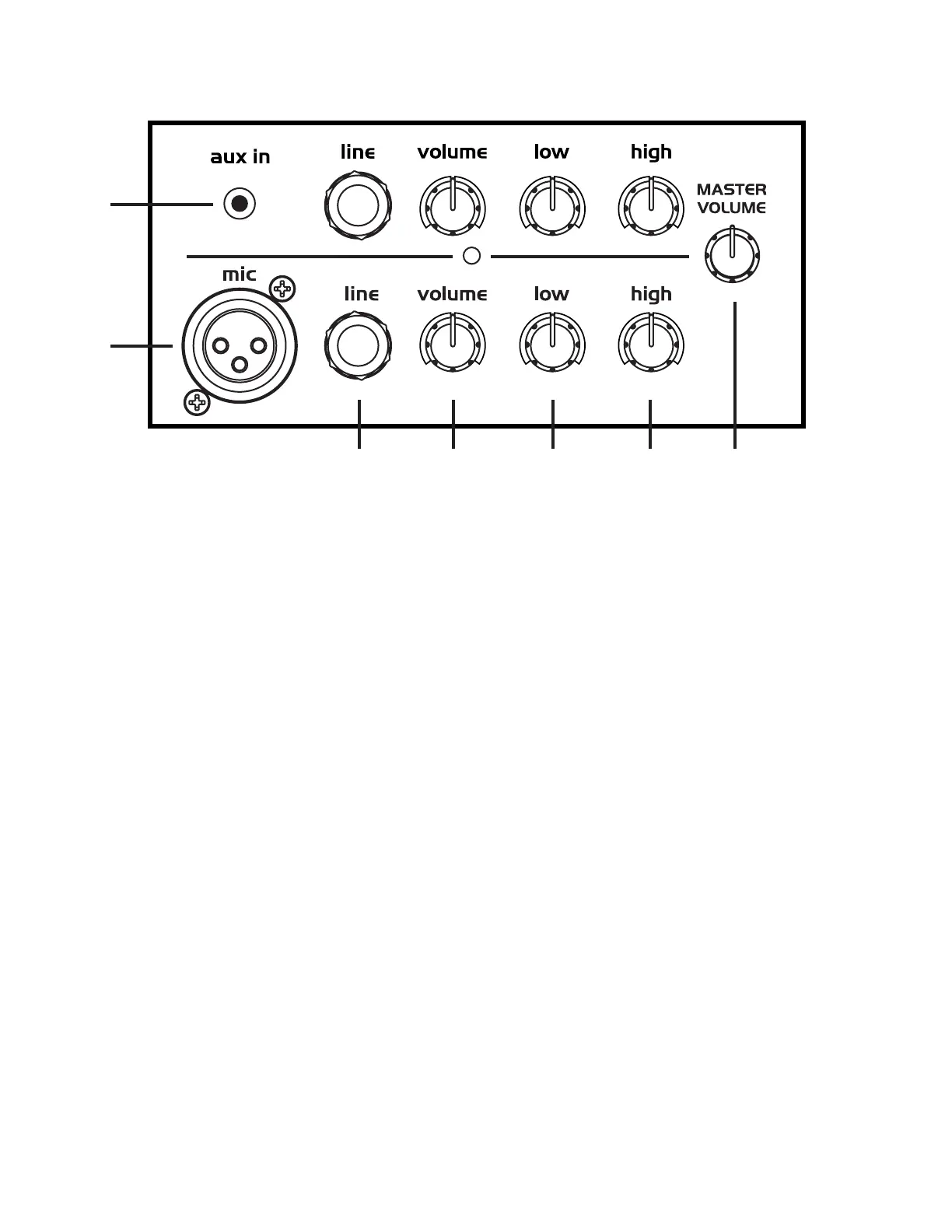
1. AUX IN: Use this stereo input to connect an external audio device such as an MP3, CD player or computer for playback. Note: Right
and Left channels are summed to mono on this input.
2. MIC Input: This XLR input is designed for low-impedance microphones or equipment that has a mic-level, balanced output.
Note: This input sends 9-volt phantom power. This is used to provide power to condenser microphones. Phantom power will not
damage any dynamic or non-condenser microphone.
3. LINE Inputs: These ¼-inch unbalanced inputs may be used to connect high-impedance microphones, keyboards, drum
machines and other audio devices.
4. Volume: Use these controls to adjust the volume level of each channel and the relative balance between them.
Note: This control affects SYNC Output level.
5. Low: Determines the emphasis of bass frequencies. Turning this knob clockwise creates a deeper, warmer tone. If you
need a brighter sound, reduce the bass by turning counterclockwise.
6. High: Turned clockwise, this control accents treble frequencies to produce clearer, crisper sound. Turn counterclockwise to make the
sound softer and less bright.
7. Master Volume: Controls the overall volume of all channels and the input of SYNC.
Note: Does not affect SYNC Output level.
Additional Features: Here are a few additional features designed to prolong the life of your Battery Powered PA.
Standby Mode: Power amplier goes into Standby Mode after 20 minutes of non-use with POWER ON to extend battery life. Power
Amp turns back on 1/2 second after input signal is detected.
Protection Mode: When driven to extreme distorted levels the amplier will go into Protection Mode (Amplier will momentarily mute
audio to protect speakers and electronics).
CONTROLS & FUNCTIONS OVERVIEW
2
3 4 5 6 7
1


 To Next Page