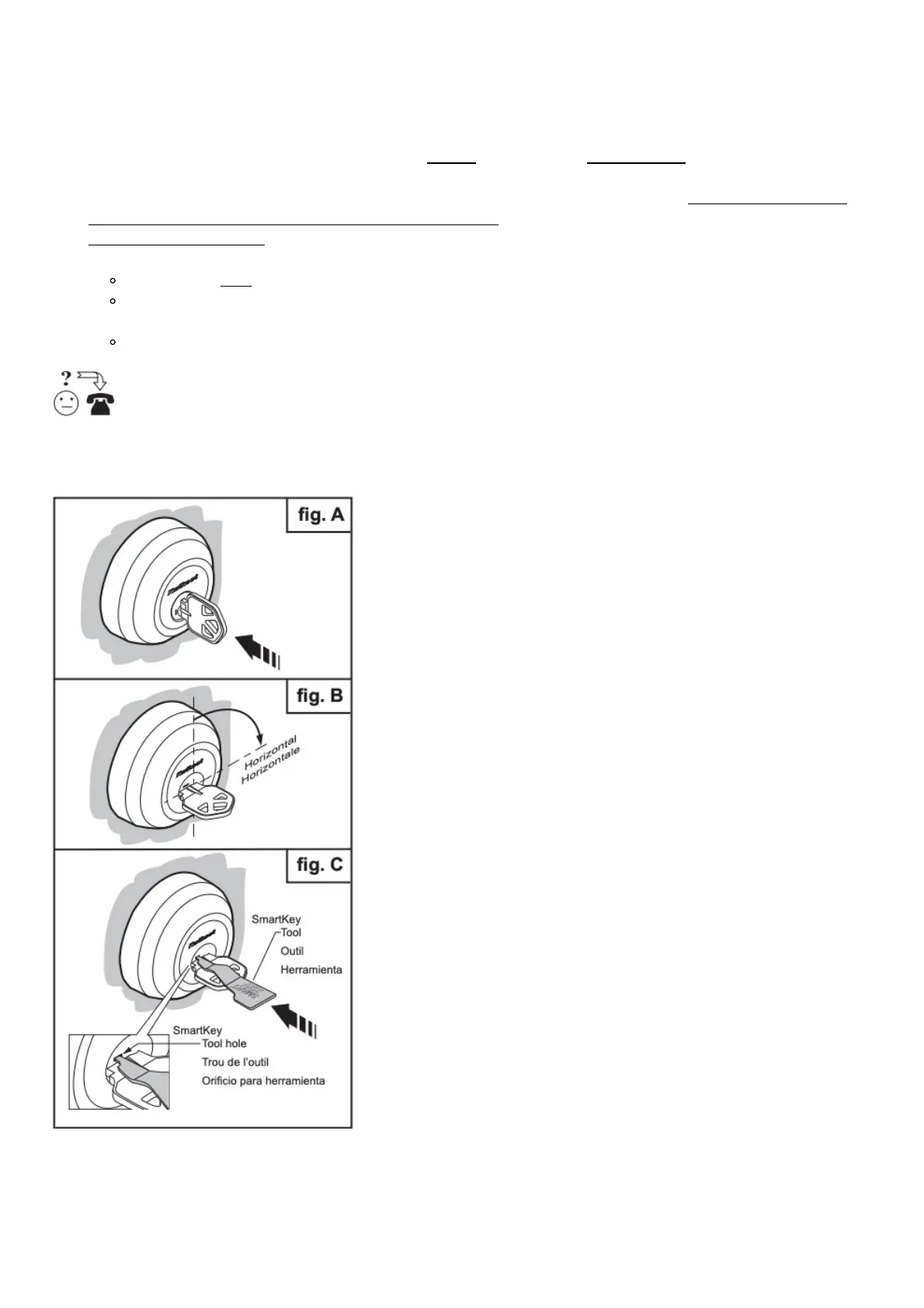
3. Rotate the key 1/4 turn to a horizontal position. See figure B.
4. With the key in the horizontal position, insert the SmartKey tool fully and firmly into the
SmartKey tool hole. See figure C. Then remove the SmartKey tool.
5. Now, keeping the key horizontal, carefully remove the key. (Note: If key does not remove,
repeat step 4 – above.)
6. Referring to figure D, insert the new key FULLY, making sure not to turn key away from the
horizontal position.
7. Referring to figure E, rotate the new key (1/4 turn) to the vertical position. Important: DO NOT
REMOVE KEY before completing step 8 below.
8. The check function: Now, rotate the new key back to the horizontal position and try to remove
the key.
If key does not remove, you have successfully rekeyed your lock.
If key does remove, rekeying was not successful and you should – reinsert that key, and
repeat steps 4, 7 and 8.
If problem persists call the number below.
1-800-327-5625
USA & CANADA





 To Next Page