Chapter 2 : DVB-T 210 Quick Installation
The DVB-T 210 card package comes with complete Windows software utilities. These utilities can be found
on the CD-ROM in this package. During installation, it is highly recommended to disable any sub-programs.
These include applications such as antivirus software and system monitoring applications.
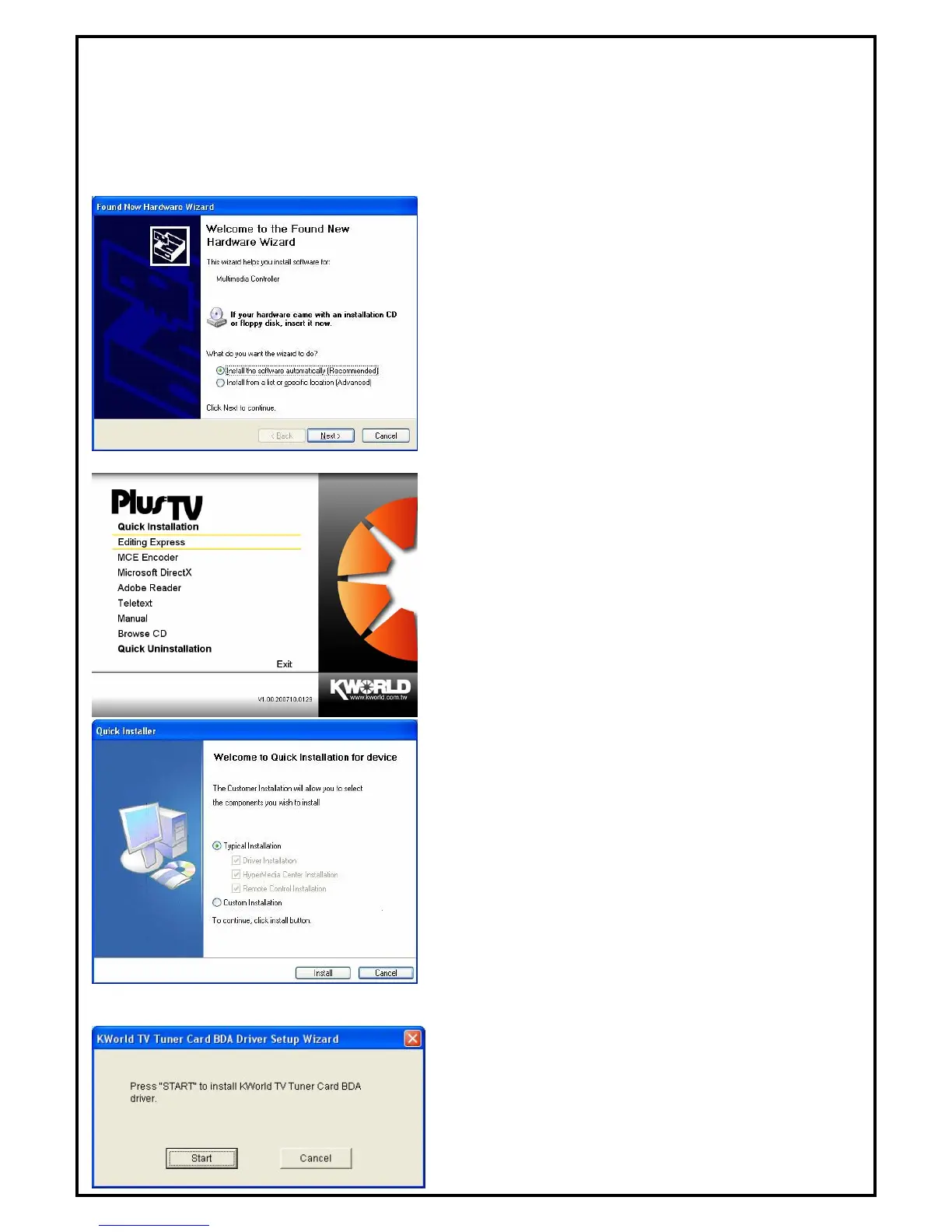
1. When you finish the hardware setup and restart your
system. The “Found New Hardware Wizard” window
will pop up. Please click “Cancel” and you can make
use of DVB-T 210 Quick Installation for proper
installation.
2. Insert the installation CD into the CD ROM device. The
autorun page will appear as the left image. Please choose
“Quick Installation”.
3. The Quick Installation provides you with two choices to
install. If you want to install device driver and software
utility completely, please choose “Typical Installation”.
or if you want to install them partially, please choose
“ Custom Installation”. Finally click “Install ” to
continue.
2.1 The Driver Installation of DVB-T 210
4. Click “Start” to install the DVB-T 210 BDA driver.
Please wait, while the installation is in process.
3



 To Next Page