6
Chapter 3:DVB-T 210 Quick U
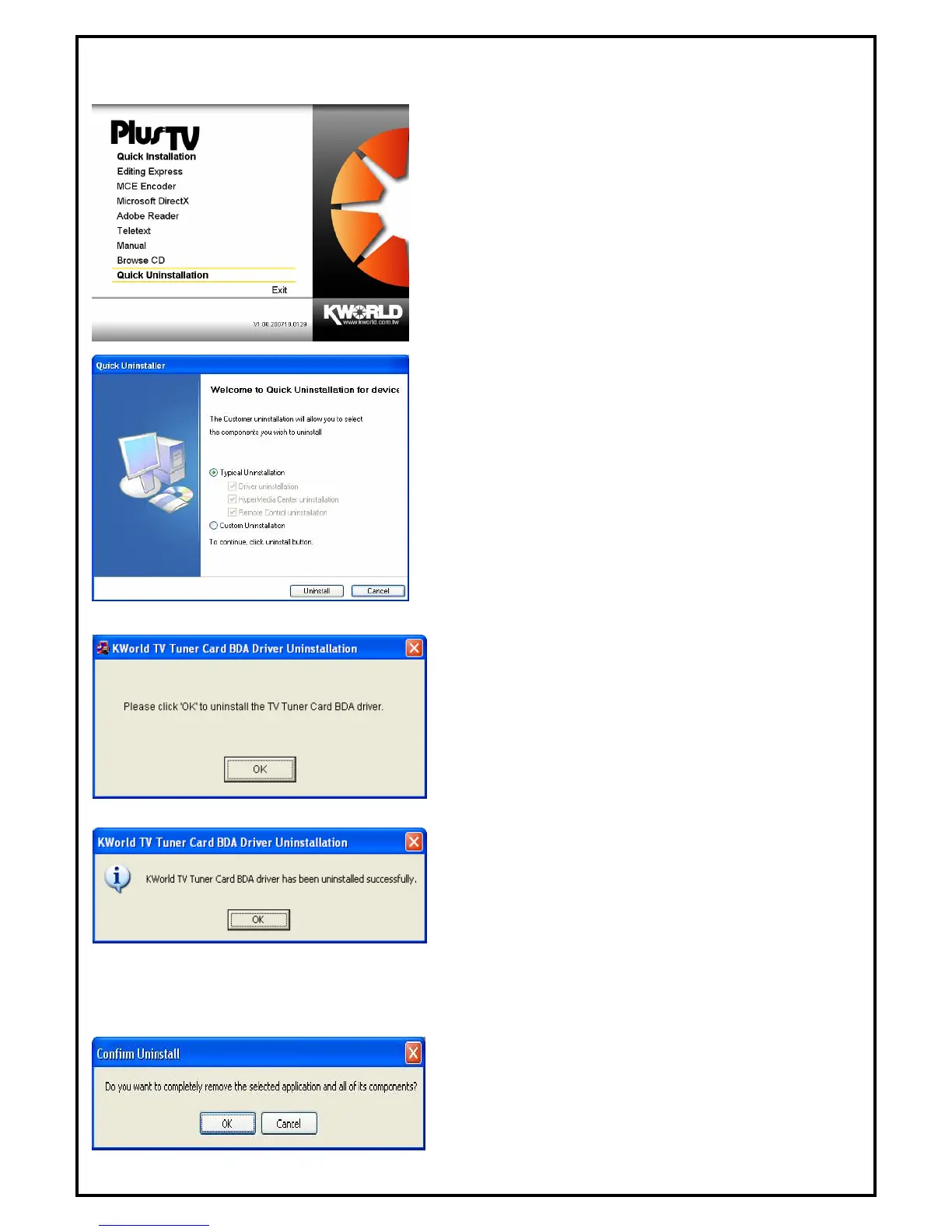
. If you want to uninstall device driver and software utility,
please click “Quick Uninstallation”.
No ninstall device driver
d software utility, please refer to chapter 6 FAQ 3.
. The Quick Uninstallation provides you with two choices
to uninstall. If you want to uninstall device driver and
y,
3.1 The Driver Uninstallation of DVB-T 210
. Click “OK” to uninstall the DVB-T 210 BDA driver.
Please wait, while the uninstallation is in process.
. Now BDA driver has been removed successfully on your
operation system and click “OK” to go to next step.
on
This step will instruct you to uninstall HyperMedia Application. Please follow the steps below for
5. This step is to remove HyperMedia application. Please
click “OK” to execute.
ninstallation
1
te: You can also take another way to u
an
2
software utility completely, please choose “Typical
Uninstallation”. or if you want to uninstall them partiall
please choose “ Custom Uninstallation”. Finally click
“Uninstall” to continue.
3
4
ti3.2 HyperMedia Application Uninstalla
uninstallation.



 To Next Page