3
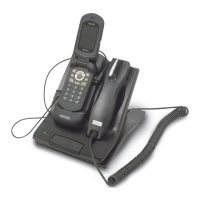
SettinguptheAT3083AAdvanceCommunicator™
1. Place the AdvanceCommunicator™ in a convenient
positionwithineasyreachofanACpoweroutlet.
2. Attachtheplugattheendofthecoilcordofthehandset
intothecorrespondingRJ45handsetreceptacleonthe
backoftheAdvanceCommunicator™.
3. PlugthepowersupplyintothewallACpoweroutlet
andtheroundbarrelplugattheendofthecordofthe
powersupplyintothecorrespondingpowerreceptacle
onthebackoftheAdvanceCommunicator™
4. AtthispointtheLEDwillflashRED
InstallingtheportableintotheAdvanceCommunicator
™
1. Removetherubberprotectivecoverfromtheconnector
receptaclecoveringthemicroUSBconnectorontheleft
side of the handset (handset facing you) and align the
microUSBconnectorattheendontheonecablefrom
thebackofthecradleandinserttheconnectorintothe
handsetwiththecablefacingDOWN.
2. Removetherubberprotectivecoverfromtheconnector
receptacle covering the audio connector on the right
side of the handset (handset facing you) and align the
pin connector at the end of the other cable from the
back of the cradle and insert the connector into the
handsetwiththecablefacingUP.
3. Insertthebottomofthehandsetbehindtheridgeonthe
cradleandpressthetopofthehandsetbackintothe
Cradleuntilitsnapsintoplace.
4. TurntheHandseton.
5. To remove the handset from the Cradle, press the
release button on the top of the cradle. The Handset
willsnapforwardoutofthecradle.


 To Next Page