4
MakingandReceivingcallsinHandsFreeMode.
1. To make a call in Hands‐free mode, dial the desired
number on the phone keypad and press SEND/GREEN
BUTTON.SpeaktowardstheMicrophonewhichis
situated on the bottom right corner of the
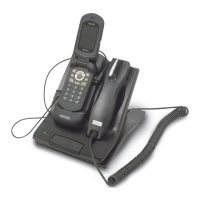
AdvanceCommunicator™
2. Thevoiceofthepersonyouarecallingwillbeheardvia
thebuilt‐inspeakerintheAdvanceCommunicator™
3. To receive a call in Hands‐free mode, press
SEND/GREEN BUTTON on the phone or press shortly
on the PTT/Space bar and speak towards the
Microphone. The caller’s voice will be heard via the
built‐inspeakerintheAdvanceCommunicator™
4. Toendacallinhands‐freemodepresstheEND/RED
buttononthephone.
MakingandReceivingcallsviatheHandset.
1. To make a call using the AdvanceCommunicator™
Handset,dialthedesirednumberonthephone’skeypad
andpressSEND/GREENbutton.Usethehandsetasyou
wouldwitharegulardesktopphone.
2. ToreceiveacallwiththeHandset,lifttheHandsetand
presstheSEND/GREENbuttononthephone’skeypad.
Use the handset as you would with a regular desktop
phone.
3. Toendacallwhileusingthehandset,placethehandset
backintothecradleandpresstheEND/REDbuttonon
thephone.
UseoftheAdvanceCommunicator™withDispatchcalls
1. ToansweradispatchcallinHands‐freemode,pressand
hold down the PTT/Space Bar and speak towards the
Microphone.


 To Next Page