MPM-1000A Operator Manual 1000-7075 Rev E
9-14
9.2.7 NCW TX Queue Tab
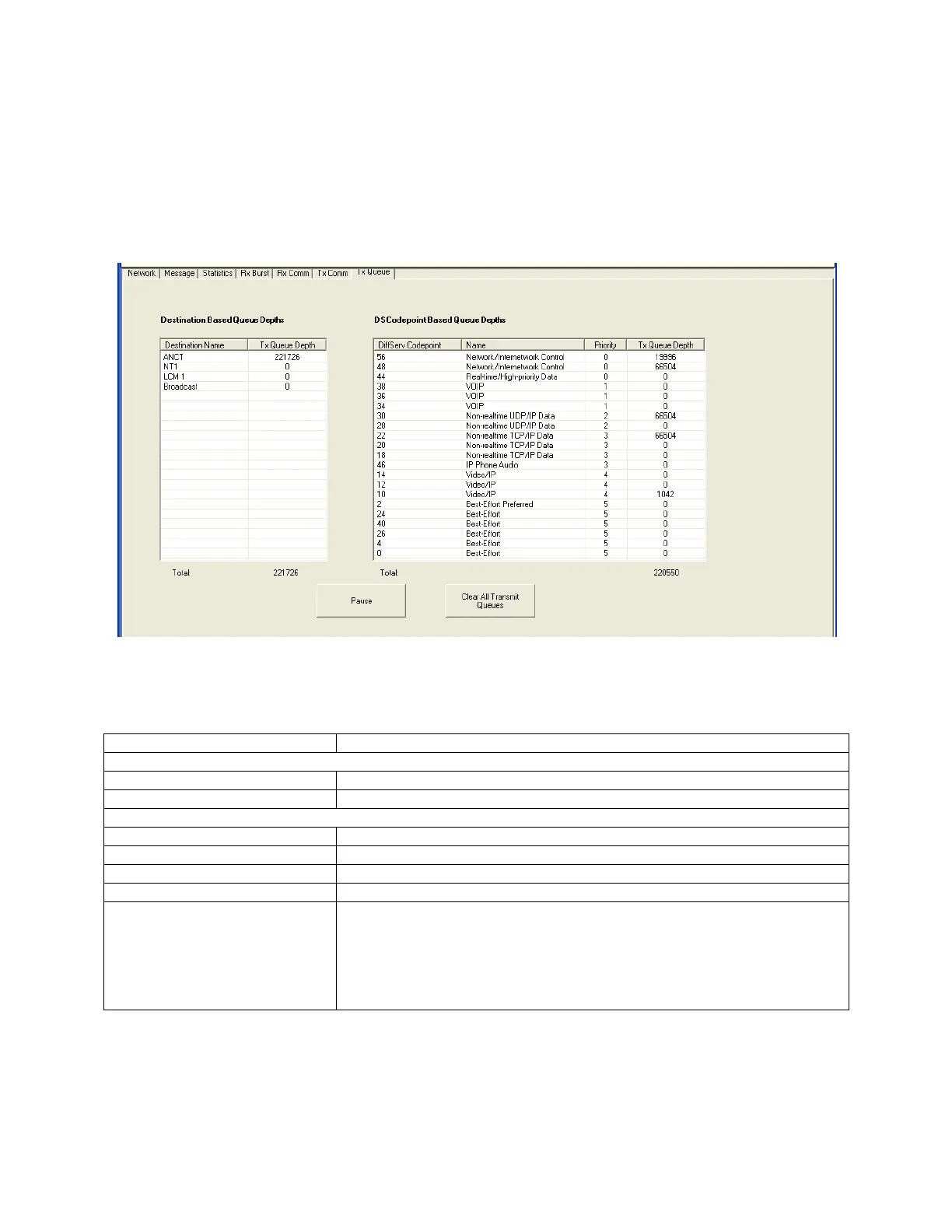
This page provides transmit queue depth statistics by network Terminal and by DiffServ
code point. The HCI displays the queue depths in bytes and it refreshes the display
once per second (unless Paused).
Refer to Table 9-7 NCW TX Queue Tab for data descriptions for this window.
Figure 9-9 NCW TX Queue Tab
Table 9-7 NCW TX Queue Tab
Control/Indicator/Function
Destination Based Queue Depths
Name of the Terminal receiving these bytes.
Number of bytes in the queue for this destination.
DSCodePoint Based Queue Depths
DiffServ CodePoint number.
SATCOM priority for this DiffServ CodePoint.
Number of bytes in the queue for this CodePoint.
Clear All Transmit Queues
This button commands the Modem to discard all data queued for
transmission. This should only be used when trying to solve a network
problem where the Modem appears to not be transmitting, or when the
terminal user has accidently queued up an extra large amount of data.
This is similar to deleting all entries in a printer queue. All queued data
is lost.


 To Next Page