
 Need help?
Do you have a question about the La Crosse Technology 513-1417CH and is the answer not in the manual?
Insert 2-AA batteries into the sensor and clock, observing correct polarity.
Hold SET for 3 seconds to enter settings menu. Use +/- to adjust and SET to confirm.
Explains automatic atomic time signal search and manual search options.
Explains icons for Low Battery, Atomic Time, AM/PM, Alarm, Snooze, Temperature Units, Trend Arrow, Sensor Signal.
Details the moon phase display based on lunar calendar and date settings.
Instructions for viewing and resetting High and Low temperature records.
Explains how trend arrows update based on hourly temperature changes.
Instructions for setting, activating, deactivating, and snoozing the alarm.
How to search for and confirm sensor signal connection.
Guidelines for optimal outdoor sensor placement and wireless transmission range.
Advice on clock placement for optimal atomic time reception and interference avoidance.
Steps to troubleshoot when outdoor readings show dashes.
Indoor/outdoor temperature ranges and wireless transmission range.
Power requirements, battery life, and physical dimensions of the clock and sensor.
Information on the 1-year limited warranty and customer support contact details.
Proper battery handling, cleaning, and general care instructions.
FCC and Canada Statements regarding device operation and interference.
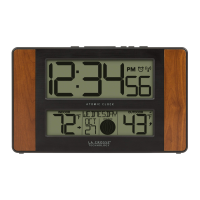
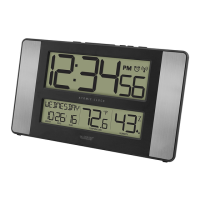
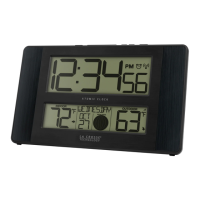
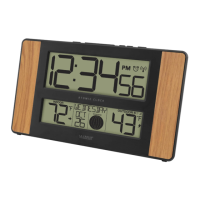
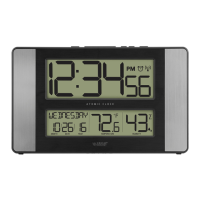
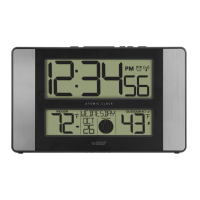
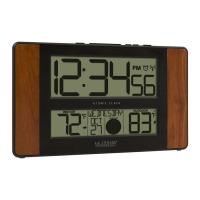
This document describes the La Crosse Technology Atomic Digital Clock, Model 513-1417CH, a versatile device designed to provide accurate time, temperature, and moon phase information. The clock is equipped with atomic time reception, ensuring precise timekeeping, and includes an outdoor sensor for remote temperature monitoring.
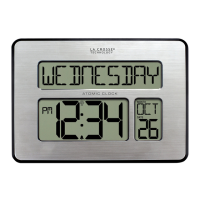
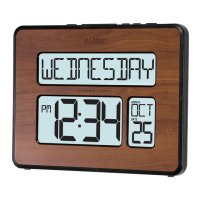
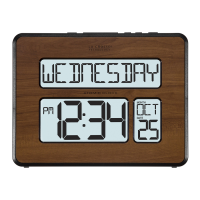
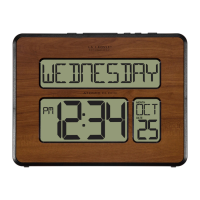
The Atomic Digital Clock serves as a comprehensive time and weather station for your home. Its primary function is to display the current time, which is automatically synchronized with the atomic time signal for accuracy. This atomic synchronization occurs at UTC 7:00, 8:00, 9:00, 10:00, and 11:00, or can be manually initiated. The clock also features a calendar display, showing the day of the week, month, and date.
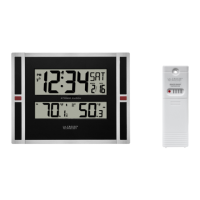
Beyond timekeeping, the device monitors both indoor and outdoor temperatures. The outdoor temperature is measured by a remote sensor, which transmits data wirelessly to the main clock unit. The clock displays current indoor and outdoor temperatures, along with temperature trend arrows that indicate whether the temperature is rising, falling, or remaining unchanged. It also records the daily high and low temperatures for both indoor and outdoor environments, which reset automatically at midnight.
A unique feature of this clock is its moon phase display. Based on the lunar calendar and the date settings, it illustrates the current moon phase, categorizing it into common phases such as New Moon, Waxing Crescent, First Quarter, Waxing Gibbous, Full Moon, Waning Gibbous, Last Quarter, and Waning Crescent.
The clock also includes an alarm function with a snooze feature. When the alarm is set, an alarm icon appears on the display. The snooze function allows for a temporary silence of the alarm for 10-minute intervals, which can be repeated.
The clock is designed for user-friendly setup and operation. To power up, 2-AA batteries are inserted into the outdoor sensor, and then into the clock, ensuring correct polarity.
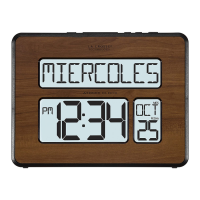
Basic settings are configured by holding the SET button for 3 seconds to enter the settings menu. Navigation and adjustments are made using the +/- buttons. The setting order includes language (English | Español), beep sound (ON | OFF), atomic time reception (ON | OFF), Daylight Saving Time (DST ON | OFF), time zone, hour, minutes, year, month, date, and temperature unit (Fahrenheit | Celsius). If the atomic time setting is turned OFF, the menu will skip directly to the hour setting. When Español is selected as the language, all weekday and sub-menu instructions will be in Spanish, and the calendar order will be Day, Month, Year.
The outdoor sensor should be placed in a shaded location to ensure accurate temperature readings. For optimal atomic time reception, the clock should be oriented with its front or back facing Ft. Collins, Colorado, and placed at least 6 feet away from other electronics like cordless phones, gaming systems, televisions, microwaves, and routers. It should also be within range of the outdoor sensor.
To view high and low temperatures, the PLUS button is pressed. Holding the PLUS button for 5 seconds resets these records. Temperature trend arrows provide a quick visual indication of temperature changes over the past hour, updating every 15 minutes.
The alarm is set by holding the ALARM button for 3 seconds, then using the +/- buttons to adjust and confirm. The alarm can be activated or deactivated by a simple press and release of the ALARM button. The snooze function is activated by pressing the SNOOZE button when the alarm sounds.
The clock can be positioned on a desk or table using its pullout stand, or mounted on a wall using the openings on the back.
Proper maintenance ensures the longevity and optimal performance of the device. When the outdoor readings display dashes, a restart procedure is recommended: bring the sensor within five feet of the station, remove batteries from both the sensor and the clock, press any button 20 times, wait 15 minutes, then reinsert batteries into the sensor and clock. After another 15 minutes to establish a strong connection, the sensor can be placed back in its shaded outdoor location.
Battery maintenance is crucial. It is advised not to mix old and new batteries, or different types of batteries (Alkaline, Standard, Lithium, or Rechargeable). Always use the correct size and grade of battery, and replace all batteries of a set at the same time. Battery contacts should be cleaned prior to installation, and batteries must be inserted with the correct polarity. If the equipment will not be used for an extended period, batteries should be removed. Expired batteries should be promptly removed.
The outdoor temperature sensor should be mounted vertically on a north-facing wall or in any well-shaded area, preferably under an eave or deck rail, to ensure accurate readings and maximize wireless transmission range. The maximum wireless transmission range is over 300 feet (91 meters) in open air, but this range can be affected by barriers such as walls or floors.
For online video support, users can visit http://bit.ly/LaxTechTalk. The full manual is available under the Support Tab at bit.ly/513-1417ch. La Crosse Technology also offers customer support via phone and email for any product-related inquiries or suggestions.
 General
| Display Type | LCD |
|---|---|
| Time Format | 12/24 Hour |
| Atomic Time Reception | Yes |
| Temperature Display | Yes |
| Humidity Display | Yes |
| Power Source | Battery |
| Snooze | Yes |
| Color | Black |
| Type | Digital Clock |
| Batteries | 2 x AA |

 To Next Page