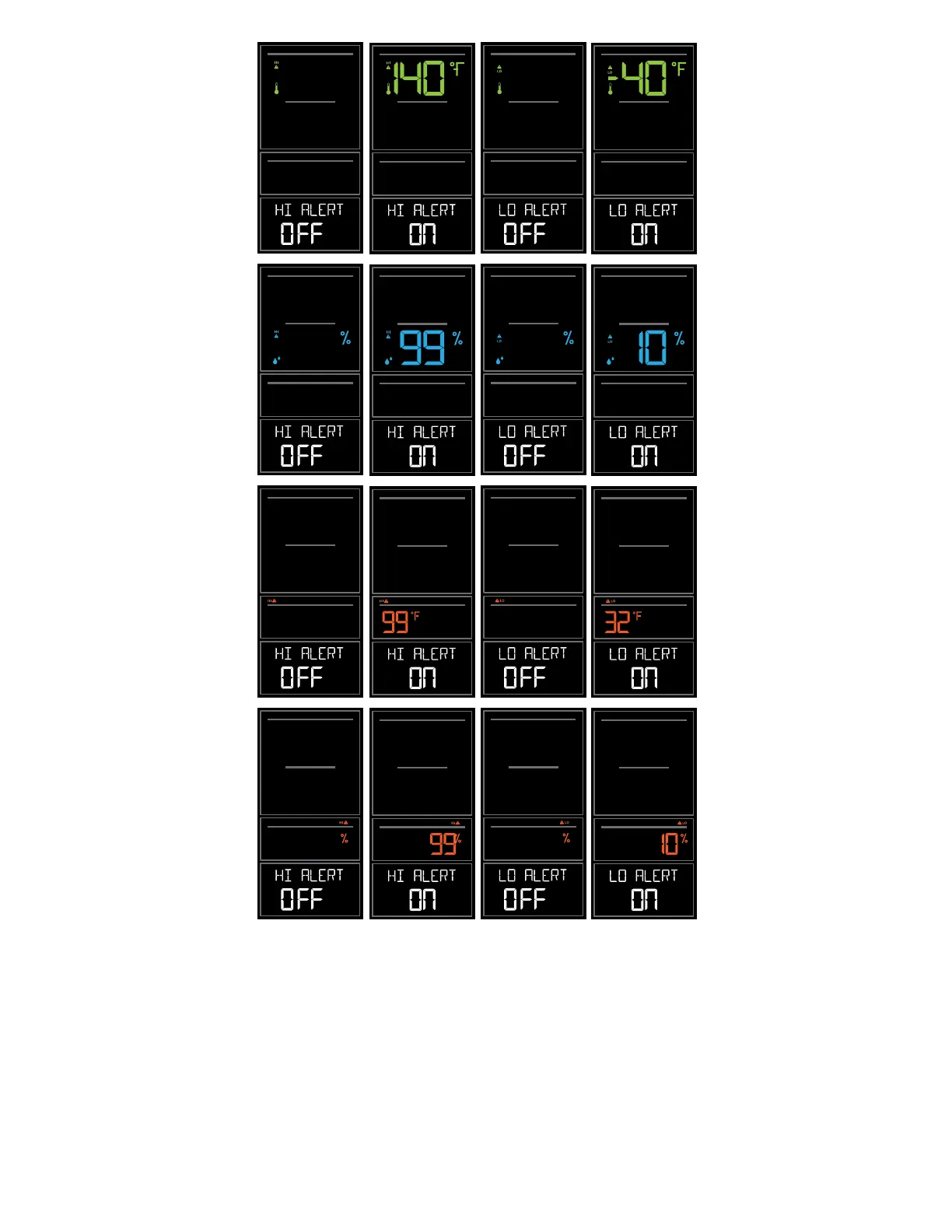
Arm & Disarm Alerts:
1. Hold the ALERTS button 3 seconds to enter alert set mode.
2. Press and release ALERTS button until you see the alert you wish to arm or disarm.
3. Press the + or - buttons to arm or disarm the alert. (If you arm and alert, the next step will be to set alert
value).
4. Press the LIGHT button to exit.
OUTDOOR OUTDOOR OUTDOOR OUTDOOR
OUTDOOR OUTDOOR OUTDOOR OUTDOOR
INDOOR INDOOR INDOOR INDOOR
INDOO
NDOOR
INDOOR INDOOR
Outdoor HI
Temperature Alert
Outdoor HI
Humidity Alert
Indoor HI
Temperature Alert
Indoor HI
Humidity Alert
Outdoor LO
Temperature Alert
Outdoor LO
Humidity Alert
Indoor LO
Temperature Alert
Indoor LO
Humidity Alert
Wireless Temperature & Humidity Station Page | 7



 To Next Page