Viewing Your Forecast Data
FORECAST
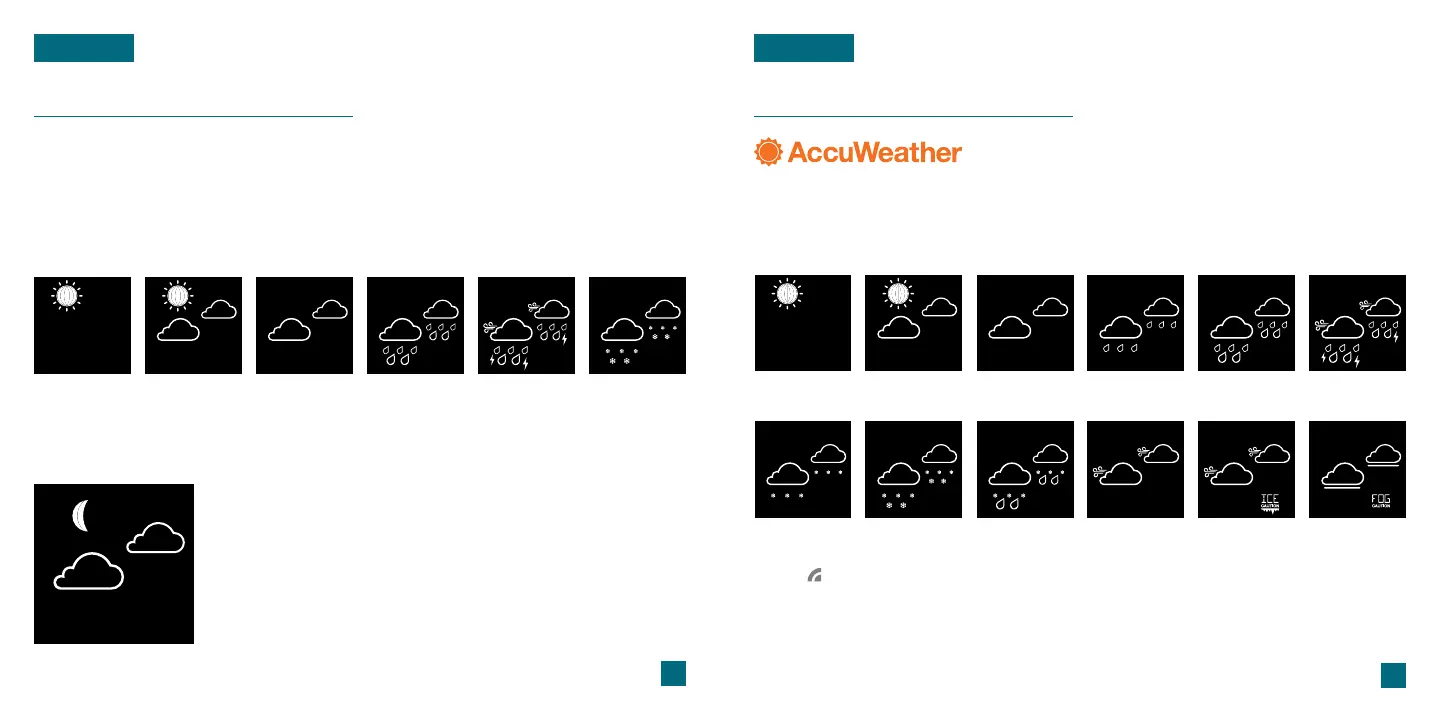
Forecast Icons
Please Note: The Forecast Icons may not represent your current weather. They are a future prediction
of the weather to come over the next 12 hours.
When using this station without Wi-Fi connection, the display will use changes in
barometric pressure to predict your weather to come in the next 12 hours. This is
represented by the 6 forecast scenes below.
*Your display must be connected to Wi-Fi to receive AccuWeather forecast data.
Available Forecast Icons on Standalone Station
Sunny Clouds T-StormPartly Sunny Rain Snow
21
22
Viewing Your Forecast Data
FORECAST
Tip: The icon will appear in the lower right of the forecast section when your display is connected
and receiving AccuWeather forecasts.
Available Forecast Icons when Connected*
When connected to Wi-Fi, the station will receive additional weather icons, chance
of precipitation values, and future forecast information. These enhanced Internet
features are powered by AccuWeather.*
Moon Phase
The Moon Phase will adjust based on your station’s date
settings, and will show during all forecast options from
7:00pm to 6:59am. Outside of these times, the Sun icon
will only show if the forecast is predicting Sunny or Partly
Sunny conditions.
Sunny Clouds RainPartly Sunny Light Rain T-Storm
Light Snow Wintry Mix IceSnow Windy Fog



 To Next Page