EasyManua.ls Logo

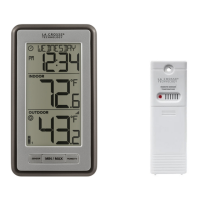
La Crosse Technology WS-9160Uv3-BK-IT - User Manual

La Crosse Technology WS-9160Uv3-BK-IT
12 pages
Print Icon
To Next Page IconTo Next Page
Loading...
SET UP GUIDE
MODEL: WS-9160Uv3-BK-IT
Wireless Thermometer
Question and Answer IconNeed help?

Do you have a question about the La Crosse Technology WS-9160Uv3-BK-IT and is the answer not in the manual?

Summary

Power Up

Custom Calendar Display

How to change the calendar display or set it to not show.

Settings Menu

Temperature;Humidity Readings

Temperature Records (MIN;MAX)

Reset Temperature Records

Sensor Mounting

Search for Sensors

Factory Restart

Sensor Weather Shield

Optional Add-on Sensors

Add Sensors

Instructions for installing and connecting new add-on sensors.

View Add-on Sensors

How to view readings from connected sensors on the station.

Stay in Touch!

Specifications

Care & Maintenance

CA WARNING

FCC Statement

Were Here to Help

Warranty & Patents

DOUBLE YOUR WARRANTY

Summary

Power Up

Custom Calendar Display

How to change the calendar display or set it to not show.

Settings Menu

Temperature;Humidity Readings

Temperature Records (MIN;MAX)

Reset Temperature Records

Sensor Mounting

Search for Sensors

Factory Restart

Sensor Weather Shield

Optional Add-on Sensors

Add Sensors

Instructions for installing and connecting new add-on sensors.

View Add-on Sensors

How to view readings from connected sensors on the station.

Stay in Touch!

Specifications

Care & Maintenance

CA WARNING

FCC Statement

Were Here to Help

Warranty & Patents

DOUBLE YOUR WARRANTY

La Crosse Technology WS-9160Uv3-BK-IT Specifications

General IconGeneral
Display TypeLCD
Temperature Resolution0.1°C
Transmission Frequency915 MHz
Indoor Temperature Range0°C to +50°C (32°F to +122°F)
Temperature Accuracy± 1.0 °C
Power Source2 AA batteries

Related product manuals