EasyManua.ls Logo

La Crosse Equity 30416 - User Manual

La Crosse Equity 30416
2 pages
Print Icon
To Next Page IconTo Next Page
Loading...
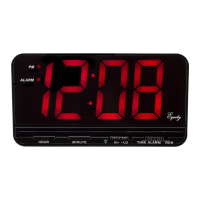
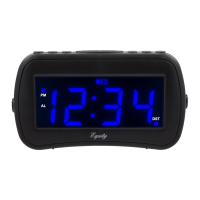
.9-inch LED Alarm Clock
with Dual Charging Ports
Model: 30416 & 30417
DC: 051518
POWER UP
1. Insert the 120 volt power cord into an outlet,
then into your clock.
Optional: Insert one 9 volt battery for backup.
2. 12:00 will flash as an indication to set the time
and/or alarm.
TIME SETTING
1. Continuously hold down the TIME button
while setting your hour and minutes.
2. While holding the TIME button, press the
HOUR button to set your hour.
Note: The PM indicator will appear when
you advance to PM time.
3. While holding the TIME button press the
MINUTE button to set your minutes.
4. Release the TIME button when the correct
time is shown on the display.
TIME ALARM
1. Continuously hold down the ALARM
button while setting your alarm time.
2. While holding the ALARM button, press
the HOUR button to set your alarm hour.
Note: The PM indicator will appear
when you advance to PM time.
3. While holding the ALARM button, press
the MINUTE button to set alarm minutes.
4. Release the ALARM button when the
correct alarm time is shown on the
display.
SNOOZE
When alarm sounds, press the SNOOZE
button to silence alarm for 8 minutes.
Snooze function can be repeated many
times if desired.
Page | 2
Page | 3
PM Light
Indicator
Alarm Light
Indicator
Time
Display
Hour MinuteAlarmTime Snooze
Alarm ON\OFF
Switch
PM
AL
DC5V 1 A DC5V 2 A
T
I
M
E
H O U R
M
I
N
A L A R M
D
I
M
ME
R
H
I
L
O
A
L
A
R
M
O
F
F
O
N
Dimmer HI \ LO
Switch
1 Amp.
2 Amp.
USB Cord not included
ALARM ON/OFF
Slide the ON/OFF switch to the ON position
to activate the alarm
Slide the ON/OFF switch to the OFF position
to deactivate the alarm
USB CHARGING PORT
• Connect your external device’s USB charging cable
(not included) to the USB charging port.
• USB Power Output: 5V 1A or 2A maximum current.
• Charge devices that are self-regulating.
Question and Answer IconNeed help?

Do you have a question about the La Crosse Equity 30416 and is the answer not in the manual?

Summary

Power Up and Time Setting

Power Up Instructions

Instructions for connecting the 120 volt power cord and optional battery backup.

Time and Alarm Setting

Steps to set the current time and alarm time, including PM indicator.

Alarm On;Off Control

Guidance on using the ON/OFF switch to activate or deactivate the alarm.

Snooze Functionality

How to use the snooze button to silence the alarm for 8 minutes.

USB Charging Port

Clock Features and Maintenance

Dimmer Switch Operation

Instructions for adjusting the display brightness using the HI/LO switch.

Battery Backup Installation

Details on inserting a 9V battery for alarm and time settings during power outages.

Care and Maintenance Tips

Advice on battery selection, cleaning contacts, polarity, and storage.

Safety Precautions

Warnings regarding fire/electrical shock risk and proper plug usage with outlets.

Product Specifications and Compliance

Power Requirements

Specifies the need for a 120V power cord and a 9V battery for backup.

Warranty and Support Information

Outlines the 2-year limited warranty and how to contact for support or repairs.

FCC Compliance Statement

Details FCC rules compliance, potential interference, and user responsibilities.

Disclaimers and Warnings

Notes on manufacturer liability for interference, manual errors, and California Proposition 65 warning.

Overview

The device described in the manual is a .9-inch LED Alarm Clock with Dual Charging Ports from Equity by La Crosse.

Function Description:

This alarm clock serves as a time-telling device with an integrated alarm function and dual USB charging ports. It displays the time using a .9-inch LED display, which can be adjusted for brightness (HI/LO). The clock allows users to set the current time and an alarm time. A PM indicator is present to differentiate between AM and PM hours. The alarm can be activated or deactivated using a dedicated ON/OFF switch. When the alarm sounds, a snooze function is available, which silences the alarm for 8 minutes and can be repeated multiple times. The device also includes two USB charging ports, allowing users to charge external devices.

Important Technical Specifications:

  • Display: .9-inch LED display with HI/LO dimmer switch.
  • Power Source: 120V power cord.
  • Battery Backup: Requires one 9V battery (not included) for backup, which maintains time and alarm settings during power interruptions. The LED display will not light up during battery backup, but the alarm will still sound at the preset time. If no battery is installed and power is interrupted, the display will flash 12:00, and time/alarm settings will need to be reset.
  • USB Power Output:
    • Port 1: 5V 1A maximum current.
    • Port 2: 5V 2A maximum current.
    • Total maximum current for both ports is 2A.
  • Models: 30416 & 30417.
  • Date Code: DC: 051518.
  • Safety: Polarized plug to prevent electrical shock.
  • Compliance: FCC Class B digital device, Part 15 of FCC Rules.

Usage Features:

  • Power Up: Insert the 120V power cord into an outlet and the clock. Optionally, insert a 9V battery for backup. The display will flash 12:00, indicating readiness for time/alarm setting.
  • Time Setting:
    1. Continuously hold down the TIME button.
    2. While holding TIME, press HOUR to set the hour. The PM indicator will appear when advancing to PM time.
    3. While holding TIME, press MINUTE to set the minutes.
    4. Release TIME when the correct time is displayed.
  • Alarm Setting:
    1. Continuously hold down the ALARM button.
    2. While holding ALARM, press HOUR to set the alarm hour. The PM indicator will appear when advancing to PM time.
    3. While holding ALARM, press MINUTE to set alarm minutes.
    4. Release ALARM when the correct alarm time is displayed.
  • Alarm ON/OFF: Slide the ON/OFF switch to the ON position to activate the alarm, or to the OFF position to deactivate it.
  • Snooze Function: Press the SNOOZE button when the alarm sounds to silence it for 8 minutes. This function can be repeated.
  • USB Charging: Connect an external device's USB charging cable (not included) to either of the USB charging ports. The device is designed to charge self-regulating devices.
  • Dimmer Switch: Slide the HI/LO display dimmer switch to HI for brighter display or LO for normal display.

Maintenance Features:

  • Battery Care:
    • Always use the correct size and grade of battery.
    • Clean battery contacts before installation.
    • Ensure correct polarity (+ and -) during installation.
    • Remove batteries from the equipment when not in use for extended periods.
    • Promptly remove expired batteries.
  • Cleaning: No specific cleaning instructions are provided beyond general battery contact cleaning.
  • Warranty: Equity provides a 2-year limited warranty from the date of consumer purchase against material and workmanship defects. This warranty covers repair or replacement at Equity's option and does not cover damage from misuse or negligence. All implied warranties are limited to two years.
  • Support: For product issues, send the product, a letter explaining the problem, and $5.00 for postage and handling to Equity by La Crosse, Warranty Department, 2830 26th St S., La Crosse, WI 54601. More information is available at www.lacrossetechnology.com/support.
  • Safety Warnings:
    • To reduce the risk of fire or electrical shock, do not expose the appliance to rain or moisture.
    • To prevent electrical shock, do not use the polarized plug with an extension cord, receptacle, or other outlet unless the blades can be fully inserted to prevent blade exposure.
    • California Proposition 65 Warning: This product can expose you to chemicals including styrene, which is known to the State of California to cause cancer. For more information, visit www.P65Warnings.ca.gov.

La Crosse Equity 30416 Specifications

General IconGeneral
BrandLa Crosse
ModelEquity 30416
CategoryAlarm Clock
LanguageEnglish

Related product manuals