EasyManua.ls Logo

La Crosse Soluna - User Manual

La Crosse Soluna
10 pages
Print Icon
To Next Page IconTo Next Page
Loading...
La Crosse Technology, Ltd Page 1
CA80994 FAQS
The links below will work in most PDF viewers and link to the topic area by clicking the
link. We recommend Adobe Reader version 10 or greater available at:
http://get.adobe.com/reader
CONTENTS
CA80994 FAQS ......................................................................................................................... 1
Power cord ................................................................................................................................. 1
Alarm Clock Factory Restart ........................................................................................................ 2
Language ................................................................................................................................ 2
12-Hour Time Format ............................................................................................................... 2
Does the clock have a backlight? ............................................................................................. 2
What is Auto Dim backlight? ..................................................................................................... 3
Glow Light Colors .................................................................................................................... 3
Time is inaccurate ................................................................................................................... 5
Daylight Saving Time ............................................................................................................... 5
Program Menu......................................................................................................................... 5
Do I need to unplug the clock to change the time? ................................................................... 7
Light Alarm (no sound, just light) ............................................................................................... 7
Activate/Deactivate Light Alarm ............................................................................................... 8
Will the light always start 30 minutes before the Light Alarm? .................................................... 8
Sound Alarm ........................................................................................................................... 8
Can I change sounds on my Sound Alarm ? .............................................................................. 9
Activate/Deactivate Sound Alarm ............................................................................................. 9
Snooze Sound Alarm ............................................................................................................... 9
USB Charge Port ..................................................................................................................... 9
Will not Charge my Phone ......................................................................................................10
Alarm Clock is dim ..................................................................................................................10
Alarm Clock is blank: No numbers or dashed lines ..................................................................10
Power cord
The design of this alarm clock is to use a power cord (5-volt) as the primary power
source.
Question and Answer IconNeed help?

Do you have a question about the La Crosse Soluna and is the answer not in the manual?

Summary

Power cord

Alarm Clock Factory Restart

Time Setting and Adjustments

Changing the Time

Alarm Functions

Light Alarm (no sound, just light)

Instructions for setting the light-only alarm, including duration and brightness.

Activate;Deactivate Light Alarm

Steps to turn the light alarm on and off, indicated by display text.

Light Alarm Pre-activation Time

Explains that the light may start brightening up to 30 minutes before the alarm.

Sound Alarm Setup

Instructions for setting the melody sound alarm, including hour, minutes, and snooze time.

Sound Alarm Gradual Wake

Describes the melody sound alarm's gradual increase in volume over a 5-minute period.

Can I change sounds on my Sound Alarm?

Confirms that only a melody sound option is available for the sound alarm.

Activate;Deactivate Sound Alarm

Procedure to turn the sound alarm on and off, as indicated by display text.

Snooze Sound Alarm

How to activate the snooze function for the sound alarm for a selected duration.

Troubleshooting Common Issues

Overview

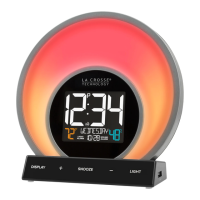
This document provides a comprehensive guide to the features and functions of the CA80994 alarm clock, designed to enhance your daily routine with its versatile timekeeping, alarm, and lighting capabilities. The device primarily operates using a 5-volt power cord, which is essential for its full functionality, including the backlight and glow light features. A capacitor provides a brief 6-minute backup for settings in case of power loss, though the time display will not be active when unplugged.

Core Functions and Usage:

The alarm clock offers manual time setting, accessible through a dedicated program menu. This menu allows users to set the hour, minutes, year, month, and date, as well as choose between Fahrenheit and Celsius for temperature display. The clock supports a 12-hour time format and includes provisions for adjusting to Daylight Saving Time manually.

Backlight and Auto-Dimming:

A key feature of this alarm clock is its adjustable backlight. The LCD backlight operates at five intensity levels: OFF, 1.5%, 20%, 50%, and 100%. Users can cycle through these levels by tapping a dedicated button. For optimal visibility, it's recommended to ensure the clock is powered by its cord, as the backlight relies on this connection.

The device also boasts an "Auto Dim" backlight feature, designed to optimize display brightness for different times of the day. Users can program the backlight to automatically dim to a low light level (level 1) at a set "START TIME" for sleeping and then return to full brightness at a designated "STOP TIME" for waking. This feature is configured by holding the dimmer button for 2 seconds, toggling Auto Dim ON, and then setting the desired start and stop hours for dimming.

Glow Light Colors and Modes:

Beyond the standard backlight, the CA80994 alarm clock incorporates a "Glow Light" with various color options and modes, designed to create different ambient experiences. These modes include:

  • EVENING Mode: This 30-minute cycle simulates a sunset, gradually dimming and shifting colors as you prepare for sleep. To activate, tap the light mode button until "EVENING" appears on the LCD, then confirm your selection by tapping the z² button, double-tapping the light mode button, or waiting 5 seconds.
  • GUIDED BREATHING Mode: This mode offers a 10-minute deep breathing exercise, with color changes guiding your inhales and exhales. The LCD also displays inhale and exhale times. Users can choose from "Energy," "Warmth," or "Calm" glow colors. Activation follows the same confirmation steps as the Evening Mode. Brightness can be adjusted using the +/- buttons, and the exercise can be ended at any time by pressing the z² button.
  • COMFORT METER Mode: In this mode, the glow light's color changes based on the indoor humidity level, providing a quick visual indicator of room comfort. Activation is similar to other modes, and brightness can be adjusted (OFF, 1, 2, 3, 4, 5) using the +/- buttons. The z² button can be used to exit this mode.
  • COLOR CYCLE Mode: This mode gradually shifts through all available glow color options, creating a dynamic ambient light. Activation is consistent with other light modes, and brightness can be adjusted.
  • COLOR SELECT: For those who prefer a static color, the clock allows users to choose a specific color from a wide palette, including Red, Forest, Fire Orange, Cyan, Sun, Dark Blue, Yellow Garden Green, Ocean, Night, Purple, and White. To select a color, tap the light mode button five times until "PICK COLOR" appears, double-tap to enter selection, use the +/- buttons to browse colors, double-tap to confirm, and press the z² button to exit. Brightness can also be adjusted in this mode.

Alarm Functions:

The alarm clock features two distinct alarm types: a "Light Alarm" and a "Sound Alarm," which can be set independently or to the same time.

  • Light Alarm (No Sound): This alarm uses only light to wake you. Once set, the "LIGHT ALARM" indicator will appear on the display. Thirty minutes before the set alarm time, the light cycle begins to brighten gradually over ten 3-minute frames, reaching full brightness at the alarm time. The light remains at full brightness until the alarm is turned off. If the alarm is set for less than 30 minutes before the current time, the light brightness will adjust to the appropriate level for the remaining time, potentially causing a "jump" in light intensity. To set, hold the alarm setting button, adjust the hour and minutes using the +/- buttons, and press the alarm setting button to confirm and exit. To activate/deactivate, press the alarm setting button once.
  • Sound Alarm: This alarm wakes you with a gentle melody that gradually increases in loudness over a 5-minute period. The only sound option available is this melody. To set, hold the alarm setting button, adjust the hour and minutes, and then select a snooze time (from 5 to 120 minutes) using the +/- buttons. Press the alarm setting button to confirm and exit. The "SOUND ALARM" indicator will show when active. To deactivate, press the alarm setting button once; press it again to reactivate for the same time.
  • Snooze Function: For the Sound Alarm, tapping the z² button will activate the snooze function for the pre-selected duration (5-120 minutes). "SNOOZE" and a minutes countdown will be displayed.

Language Settings:

The clock supports multiple languages for displaying weekdays and directions, including English (default), Spanish, French, and German. Language selection is done through the program menu.

USB Charge Port:

A convenient 1 Amp USB charging port is located on the side of the clock, allowing you to charge external devices. The included power adapter must be connected for the USB port to function. Users should connect their device's charging cable (not included) to the port. Charging times will vary, and the port provides a maximum output of 1A, suitable for 1A devices or self-regulating devices.

Maintenance and Troubleshooting:

  • Factory Restart: If the clock experiences issues, a factory restart can often resolve them. This involves unplugging the clock for 15 minutes. If problems persist, a small reset button on the back of the clock can be pressed with a pen or paper clip.
  • Time Inaccuracy: Since the clock has manual time setting, users should access the program menu to adjust the time if it becomes inaccurate.
  • Changing Time without Unplugging: The program menu can be accessed by holding the dedicated button for 3 seconds, eliminating the need to unplug the clock to change the time.
  • LCD Backlight Not On: If the backlight isn't working, ensure the clock is connected to the power cable and tap the backlight button several times, waiting 15 seconds to confirm it's not in OFF mode.
  • Phone Not Charging: Verify that the phone's charging cord is correctly attached to the USB port.
  • Dim Alarm Clock: If the display is dim, tap the backlight button to check if the LCD backlight is set to HIGH or LOW. The clock must be powered by the cord for the backlight to remain on.
  • Blank Alarm Clock (No Numbers/Dashed Lines): First, check that the power cord is correctly installed and connected to an active outlet. If the issue persists, press any button 20 times and then leave the alarm clock unpowered for 1-2 hours.

This alarm clock is designed to be a versatile and user-friendly device, offering a range of features to support your daily schedule and create a personalized environment.

La Crosse Soluna Specifications

General IconGeneral
Display TypeLCD
Power SourceAC Adapter
BacklightYes
Snooze FunctionYes
Alarm SoundBeep
Time Display Format12/24 hour
Alarm TypeSingle alarm
Display FeaturesDate

Related product manuals