Controls end User Interface
7
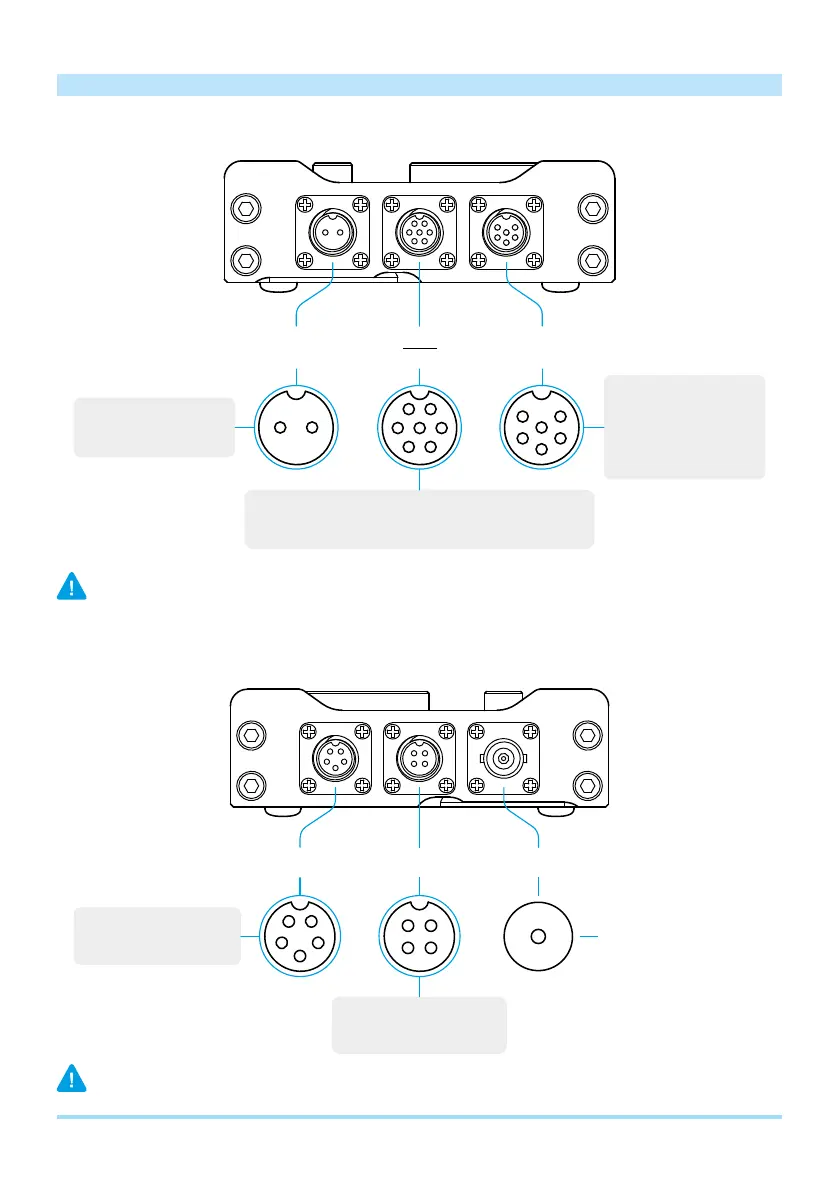
Left side
DC 9-15V
Power supply
1 – GND
2 – DC IN (9-15V/3A max)
1 – SPEAKER –
*
2 – MIC IN
3 – PTT IN
4 – SPEAKER +
5 – MIC IN (V+)
**
6 – GND
1 – PTT IN
2 – PTT OUT
3 – AUDIO DATA OUT
4 – Q 5 – I
6 – AUDIO DATA IN
7 – GND
2
5
6
1
2
4
5
6
3
4 3
2
1
7
1
MIC/SP
Microphone / Speaker
REM
DATA
* Connect a speaker or headphones with the appropriate pins 1 & 4, SPEAKER (-) and SPEAKER (+).
Do not connect a speaker to ground, pin 6.
** For connecting an external electret microphone that requires additional power supply.
Right side
1
4
5
3
2
CW KEY ANTCAT
4
3
1
2
1 – GND
2 – RX
3 – +3.3V IN
***
4 – TX
1 – GND
2 – “•”
5 – “–”3 – NC
4 – NC
Antenna (50 Ohm)
*** When connecting with a third-party USB adapter, make sure that an input voltage of 3.3V (10mA) is supplied to the pin.


 To Next Page