Before you continue... Connecting LabelTac
BEFORE INSTALLING DRIVERS...
Please connect your LabelTac Printer to both
your computer and to power, and make sure
the printer is turned on.
See pages 7-9 for connection instructions.
Setup & Install Before you continue...6 Setup & Install Connecting LabelTac 7
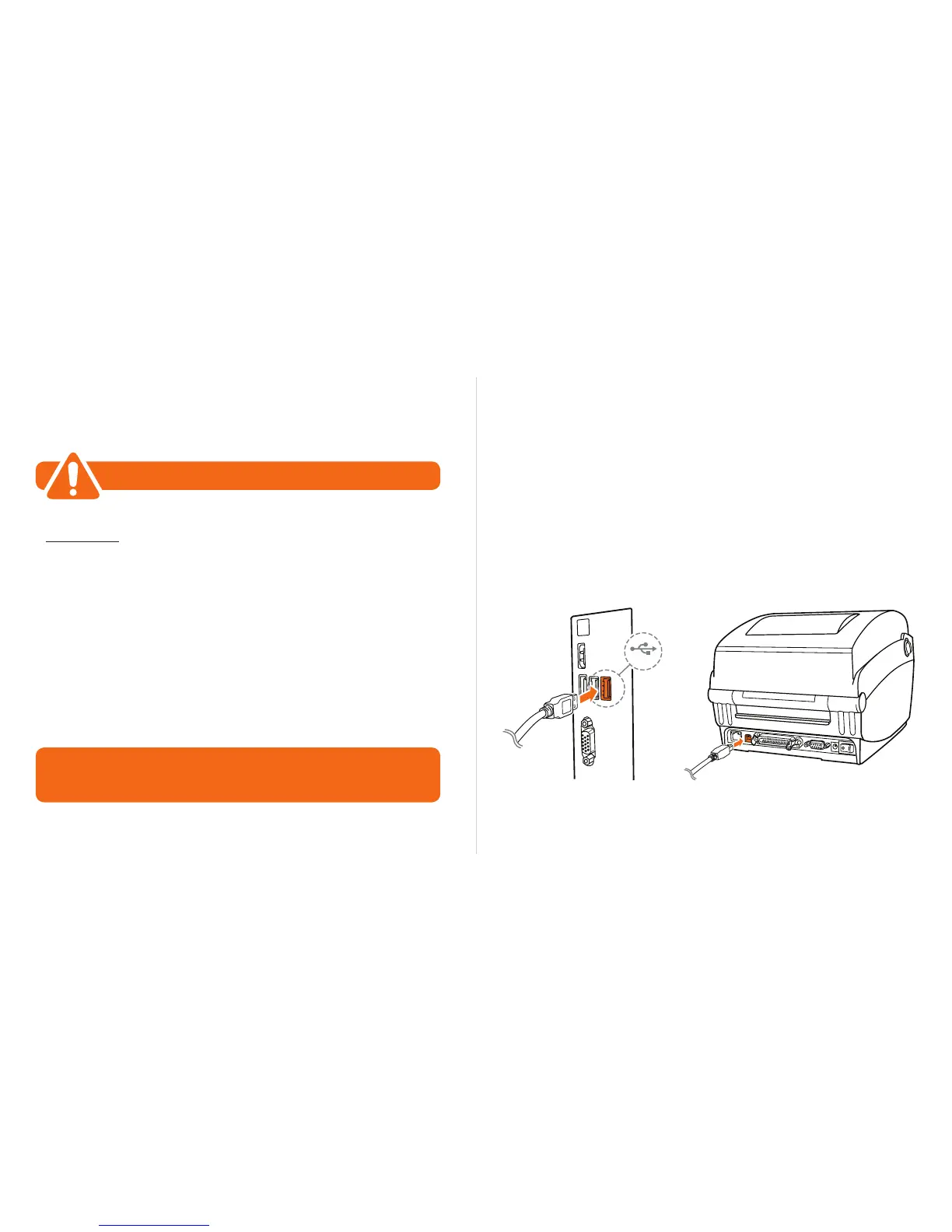
Step 1: Connect to PC
Connect one end of the USB cable to an available USB 2.0
port on the back of your computer.
Connect the other end of the cable to the USB port on your
LabelTac 4 printer.
1
2
USB 2.0
IMPORTANT
Let us install LabelTac for you, for free!
We offer a quick 5-minute remote installation- Go ahead, let us do the work while
you grab a cup of coffee! Call us at (866) 777-1360. Mon-Fri, 6am-3:30pm (PST)
. . .


 To Next Page