4
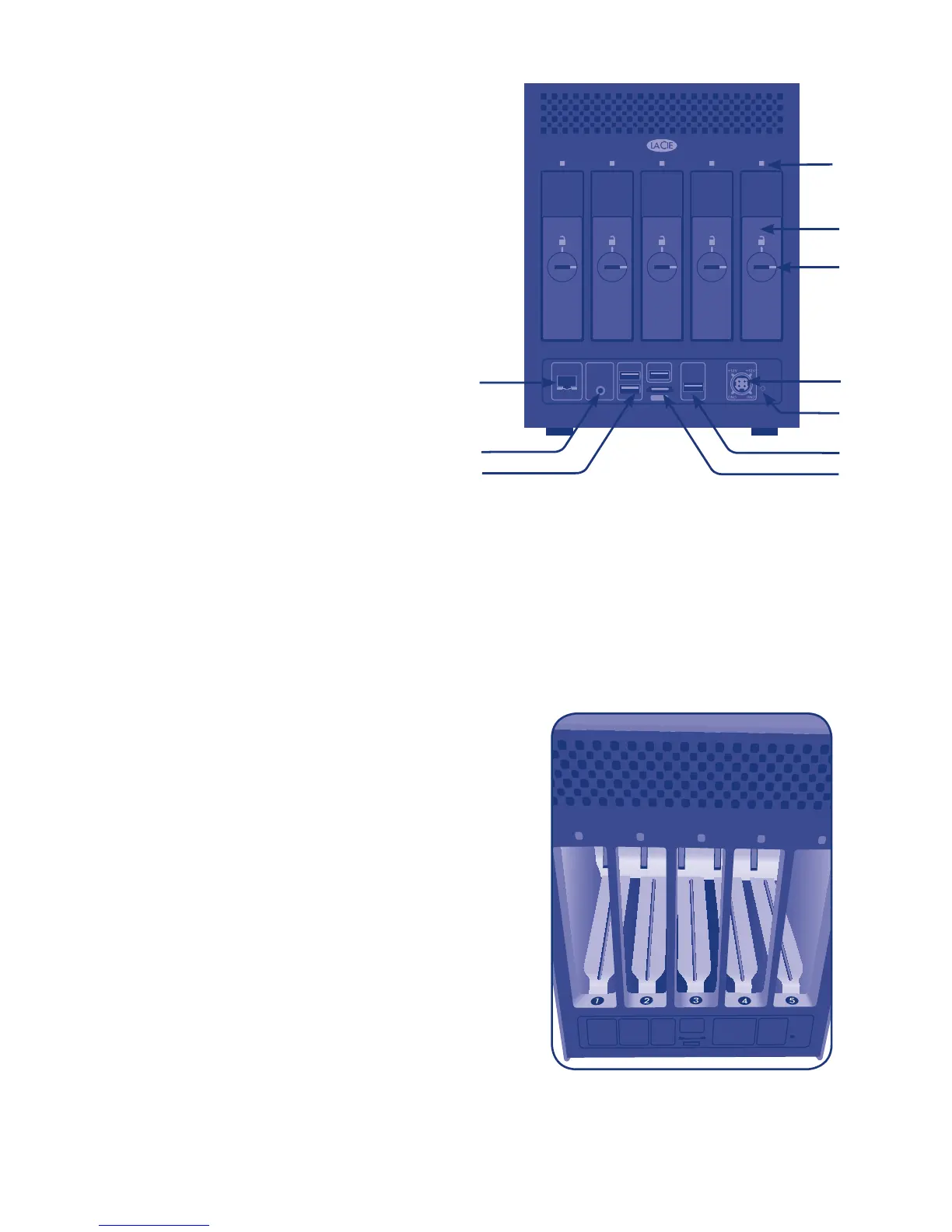
Rear View – (Fig. 02)
2. Ethernet port
3. Stereo audio out
4. USB 2.0 expansion ports (4)
5. eSATA expansion port
6. System recovery button*
7. Power input connection
8. Drive tray lock
9. Drive tray handle
10. Drive LED
*Use the system recovery button to boot the 5big Backup Server in recovery mode. See the
Configuration Guide for more information.
3
DESIGNED BY NEIL POULTON
POWER
AUDIO OUTLAN 1 USB USB USB
eSATA
10
7
4
2
4
6
8
9
Fig. 02
5
Fig. 03 - Rear view without disk trays
5big Backup Server Numbered Slots and Disk
Trays – (Fig. 03)
For convenience when adding or removing disks,
the 5big Backup Server drive slots and trays have
matching numbers.
Please see the Configuration Guide for instructions on
adding and removing disks.



 To Next Page