- 3 -
2. GETTING TO KNOW THE CAMERA / CONTROLS
F
G
B
C
D
A
E
A
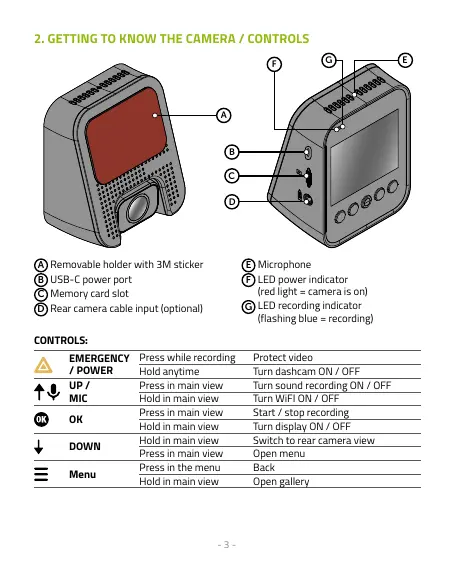
Removable holder with 3M sticker
B
USB-C power port
C
Memory card slot
D
Rear camera cable input (optional)
E
Microphone
F
LED power indicator
(red light = camera is on)
G
LED recording indicator
(flashing blue = recording)
CONTROLS:
EMERGENCY
/ POWER
Press while recording Protect video
Hold anytime Turn dashcam ON / OFF
UP /
MIC
Press in main view Turn sound recording ON / OFF
Hold in main view Turn WiFI ON / OFF
OK
Press in main view Start / stop recording
Hold in main view Turn display ON / OFF
DOWN
Hold in main view Switch to rear camera view
Press in main view Open menu
Menu
Press in the menu Back
Hold in main view Open gallery



 To Next Page