- 4 - - 5 -
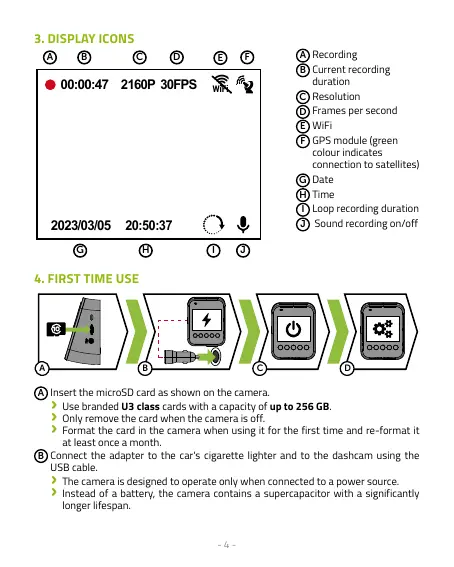
3. DISPLAY ICONS
WiFi
20:50:37
00
:00:47
2160P 30FPS
2023/03/05
A C D
H
I
F
J
G
E
B
A
Recording
B
Current recording
duration
C
Resolution
D
Frames per second
E
WiFi
F
GPS module (green
colour indicates
connection to satellites)
G
Date
H
Time
I
Loop recording duration
J
Sound recording on/off
4. FIRST TIME USE
A
B
C D
A
Insert the microSD card as shown on the camera.
›
Use branded U3 class cards with a capacity of up to 256 GB.
›
Only remove the card when the camera is off.
›
Format the card in the camera when using it for the first time and re-format it
at least once a month.
B
Connect the adapter to the car's cigarette lighter and to the dashcam using the
USB cable.
›
The camera is designed to operate only when connected to a power source.
›
Instead of a battery, the camera contains a supercapacitor with a significantly
longer lifespan.



 To Next Page