- 4 - - 5 -
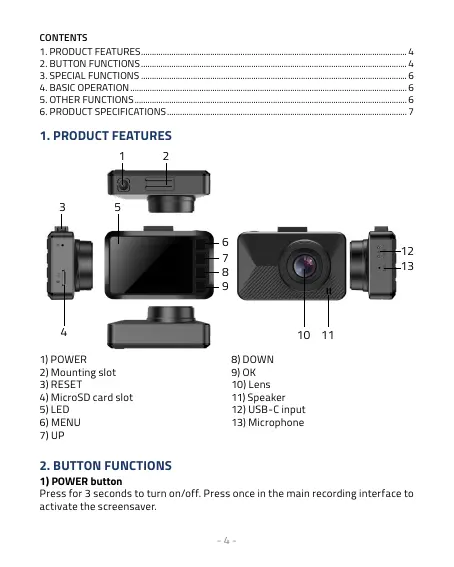
1. PRODUCT FEATURES
6
12
7
13
8
9
10 11
3
4
5
1) POWER
2) Mounting slot
3) RESET
4) MicroSD card slot
5) LED
6) MENU
7) UP
8) DOWN
9) OK
10) Lens
11) Speaker
12) USB-C input
13) Microphone
2. BUTTON FUNCTIONS
1) POWER button
Press for 3 seconds to turn on/off. Press once in the main recording interface to
activate the screensaver.
CONTENTS
1. PRODUCT FEATURES ...........................................................................................................................4
2. BUTTON FUNCTIONS ........................................................................................................................... 4
3. SPECIAL FUNCTIONS ...........................................................................................................................6
4. BASIC OPERATION ................................................................................................................................ 6
5. OTHER FUNCTIONS .............................................................................................................................. 6
6. PRODUCT SPECIFICATIONS ............................................................................................................... 7



 To Next Page