- 4 -
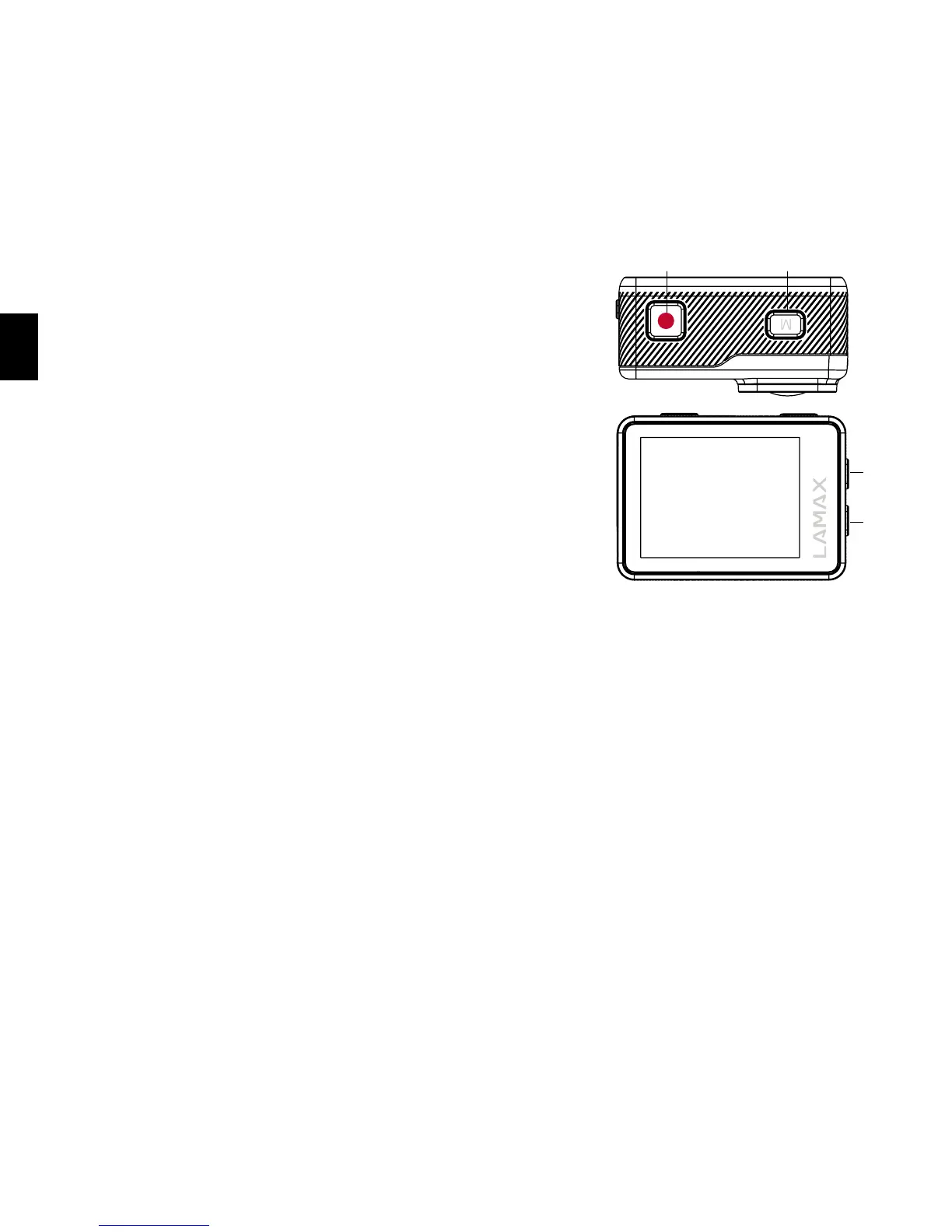
Buttons and camera functions
1. “On/Off” button – this button is located on the top of
the camera and is marked with the letter “M”. It also
serves as the “Change mode” button.
2. “Shutter” button – this button is located on the top of
the camera and is marked with the red “REC” symbol.
It also serves to confirm a function when browsing
the menu.
3. “Up” button – used to browse the menu and also
turns Wi-Fi on or off.
4. “Down” button – used to browse the menu.
2 1
4
3
Accessories
– Waterproof case
– Remote control
– Pole mount
– Frame for use without waterproof case
– J mount
– Fast plug-in
– Adhesive mount, flat
– Adhesive mount, curved
– 3-axis connector (3 parts)
– Tripod adapter
– Li-ion batterie
– Tripod reducer bushing
– Replacement 3M pads (x 2)
– USB cable
– Lightweight door for better sound
recording in case
CAUTION: When using lightweight door,
case is not waterproof
– Microfibre cloth
– User manual
– Protective cloth cover


 To Next Page