3
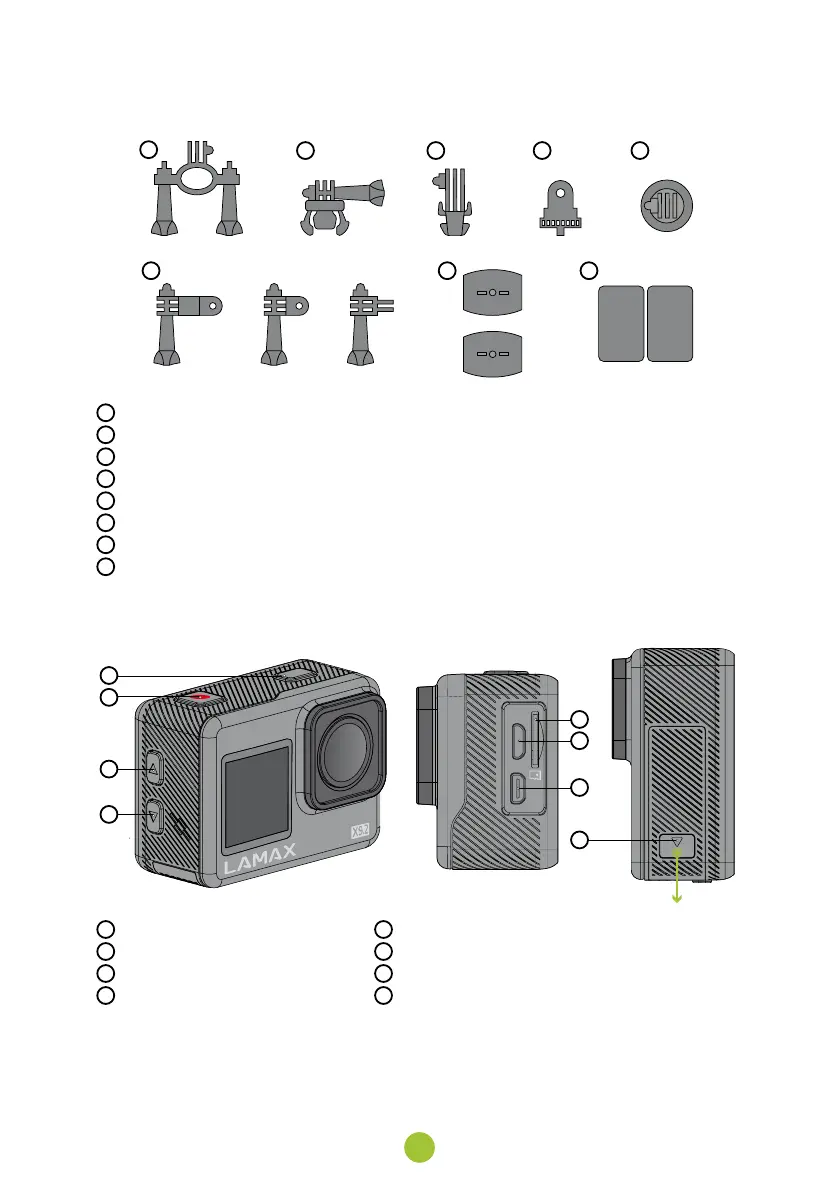
MOUNTS
A
B C D E
F G H
A
Pole mount – for attaching to handlebars
B
Fast plug-in – for quickly snapping into the mount
C
J mount – for quick snap-in with elevation
D
Thread adapter – for connecting the camera without the case
E
Tripod adapter – for connecting the camera in the case
F
3-axis connector – for mounting in any direction
G
2× self-adhesive mount – for attaching to a smooth surface (helmet, bonnet)
H
2× spare 3M pads – for reattaching the self-adhesive mount
2. GETTING TO KNOW THE CAMERA
A
B
C
D
F
E
G
H
A
POWER / MODE button
B
REC / OK button
C
UP button
D
DOWN button
E
Memory card slot
F
Micro USB port
G
Video out
H
Battery door
Use only recommended accessories, otherwise the camera may be damaged.


 To Next Page