4
3. CAMERA CONTROLS
Press the REC / OK button
Hold the REC / OK button
Press the POWER / MODE button
Hold the POWER / MODE button
Press the UP button
Hold the DOWN button
Press the DOWN button
A
B
A
›
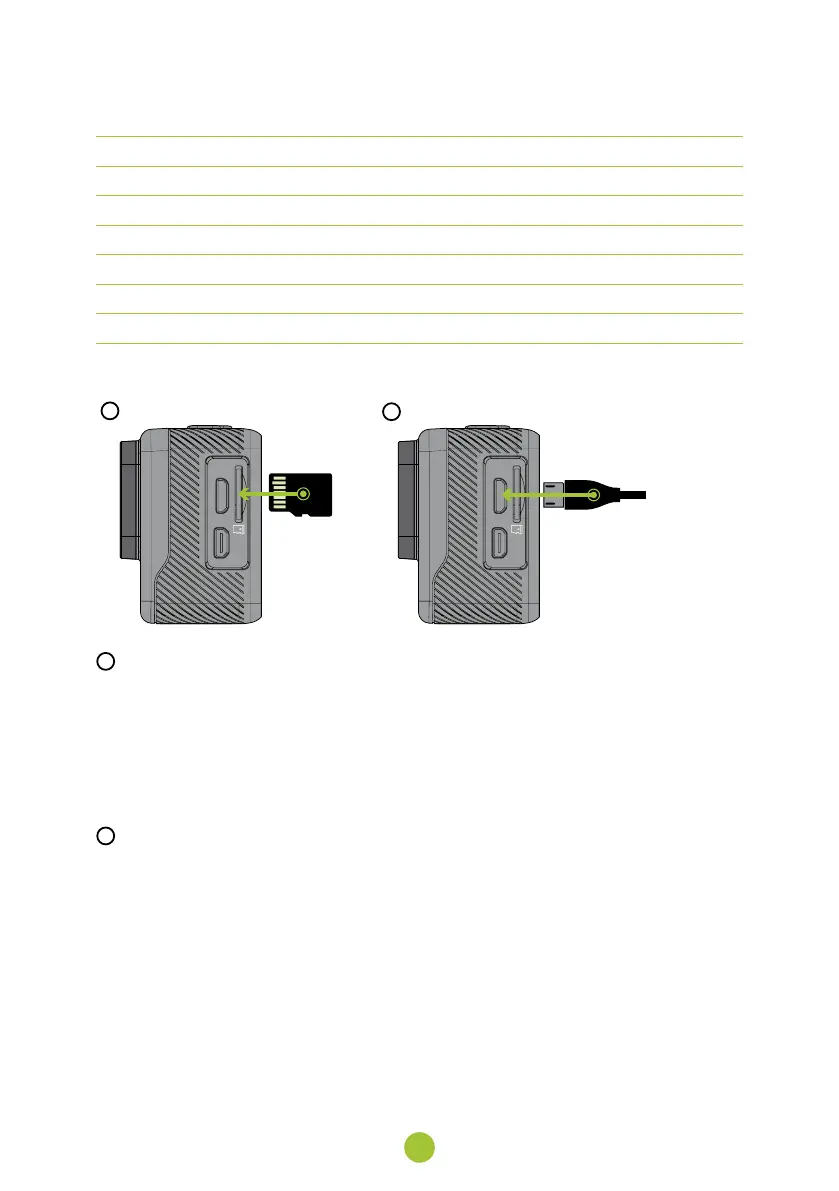
Insert the card only when the camera is turned off and not connected to a computer.
›
Format the card directly in the camera the first time you use it.
›
We recommend memory cards with a high write speed (UHS Speed Class – U3 and higher) and a maxi-
mum capacity of 128 GB.
Use only Micro SDHC or SDXC cards from reputable manufacturers. Cards from non-branded manu-
facturers are not guaranteed to function properly for data storage.
B
CONNECT THE CAMERA TO A POWER SOURCE
›
Charge the camera either by connecting it to a computer or by using the optional AC adapter.
›
Fully charge the battery before first use.
›
It takes approximately 4 hours to charge the battery from 0 to 100 %. After charging, the charging indi-
cator turns off.
Charging the battery from 0 to 80 % takes 2.5 hours.



 To Next Page