| 9
> Lock/Unlock touchscreen – touch the icon to lock the display screen. A lock
appears in the centre of the display. Touch the lock to unlock the screen.
> Turn off camera – touch to turn off the camera. When you touch the icon , a con-
firmation message will appear asking if you really want to turn off the camera.
13
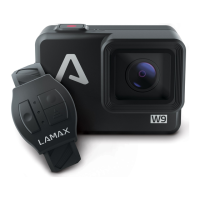
LAMAX W9 ACTION CAMERA PARAMETERS
LCD 2” Touch
Waterproof Up to 12m without case
Menu Languages Czech, Slovak, Polish, English, German, Hungarian,
Lithuanian
Resolution Options 4K – 3840×2160 / 2880×2160 at 30 fps,
2,7K – 2704×1520 / 2704×2028 at 30 fps,
1440p – 2560×1440 to 60 fps,
1080p – 1920×1080 to 120 fps,
720p – 1280×720 to 240 fps
Video Format MP4, H.264, H.265 compression
Photo Format JPG
Photo Resolution 16Mpx/14Mpx/12Mpx/8Mpx/5Mpx/3Mpx
Photo Modes Single / Burst / Self-timer / Video + Photo
Network Frequency 50 Hz / 60 Hz
Storage Compatibility MicroSDHC and microSDXC up to 128 GB
Connectivity WiFi, USB-C, HDMI
Battery Capacity 2× 1100 mAh
Battery Life 2× 90 min / Full HD video
Charging Time 105 min
OS Compatibility Windows XP / Vista / 7 / 8 / 10, MacOS
Camera Dimensions 60 × 44 × 35 mm
Weight 134 g


 To Next Page
 Loading...