2
Back to contents
LAMAX WatchY2
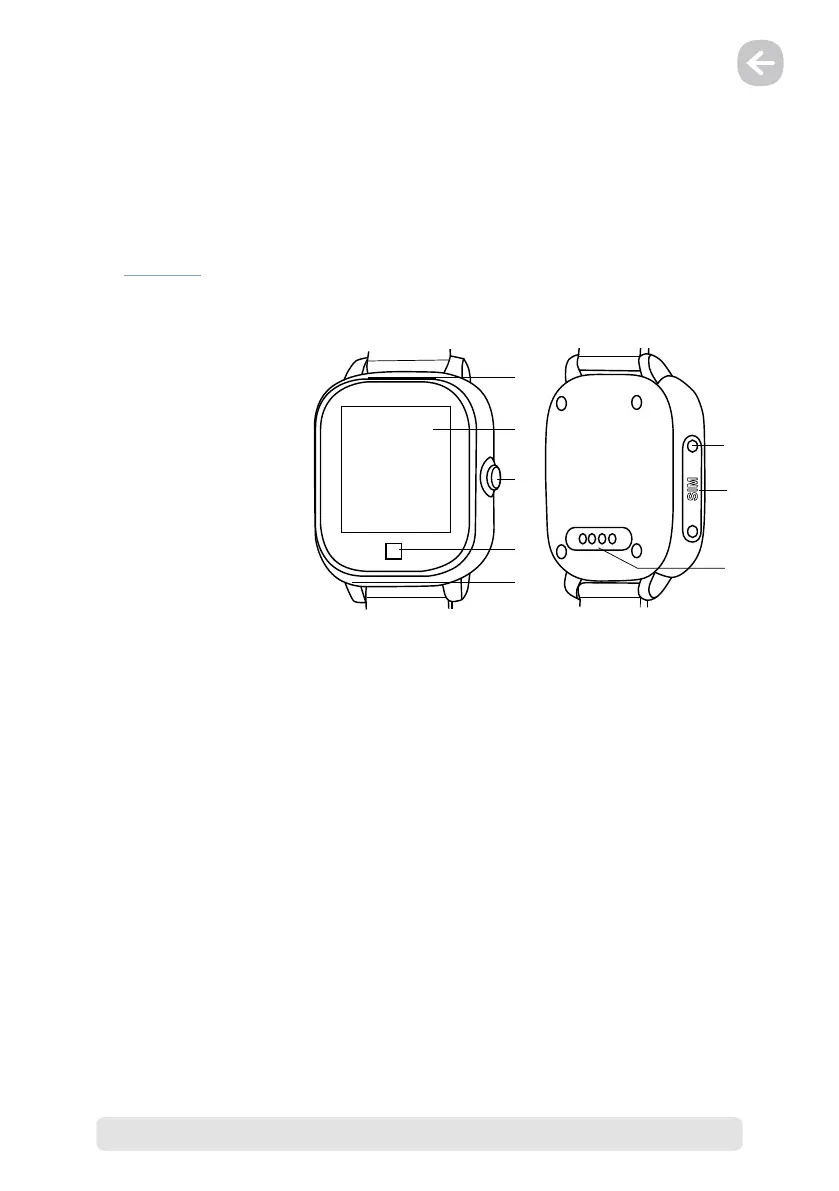
1. LAMAX WatchY2 Controls
1. Speaker
2. Touch screen
3. SOS button; On / Off
4. „Back“ touch button
5. Microphone
6. Screws (×2) for SIM card door
7. Micro SIM card slot
8. Power connector (magnetic)
1) Switching on the device
– To switch on the device, hold down the „SOS button“ for at least 5 seconds.
2) Switching off the device
a) No SIM card inserted in the LAMAX WatchY2 / no signal.
– Hold down the „SOS button“ for at least 5 seconds to switch off the device.
b) SIM card inserted in the LAMAX WatchY2 / with signal.
– Switching off cannot be done in the same way as when there is no SIM card inserted or
if the device has no signal. This measure prevents the LAMAX WatchY2 from being easily
and accidentally turned off manually by the user. Pressing the „SOS button“ for 5 seconds
in this case initiates an SOS call to the set SOS contact numbers in the LAMAX Tracking
application.
– In this case there are 2 ways to switch off the LAMAX WatchY2.
1. Press the „SOS button“ 10 times in succession and the device will switch off within 3
seconds.
2. Switch off the LAMAX WatchY2 remotely via the LAMAX Tracking application (Menu →
Remote device shutdown).
8
6
7
3
4
5
1
2



 To Next Page