Setting of regeneration cycles
By default the regeneration is planned every 3 washing cycles.
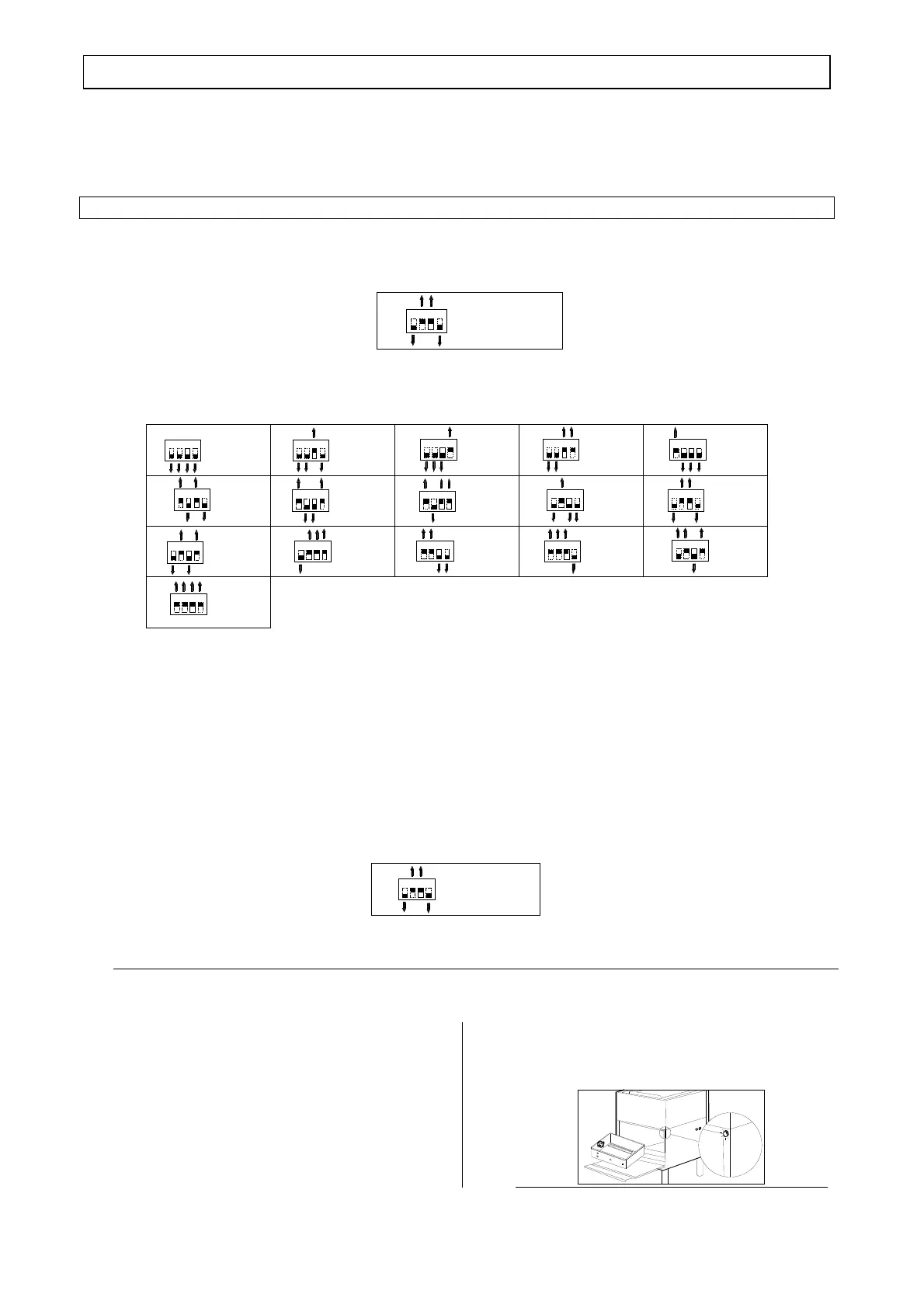
However, it is possible to plan the Regeneration on the basis of water hardness.
When the number of cycles suitable for the water hardness of your system has been established, it is
possibile to configure the dip-switch on the electronic card placed in the control box.
Follow the instructions to programme the electronic board.
REGENERATION SETTING PROGRAMMING
1 –Disconnect the machine from the supply mains by the wall switch.
With the machine stopped, check the position of the dip-switches on the electronic board and
memorise it;
1234
ON
F85-RGB-add-PS
F85-RGB-add
L21-RGB-add
L21-RGB-add-PS
OFF
2 - Then set the dip-switch in accordance with the following table, according to the number of
washing cycles you wish to set to start the regeneration operation signaling;
123
4
ON
ON
ON
ON
ON
ON
ON
ON
ON
ON
ON
ON
ON
ON
ON
ON
3
1
2
6
4
5
9
7
8
12
10
11
15
13
14
OF F
OF F
OF F
OF F
OF F
OF F
OF F
OF F
OF F
OF F
OF F
OF F
OF F
OF F
OF F
OF F
1234
1234
1234
1234
123
4
1234
1234
1234
1234
1234
1234
1234
1234
1234
1234
Conteggio disabilitato
Compte inactif
Count-off
Nach za hlun g
nicht Akt iviert
CIC LI
CYCLES
CYCLES
ZYKLUS
CICLI
CYCLES
CYCLES
ZYKLUS
CIC LI
CYCLES
CYCLES
ZYKLUS
CIC LI
CYCLES
CYCLES
ZYKLUS
CIC LI
CYCLES
CYCLES
ZYKLUS
CIC LI
CYCLES
CYCLES
ZYKLUS
CIC LI
CYCLES
CYCLES
ZYKLUS
CIC LI
CYCLES
CYCLES
ZYKLUS
CIC LI
CYCLES
CYCLES
ZYKLUS
CICLI
CYCLES
CYCLES
ZYKLUS
CICLI
CYCLES
CYCLES
ZYKLUS
CICLI
CYCLES
CYCLES
ZYKLUS
CICLI
CYCLES
CYCLES
ZYKLUS
CICLI
CYCLES
CYCLES
ZYKLUS
CIC LI
CYCLES
CYCLES
ZYKLUS
3 - Open the hood of the machine;
4 - Press the pushbutton C;
5 - Keep the pushbutton C pressed and meanwhile turn the machine ON by using the wall switch;
6 - Wait for the lighting of the cycle pushbutton C (red colour);
7 - Turn the machine OFF by using the wall switch;
8 - Reset the dip-switches according to the original position of the washing period programming;
1234
ON
F85-RGB-add-PS
F85-RGB-add
L21-RGB-add
L21-RGB-add-PS
OFF
Attention! Make setting operation when the machine is empty!!!
09 – Turn on the machine and wait until the end of the tank loading!
10 –After setting the new configuration, when you first
turn, the machine will perform a regeneration cycle and
the lamp “L” will turn on for 7 seconds (see figure at
right), Subsequently, the new cycle of regeneration will
take place after the setting number of cycles, and the
lamp “L” will light up initially for 7 seconds to alert the
start of the Regeneration cycle.
.
NOTE! Every 45 seconds of tank loading, the
machine stops to perform a regeneration cycle of about
2 minutes.
L


 To Next Page
 Loading...