28
5 Operating Control and Displays
Set duration of post-ventilation
1. Use cursor keys to select menu and press ENTER to confirm.
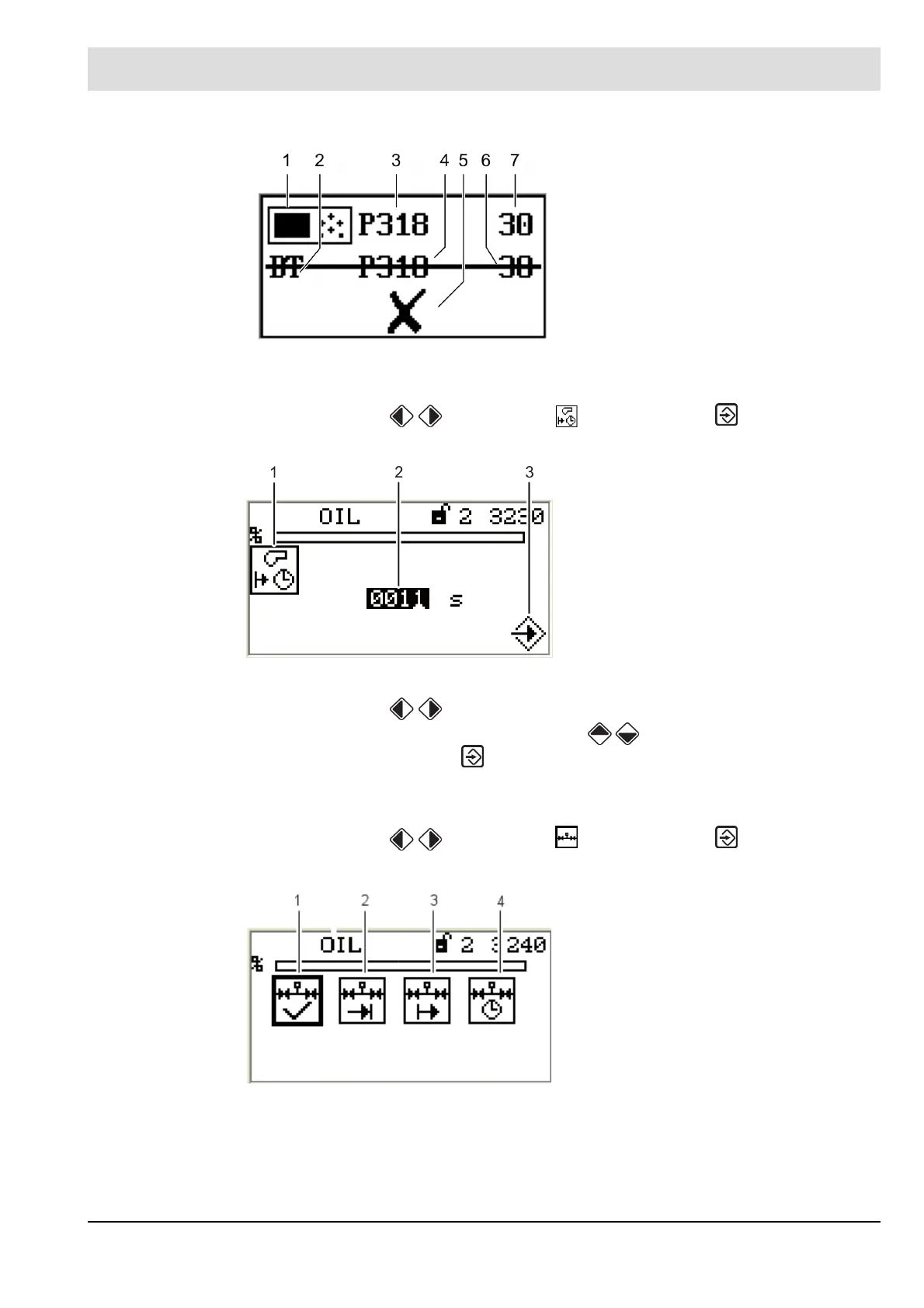
The display shows the post-ventilation period menu.
2. Use cursor keys to select number you wish to change.
3. Change the numerical value with cursor keys .
4. Confirm entry with ENTER .
Accept or discard the entry!
Leakage test functions
1. Use cursor keys to select menu and press ENTER to confirm.
The display shows the valve leakage test menu.
Fig. 5-29 Display of invalid data transfer
1 Pictogram UI300
2 Pictogram BT300
3 Parameter number UI300
4 Parameter number BT300
5 Pictogram apply parameters
6 Value BT300
7 Value UI300
Fig. 5-30 Post-ventilation period menu
1 Post-ventilation period pictogram
2 Setting post-ventilation time
3 Press ENTER to acceppt setting
Fig. 5-31 Leakage test menu
1 Leakage test ON/OFF
2 Leakage test before ignition
3 Leakage test after ignition
4 Leakage test period



 To Next Page