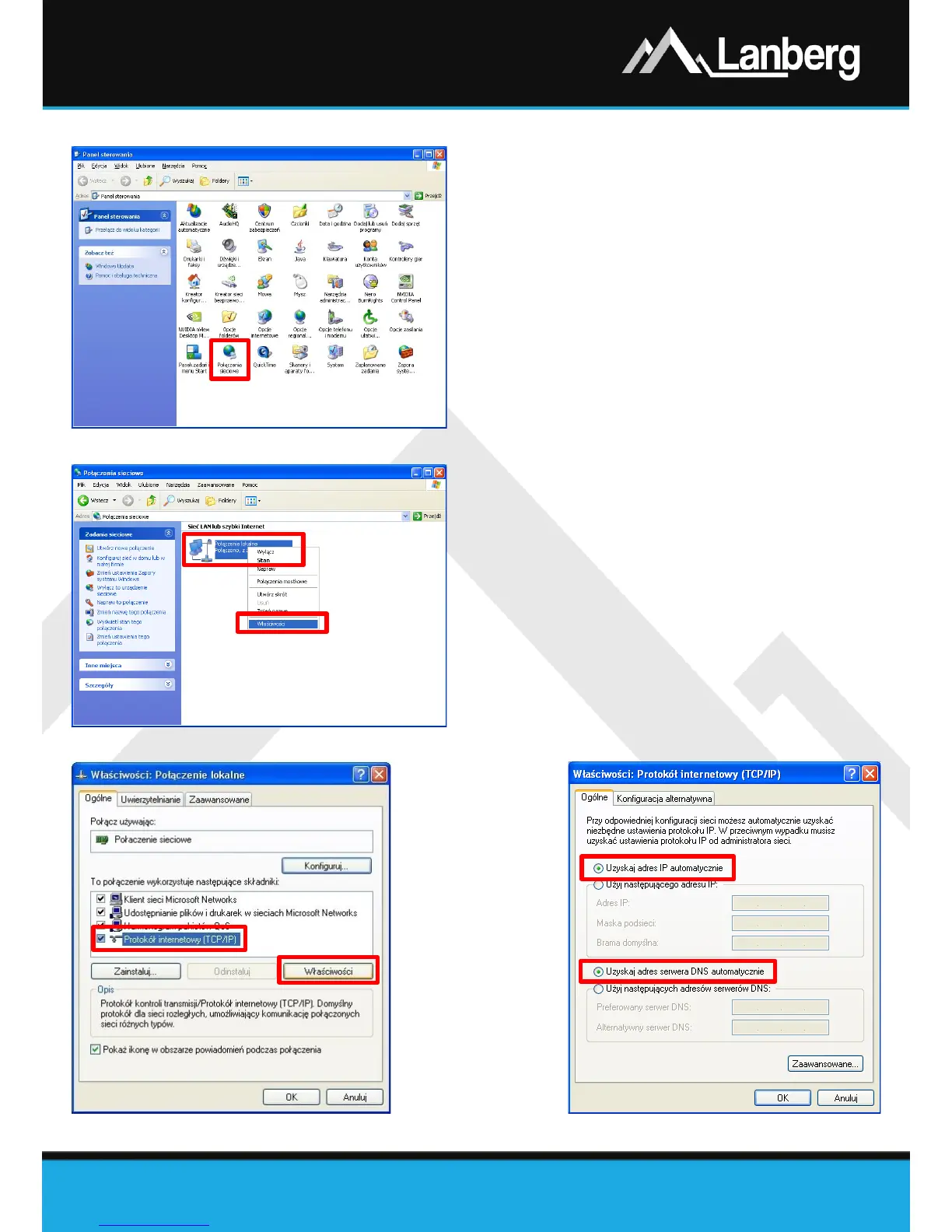
3.3.1) Windows 98/ME/2000/XP
Step 1) Press „Start” „Control panel”. After new
window will open, press left mouse button twice
on „Network Connections”,
Step 2) Press the right mouse button on „Local Area
Connection”, then from the drop-down list, select
„Properties”,
Step 3) On the newly opened window select verse
„Internet Protocol (TCP/IP)” by pressing left
mouse button and then left click the button
„Properties”,
Step 4) On the newly opened window select flags „Obtain
an IP Address automatically” and „Obtain DNS
server address automatically” by left clicking,
then next choose „OK” button,
Step 5) In order to receive updates regarding the
connection status during its initialization, left click
on the previous window the following flag „
Show
icon in notification area when connected”.



 To Next Page