EasyManua.ls Logo

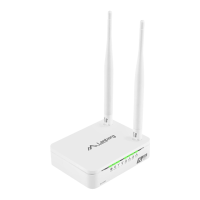
Lanberg RO-030FE - User Manual

Lanberg RO-030FE
32 pages
Go to English
Print Icon
To Next Page IconTo Next Page
Loading...
Skrócona instrukcja obsługi |QIG
Routery szerokopasmowe
Broadband routers
WERSJA | VERSION: 2018/05
PL | EN
E-mail: support@lanberg.pl | support@lanberg.eu
www.lanberg.pl | www.lanberg.eu
Lanberg © 2015-2018
Routery szerokopasmowe
seria RO
Broadband routers
RO series
Question and Answer IconNeed help?

Do you have a question about the Lanberg RO-030FE and is the answer not in the manual?

Summary

Health and Environmental Precautions

WEEE and RoHS Compliance

Explains WEEE symbol for proper disposal and RoHS for hazardous substance reduction.

Router Components and Configuration Overview

LED Indicators Explained

Explains the meaning of different LED lights on the router for status indication.

Connecting and Configuring Your Router

Resetting Router to Factory Defaults

Step-by-step guide on how to reset the router to its original factory settings.

Windows XP Network Configuration

Windows Vista Network Configuration

Windows 7;8;8.1;10 Network Configuration

Internet (WAN) Interface Configuration

Login to Router Web Interface

How to access the router's configuration page via a web browser.

WAN Setup: DHCP Client Mode

Configures the router's WAN interface using DHCP client for internet connection.

Connecting to Target Wireless Network

Guides connection of the router to a selected wireless network and its security.

Summary

Health and Environmental Precautions

WEEE and RoHS Compliance

Explains WEEE symbol for proper disposal and RoHS for hazardous substance reduction.

Router Components and Configuration Overview

LED Indicators Explained

Explains the meaning of different LED lights on the router for status indication.

Connecting and Configuring Your Router

Resetting Router to Factory Defaults

Step-by-step guide on how to reset the router to its original factory settings.

Windows XP Network Configuration

Windows Vista Network Configuration

Windows 7;8;8.1;10 Network Configuration

Internet (WAN) Interface Configuration

Login to Router Web Interface

How to access the router's configuration page via a web browser.

WAN Setup: DHCP Client Mode

Configures the router's WAN interface using DHCP client for internet connection.

Connecting to Target Wireless Network

Guides connection of the router to a selected wireless network and its security.

Lanberg RO-030FE Specifications

General IconGeneral
BrandLanberg
ModelRO-030FE
CategoryNetwork Router
LanguageEnglish

Related product manuals