3.5.10) Client mode setup of the device
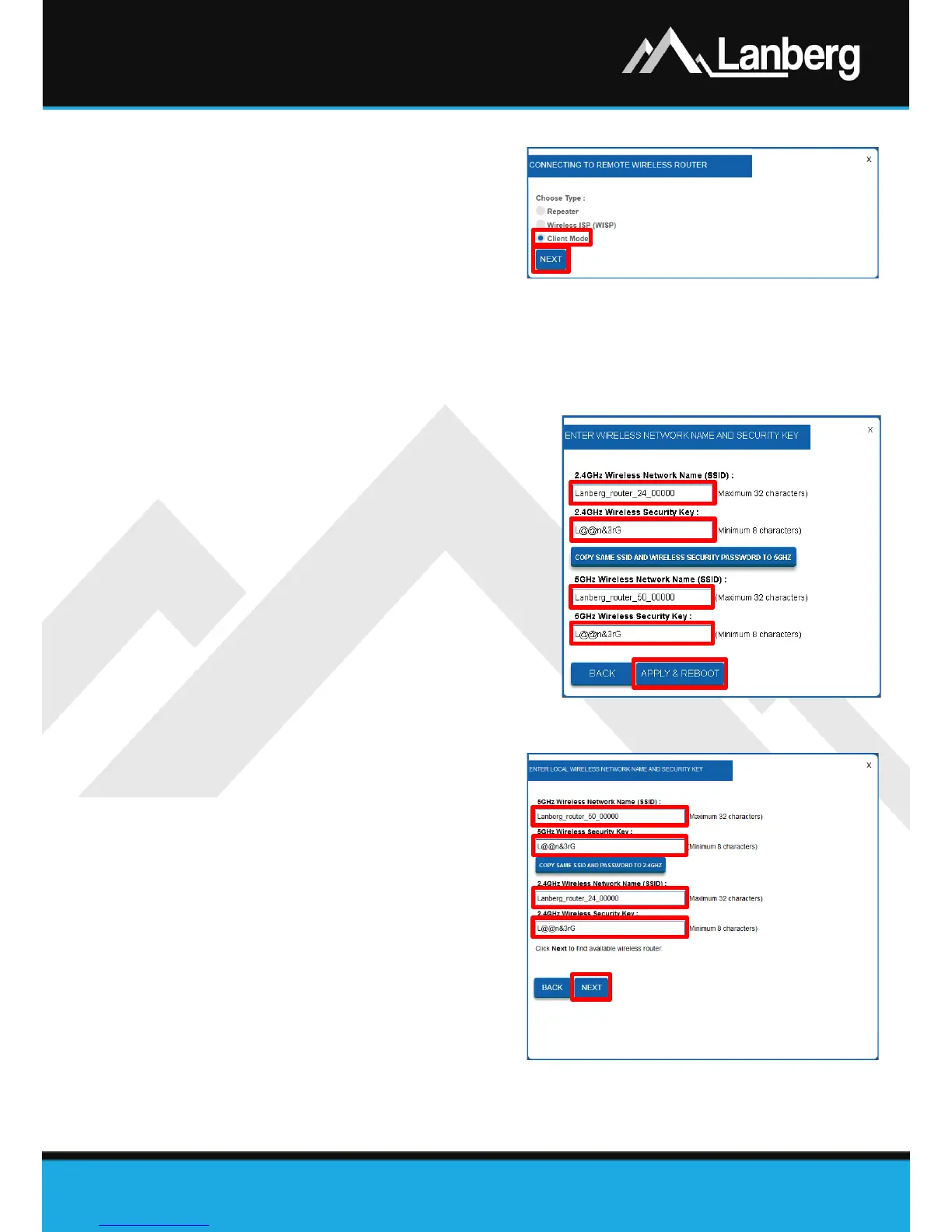
Step 1) On the newly opened window select the
internet connection type by choosing
the „Client Mode”,
Step 2) Press „Next” button. The router will
apply the new settings in approx. 30
seconds. Please refer to annotation no.
1,
Step 3) Further part of configuration of connection of the router with the target access point via the Wi-Fi
network is described in 3.5.13 section.
3.5.11) Configuration of the wireless network (Wi-Fi) of the router – Router /
AP
Step 1) In the new section, set the name of the
broadcasted wireless network (SSID) for
2.4GHz band in the „2.4GHz Wireless
Network Name (SSID)” field and your private
password for this network in the „2.4 GHz
Wireless Security Key” field,
Step 2) Only RO-120GE, RO-175GE models - Repeat
exactly the same steps for 5GHz wireless
band fields by setting the wireless broadcast
name (SSID) and password as the security
key,
Step 3) Press „Apply & Reboot” button. The router
will apply the new settings in approx. 30
seconds.
3.5.12) Configuration of the wireless network (Wi-Fi) of the router – Repeater
/ WISP / Client
Step 1) In the new section, set the name of the
broadcasted wireless network (SSID) for
2.4GHz band in the „2.4GHz Wireless
Network Name (SSID)” field and your
private password for this network in the
„2.4 GHz Wireless Security Key” field,
Step 2) Only RO-120GE, RO-175GE models -
Repeat exactly the same steps for 5GHz
wireless band fields by setting the
wireless broadcast name (SSID) and
password as the security key,
Step 3) Press „Next” button. The router will
apply the new settings in approx. 30
seconds.


 To Next Page
 Loading...