3.5.3) WAN interface setup of the
router in PPPoE mode
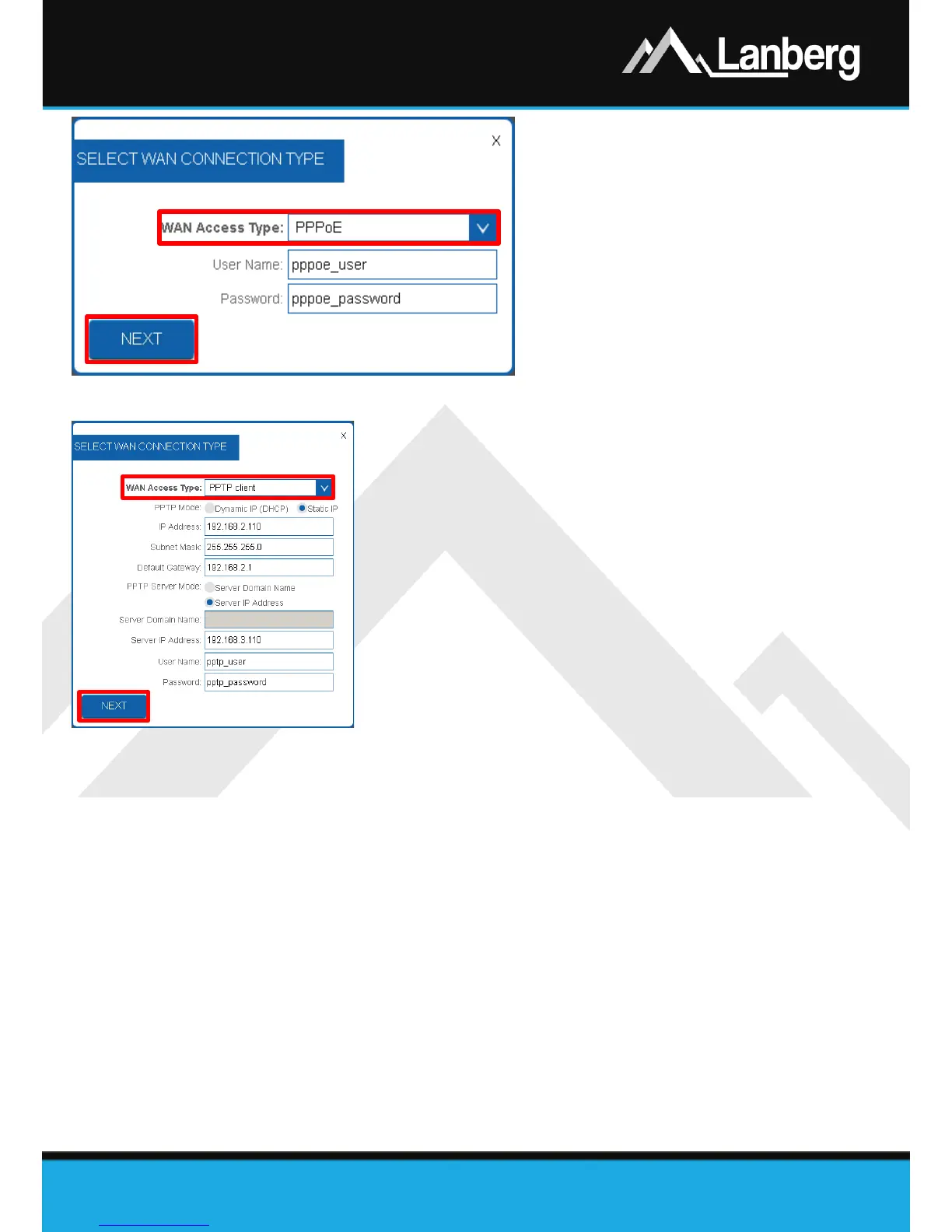
Step 1) On newly opened window, select the
entry „PPPoE” from the „WAN Access
Type” drop-down list,
Step 2) Input the value of the „User Name” and
„Password” fields, received from your
ISP,
Step 3) Press „Next” button,
Step 4) Further part of the configuration (Wi-Fi)
is described in 3.5.11 section.
3.5.4) WAN interface setup of the router in the client mode of PPTP VPN
Step 1) On newly opened window, select the entry „PPTP client” from the
„WAN Access Type” drop-down list,
Step 2) Depending on the defined network for the WAN interface of the
router, select the automatic configuration of the WAN interface in
the field „PPTP Mode” by selecting „Dynamic IP (DHCP)” or in the
case of manual settings select „Static IP”, additionally completing
the following fields „IP Address”, „Subnet Mask” and „Default
Gateway”, as well, for the WAN interface of the router,
Step 3) Next, depending on if the customer end device, to which the VPN
tunnel connection is to be established using the PPTP protocol with
Lanberg’s router, has a variable or fixed IP address, please set the
„PPTP Server Mode” field to „Server domain name” if applicable
customer end device has an variable IP address and its unique
identifier in the form of a domain granted by the DDNS service or
„Server IP Address” if the client’s end device has a fixed IP address.
Failure to meet one of these conditions may result in problems with the VPN tunneling setup. To
proceed further, fill in the fields „Server Domain Name” or „Server IP Address” and „User Name”
and „Password”,
Step 4) Press „Next” button,
Step 5) Further part of the configuration (Wi-Fi) is described in 3.5.11 section.


 To Next Page
 Loading...