CUB-RANGE
USER MANUAL
www.laney.co.uk
6
9 - BOOST - Determines the amount of pre boost hitting the rst tube in the ampliers signal path.
Dialling in more BOOST will have the eect of pushing a clean amp into warm tube clipping or
naturally compressing an already clipping amplier.
10 - BOOST LED - Indicates that the BOOST is engaged.
11 - INPUT SOCKET - 15W & <1W inputs. Plugging into the 15W input socket accesses the full power
of the amplier - producing 15 watts RMS of tube tone. Plugging into the <1Watt input switches the
output power stage down to <1 watt RMS. Ideal for recording or bedroom playing.
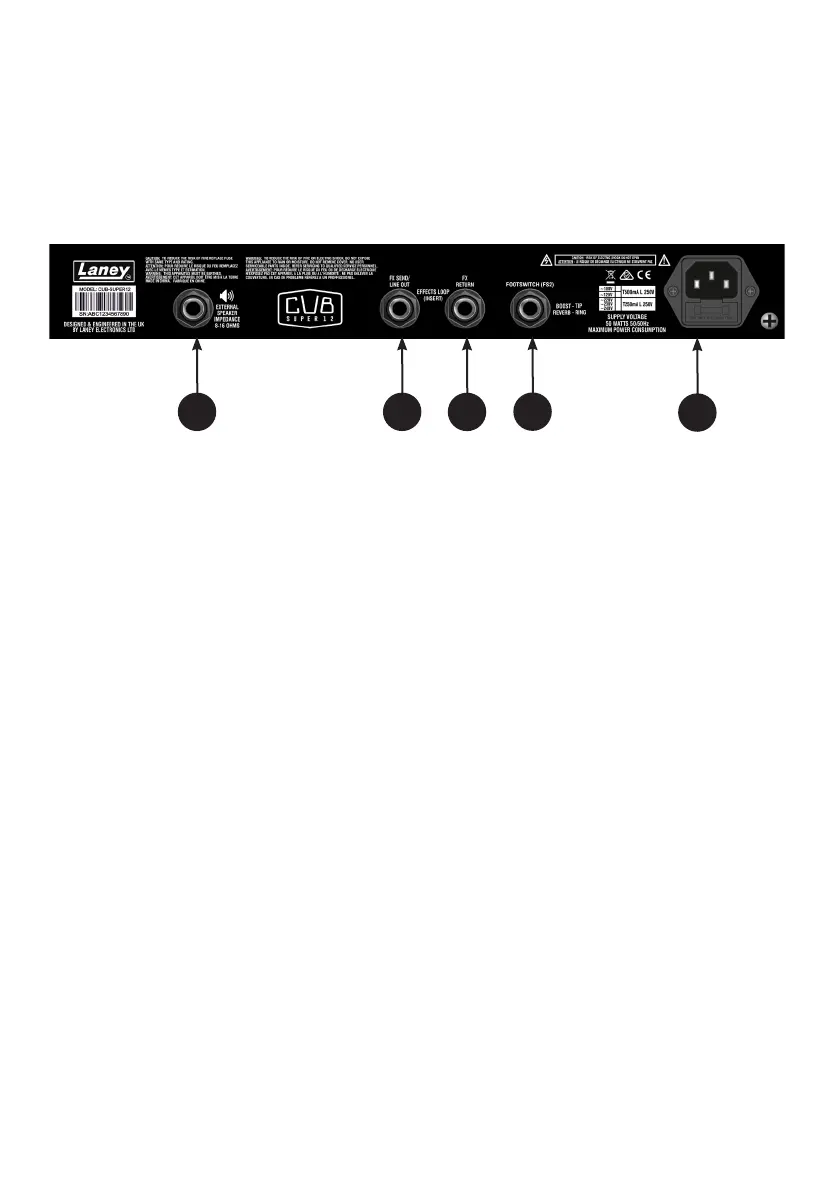
12 - EXTERNAL SPEAKER - Your CUB-SUPER12 is loaded with a HH Custom designed 8 Ohm Internal
speaker. Should you want to run an external speaker cabinet it can be connected here. Please use a
good quality SPEAKER cable. Connecting an external speaker cabinet will disconnect the internal
speaker. Please make sure you use the correct impedance of speaker cabinet from 8 - 16 Ohms.
13 - FX LOOP SEND - This is where you plug the INPUT of your Eect(s). Use a high quality shielded
guitar cable. This socket can also be used as a line out.
14 - FX LOOP RETURN - This is where you plug the OUT of your Eect(s). Use a high quality shielded
guitar cable.
15 - FOOTSWITCH SOCKET - This is where you plug in the footswitch. FS2-Mini optional extra. Enables
remote switching of the boost circuit and reverb. Ensure the boost switch (7) is switched in and the
reverb level is set above zero.
16 - POWER SOCKET - Plug in the supplied IEC power cord here.
13 12
14
15
16
CUB-SUPER12 FEATURES



 To Next Page