11
General Operation & Programming cont.
ECOH-PP Control Panel
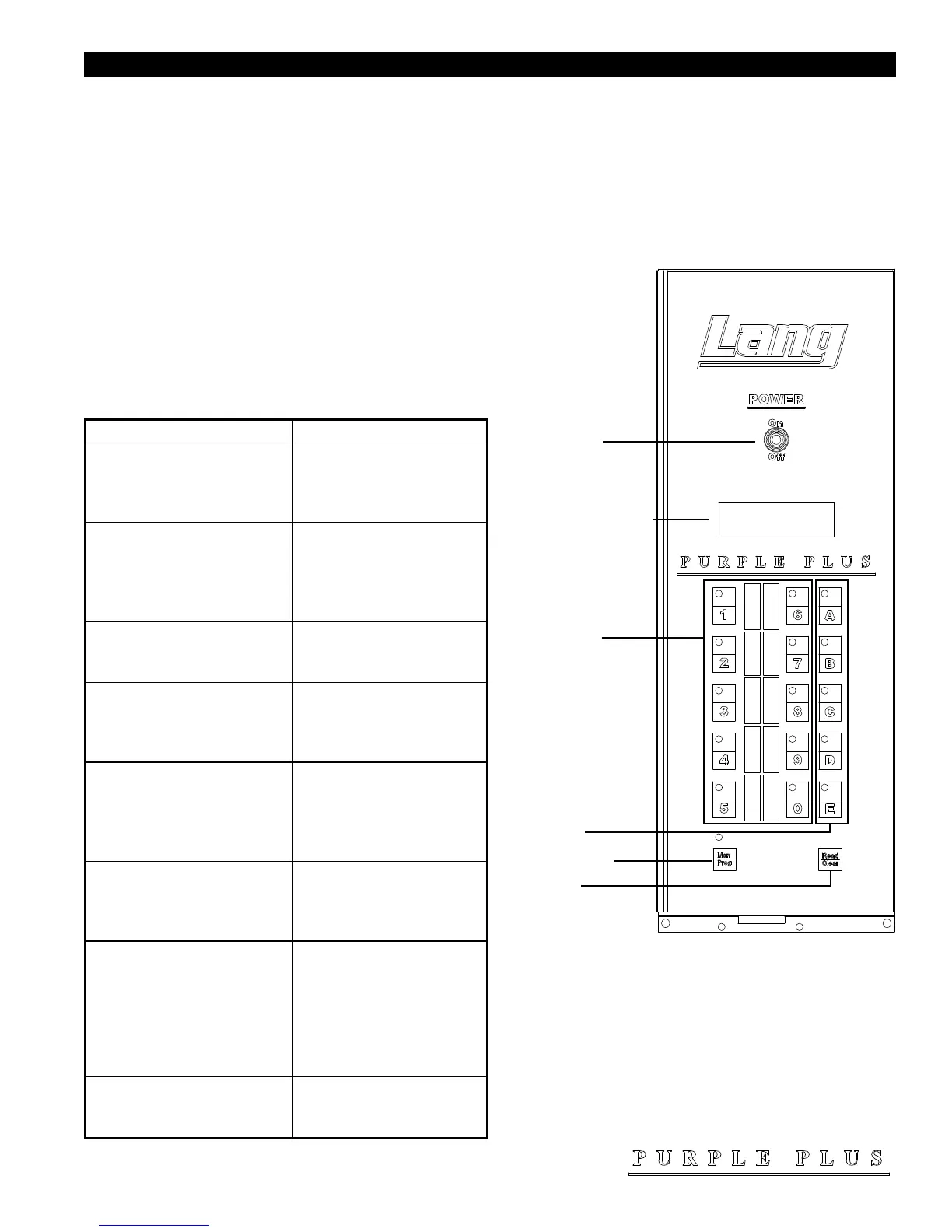
The control panel consists of the following items. Detailed operational descriptions are given later this section.
Power Switch: Turns the oven on and off
Alpha Numeric Display: Displays your interface with the computer.
Product Select Button: Each button can be
programmed for a specic menu, see programming
section to see how.
Shelf Select Button: Press to select which shelf the product will be placed on. “A” is the top position, “E” is the
bottom position.
Manual Program Button: Used when product being
cooked is for one time only.
Read / Clear Button: Used to read programs, clear
programs, and to access program menus.
Typical Operation Sequence
Power Switch
AlphaNumeric Display
Product Select
Shelf Select
Manual Program
Read/Clear
IL1458
Action Result
Turn power switch to ON.
Control panel comes on; display
says “SELECT PRODUCT
or READ/CLEAR TO
PROGRAM.
Press a product button.
Display says “PRODUCT
X PREHEATING TO
XXX F”. Motor starts and
oven begins preheating to the
programmed temperature.
Beeper sounds briey.
Display says “READY
SELECT PRODUCT TO
START ”.
Open the oven doors and load the
product. Close the door and press
the product button again.
Beeper sounds briey and
display says, “SELECT
OVEN SHELVES
PRODUCT X”.
Press the shelf button(s) which
correspond to the shelf positions,
which the product is loaded (A
equals the top shelf and E equals
the bottom shelf).
Display shows a countdown
timer and begins to count toward
zero.
Beeper sounds continuously.
Display shows “DONE
PRESS SHELF BUTTON
X, REMOVE PRODUCT”,
shelf button(s) ash.
Press the ashing shelf button(s).
Beeper stops. Display shows
“READY SELECT
PRODUCT TO START” if
no other shelves carry product
or resume count down for
shelves that still have product
cooking.
Open oven door and remove the
product, which corresponds to
ashing shelf button(s).


 To Next Page