7
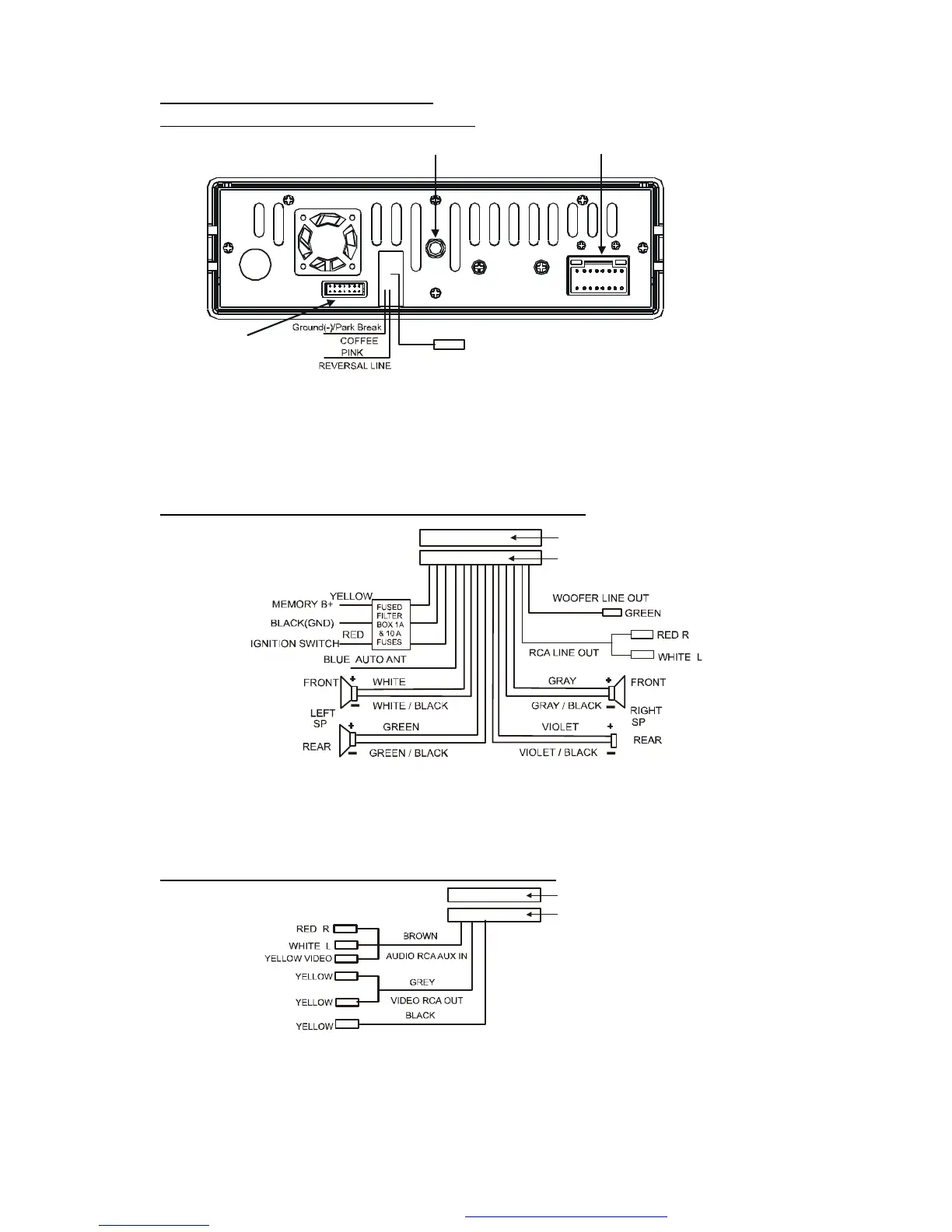
1.7 Wires Connection Description
The Description of the Wires Connection
Fixing Screw Bolt
Wiring Connecting Socket 1
Wiring Connecting Socket 2
Radio Antenna jack
Black
Black
1. Parking wire must be connected. And the parking brake must be engaged in order for the
monitor to work.
2. Use the clip end of the Ground Wire provided by manufacturer to connect Mounting Screw,
using the other end of the Ground Wire to connect the negative pole of the power source.
Otherwise, the video on screen maybe flashes.
The Description of the Wiring Diagram for Socket 1
WIRING CONNECTING SOCKET 1
WIRING CONNECTING PLUG 1
NOTES:
1. Only speakers with 4 ohms impedance may be used.
2. Ensure that the blue auto antenna cable does not make contact with any ground
connection.
The Description of the Wiring Diagram for Socket 2
REAR VIEW CAMERA
WIRING CONNECTING SOCKET 2
WIRING CONNECTING PLUG 2
PDF created with FinePrint pdfFactory trial version http://www.pdffactory.com



 To Next Page