Button modes
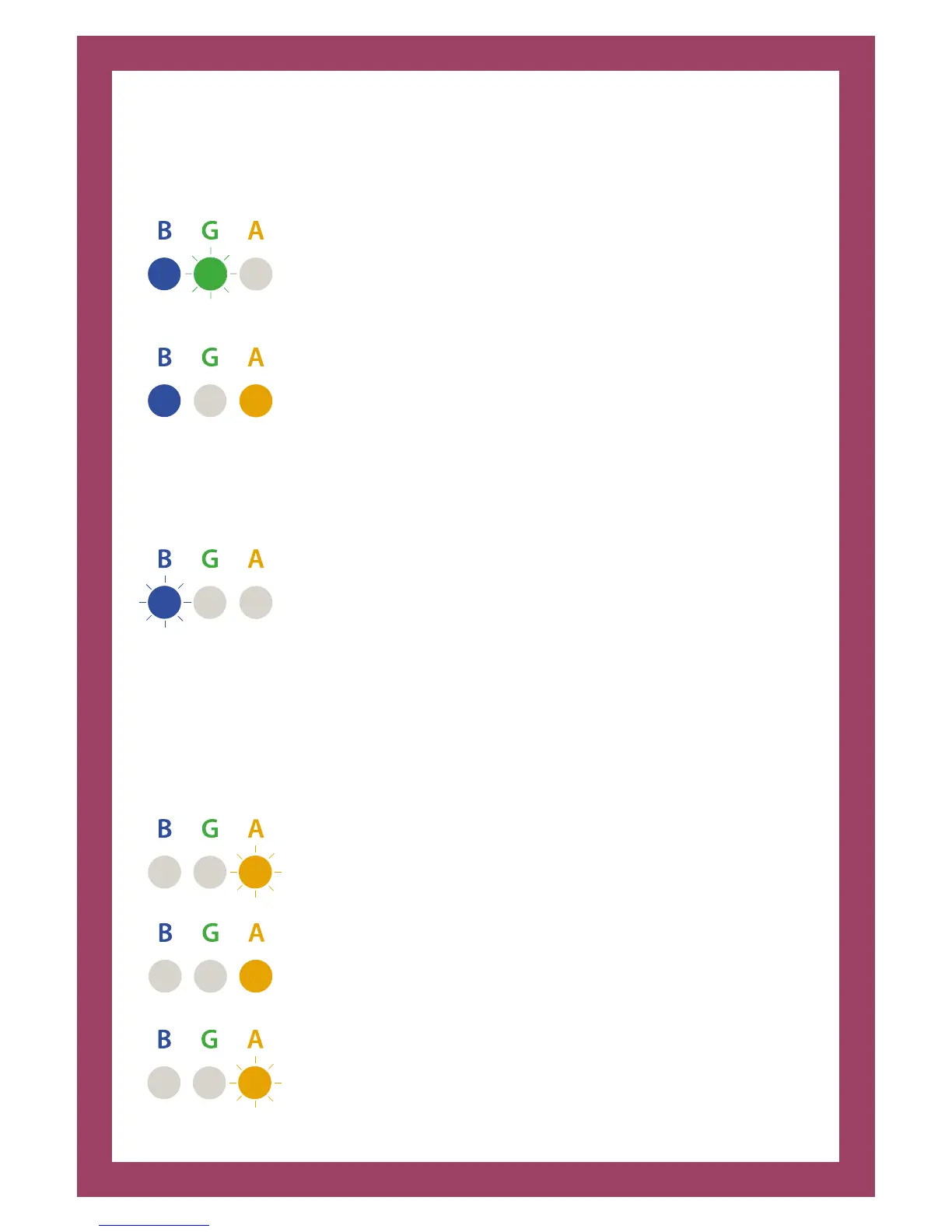
The lights on the charge and sync unit explains which mode it is in; sync and
charge, charge and sync or auto cycles:
AMBER light o, GREEN light flashing slowly, and BLUE light on
– synchronising will commence once the devices are connected
to host laptop or MacBook. Charging will commence once the
synchronising has finished or timed out.
Note: If no host device is connected when the unit is switched on
charging will commence. (GREEN light o, AMBER light comes on
to indicate charge and will blink to confirm full charge).
‘All O’ mode
Pressing once aer power-up will select ‘All O’ mode.
AMBER and GREEN lights o, BLUE light blinking briefly = Power
on with no activity.
From the ‘All O’ mode, pressing the black button again will select ‘All Charge’
mode.
‘All Charge’ mode
Pressing twice aer power-up, will also select ‘All Charge’ mode.
BLUE and GREEN lights o, AMBER light flashing slowly - waiting
for iPads/tablets to be connected = charging on standby.
BLUE and GREEN lights o AMBER light solid = One or more
devices are charging.
BLUE and GREEN lights o AMBER light blinking briefly = All
connected devices are fully charged.


 To Next Page