This document is a user manual for the Laser AO-AK350TWS True Wireless Stereo Earbuds. It provides instructions on how to use, troubleshoot, and maintain the earbuds, along with information about their features and controls.
Function Description:
The Laser AO-AK350TWS are True Wireless Stereo (TWS) earbuds designed for audio playback and hands-free communication. They connect wirelessly to a smart device via Bluetooth, allowing users to listen to music, podcasts, and other audio content, as well as make and receive phone calls without the need for physical cables. The earbuds come with a dedicated charging case that not only stores them securely but also recharges them on the go, ensuring extended usage time. The design suggests a focus on portability and convenience, making them suitable for various activities and daily use. The inclusion of touch controls on the earbuds themselves provides a direct and intuitive way to manage audio playback, calls, and device settings without needing to interact with the connected smart device directly. The earbuds also feature different modes, such as a game mode and music mode, indicating an optimized audio experience for various types of content.
Usage Features:
The AO-AK350TWS earbuds offer a range of features designed to enhance the user experience.
- Wireless Connectivity: The primary feature is their true wireless stereo capability, allowing for a cable-free listening experience. They connect to your device via Bluetooth, providing freedom of movement.
- Automatic Pairing: Once the earbuds are turned on, they automatically enter pairing mode. Users then need to open the Bluetooth settings on their device, search for "AO-AK350TWS," and select it to establish a connection. This streamlined process aims for quick and easy setup.
- Touch Controls: The earbuds are equipped with touch-sensitive panels for various functions, eliminating the need for physical buttons.
- Basic Playback and Call Management: A short tap on the touch control panel allows users to play or pause audio, as well as receive or end calls.
- Call Rejection: A long tap (2 seconds) can be used to reject an incoming call, providing quick control over communication.
- Mode Switching: A longer tap (4 seconds) enables switching between different operational modes, specifically "Game mode" and "music mode." This suggests an adaptive audio profile to suit different content types, potentially optimizing latency for gaming or enhancing audio quality for music.
- Power Control: An even longer tap (6 seconds) is used to power the earbuds on or off, offering direct control over their operational status.
- Voice Assistant Activation: Tapping the control panel four times activates the connected device's voice assistant, providing hands-free access to smart features like Siri or Google Assistant.
- Volume Control: The earbuds allow for direct volume adjustment. Tapping the left earbud three times decreases the volume, while tapping the right earbud three times increases it.
- Track Navigation: Users can navigate through their audio tracks directly from the earbuds. Tapping the left earbud two times skips to the previous track, and tapping the right earbud two times skips to the next track. These controls offer comprehensive management of media playback without needing to access the paired device.
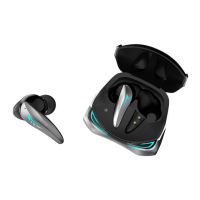
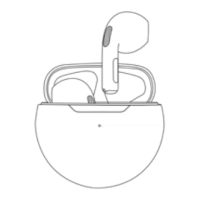
- Charging Case: The included charging case is integral to the user experience. It serves as a portable power bank for the earbuds, extending their usage time significantly. The case features two panels that lift to reveal the earbuds and their charging sockets, indicating a secure and protective enclosure.
- Charging Indicators: The case provides visual feedback on its charging status and the charging status of the earbuds.
- When the case is fully charged, its indicator light turns off.
- An orange light indicates that the case itself is currently charging.
- A blue light signifies that the earbuds placed inside the case are currently charging. These indicators help users monitor the power status of their device.
- USB-C Charging Port: The charging case is equipped with a USB-C port for convenient and modern charging, compatible with standard DC 5V input.
Maintenance Features:
The manual provides guidance on maintaining the earbuds and troubleshooting common issues, primarily focusing on power and connectivity.
- Charging and Power Management:
- Users are advised to check the battery level of the earbuds and the charging case regularly and charge them as needed to ensure continuous operation.
- For optimal charging, it is recommended to charge the case using a USB wall adapter (like a smartphone charger) rather than a laptop or computer. This suggests that a dedicated power source might provide more consistent or efficient charging.
- A USB wall adapter with a specification of up to 5V/1A is specifically recommended for charging, indicating the appropriate power input for the device.
- In cases of no power, a troubleshooting tip suggests leaving the case charging overnight, implying that a longer charge duration might resolve initial power issues or deeply discharged batteries.
- Earbud Protection: The earbuds feature a "Non-removable mesh earbud cover." This cover is designed to prevent dirt and dust from getting inside the earbud, which is a crucial maintenance feature for preserving sound quality and the longevity of the internal components. Users should avoid attempting to remove this cover.
- Connectivity Troubleshooting: The manual offers solutions for common Bluetooth connection problems:
- Proximity: If connection issues arise, users should ensure the earbuds are placed close to the smart device they are trying to pair with (e.g., a smartphone).
- Refreshing Device List: If the "AO-AK350TWS" Bluetooth name does not appear in the list of available devices, users are advised to refresh the list or search again. This helps in re-scanning for available devices.
- Waiting Period: It's suggested to allow up to 1 minute for the device to appear on the Bluetooth list, acknowledging that discovery can sometimes take a moment.
- Unpairing from Previous Devices: A critical troubleshooting step for connectivity is to ensure the earbuds are not already connected to another smart device. If they are, they must be unpaired from that device first, or be out of its Bluetooth connection range, before they can be connected to a new device. This prevents conflicts and ensures a clean connection.
- General Care: While not explicitly detailed as maintenance steps, the design of the charging case as a protective enclosure for the earbuds inherently contributes to their maintenance by shielding them from physical damage and environmental factors when not in use.
Overall, the Laser AO-AK350TWS earbuds are designed for ease of use with intuitive touch controls and a convenient charging solution, while also providing practical advice for troubleshooting and maintaining the device's functionality and longevity.

 Need help?
 General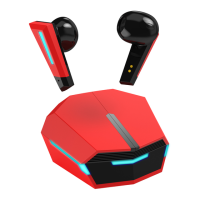

 To Next Page