EasyManua.ls Logo

Laser EPS-TWS - User Manual

Laser EPS-TWS
2 pages
Print Icon
To Next Page IconTo Next Page
Loading...
User Manual
TWS Earbuds
EPS-TWS
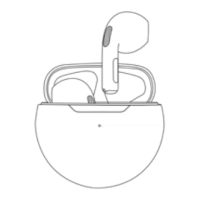
WHAT’S IN THE BOX:
OVERVIEW
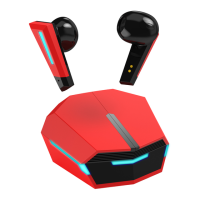
TWS Earbuds
Charging case
USB-C cable
User manual
CHARGING
Fully charge the earbuds and the case before rst use with the supplied cable. We recommend
using a standard 5V USB wall charger, laptop/PC or powerbank.
The charging indicator on the case will ash amber while charging and stay static when fully
charged.
Place the earbuds in the case; the indicator on the case will turn green, indicating charging. The
indicator will turn o when the earbuds are fully charged.
Earbuds will sound an alert when the battery is low.
SETTING UP
1. Take the earbuds out of the case; they will power on and sync with each other. Place them in your
ears.
2. On your connecting device, go to Settings, turn on Bluetooth and search for nearby devices.
3. Select EPS-TWS to pair with the your device. The earbuds will conrm the connection with a voice
prompt. From now on, any audio played on your device will be transmitted through the TWS
earbuds.
NOTE:
If EPS-TWS does not appear on the connecting device, retry from step 2.
Your earbuds auto-turn o after 5 minutes of no connection. Place them in the charging case
and restart from step 1 if needed.
The earbuds can be paired with multiple devices, but can only play music from 1 paired device
at a time.
Power button
Chaging
indicator
Pinch area Pinch area
USB-C Charging port
(at the bottom)
Pinch to
control

Question and Answer IconNeed help?

Do you have a question about the Laser EPS-TWS and is the answer not in the manual?

Summary

Overview of TWS Earbuds

Charging Your TWS Earbuds

Setting Up Your TWS Earbuds

Earbud Function Operations

Safety Precautions for TWS Earbuds

Troubleshooting Common Issues

TWS Earbuds Specifications

Summary

Overview of TWS Earbuds

Charging Your TWS Earbuds

Setting Up Your TWS Earbuds

Earbud Function Operations

Safety Precautions for TWS Earbuds

Troubleshooting Common Issues

TWS Earbuds Specifications

Overview

This document describes the LASER EPS-TWS True Wireless Stereo (TWS) Earbuds, a personal audio device designed for wireless listening.

Function Description

The EPS-TWS earbuds provide a wireless audio experience, connecting to compatible devices via Bluetooth. They allow users to listen to music, make and receive calls, and interact with their device's voice assistant. The earbuds come with a charging case that not only stores them but also recharges them on the go.

Important Technical Specifications

  • Bluetooth Version: 5.3
  • Bluetooth Range: 10 meters
  • Earbud Battery Capacity: 30mAh
  • Charging Case Battery Capacity: 200mAh
  • Power Input: 5V
  • Charging Port: USB-C

Usage Features

Getting Started

  1. Unboxing: The package includes the TWS Earbuds, a Charging case, a USB-C cable, and a User manual.
  2. Initial Charging: Before first use, fully charge both the earbuds and the case using the supplied USB-C cable. A standard 5V USB wall charger, laptop/PC, or power bank is recommended. The charging indicator on the case will flash amber during charging and become static when fully charged. When earbuds are placed in the case for charging, the indicator turns green and then off once fully charged. An audible alert will sound when the earbud battery is low.
  3. Power On/Off:
    • Power On: Take the earbuds out of the case. They will automatically power on and sync with each other. Alternatively, press and hold for approximately 3 seconds until the earbud powers on.
    • Power Off: Press and hold for approximately 5 seconds until the earbud powers off.
  4. Pairing:
    • Take the earbuds out of the case and place them in your ears.
    • On your connecting device (e.g., smartphone, tablet), go to Settings, enable Bluetooth, and search for nearby devices.
    • Select "EPS-TWS" from the list to pair. A voice prompt will confirm the connection.
    • If "EPS-TWS" does not appear, retry the pairing process from step 2.
    • The earbuds will auto-turn off after 5 minutes of no connection. To restart, place them back in the charging case and then take them out again.
    • While the earbuds can be paired with multiple devices, they can only play music from one paired device at a time.

Controls

The earbuds feature intuitive pinch controls for various functions:

  • Play/Pause: Pinch once.
  • Volume Up: Pinch 3 times on the Left earbud.
  • Volume Down: Pinch 3 times on the Right earbud.
  • Play Next Track: Pinch twice on the Left earbud.
  • Play Previous Track: Pinch twice on the Right earbud.
  • Answer/End Call: Pinch once.
  • Reject Call: Pinch and hold for 2 seconds.
  • Activate Voice Assistant: Pinch and hold for 2 seconds until you hear the voice assistant's bell sound.

Maintenance Features

Cleaning

  • Clean the earbuds using a soft, dry cloth.

Storage and Environmental Considerations

  • Avoid exposing the earbuds to damp, dusty, or prolonged hot/sunny conditions.
  • Extreme temperatures (below 0°C or above 45°C) can deform the device and diminish battery capacity and lifespan.
  • Store out of reach of children and supervised individuals to prevent accidental ingestion.

Troubleshooting

  • Sound from only one earbud:
    • Ensure both earbuds are fully charged.
    • Reset synchronization: Place both earbuds back in the charging case, then take them out and wait for them to sync. If not synchronized, both earbuds will flash blue; when synced, only one earbud will flash.
  • Earbuds won't connect to other devices:
    • Verify that Bluetooth is enabled on your device.
    • Confirm that no other device is currently paired with the earbuds.
    • Keep the earbuds close to the device during the initial connection process.
    • If "EPS-TWS" does not appear on the connecting device, retry the pairing process.
    • If EPS-TWS does not appear on the connecting device, ensure that the earbuds are not already connected to another device.

Safety Precautions

  • Hearing Protection: Excessive volume can harm your hearing.
  • Situational Awareness: Be cautious when using the device while walking, driving, or cycling to prevent accidents.
  • Magnetic Interference: This product contains magnets that may interfere with pacemakers or other medical devices. Keep it away from individuals with such devices and consult a doctor before use.
  • Disposal and Recycling: Follow local laws for proper disposal and battery recycling; avoid placing the device in kerbside bins.

Product Support

For product support, you can contact Laser via:

  • Email: support@laserco.com.au
  • Phone: (02) 9870 3355

Laser EPS-TWS Specifications

General IconGeneral
BrandLaser
ModelEPS-TWS
CategoryHeadphone
LanguageEnglish

Related product manuals