QUICK START GUIDE MP4-P20-BLK
SETTINGS
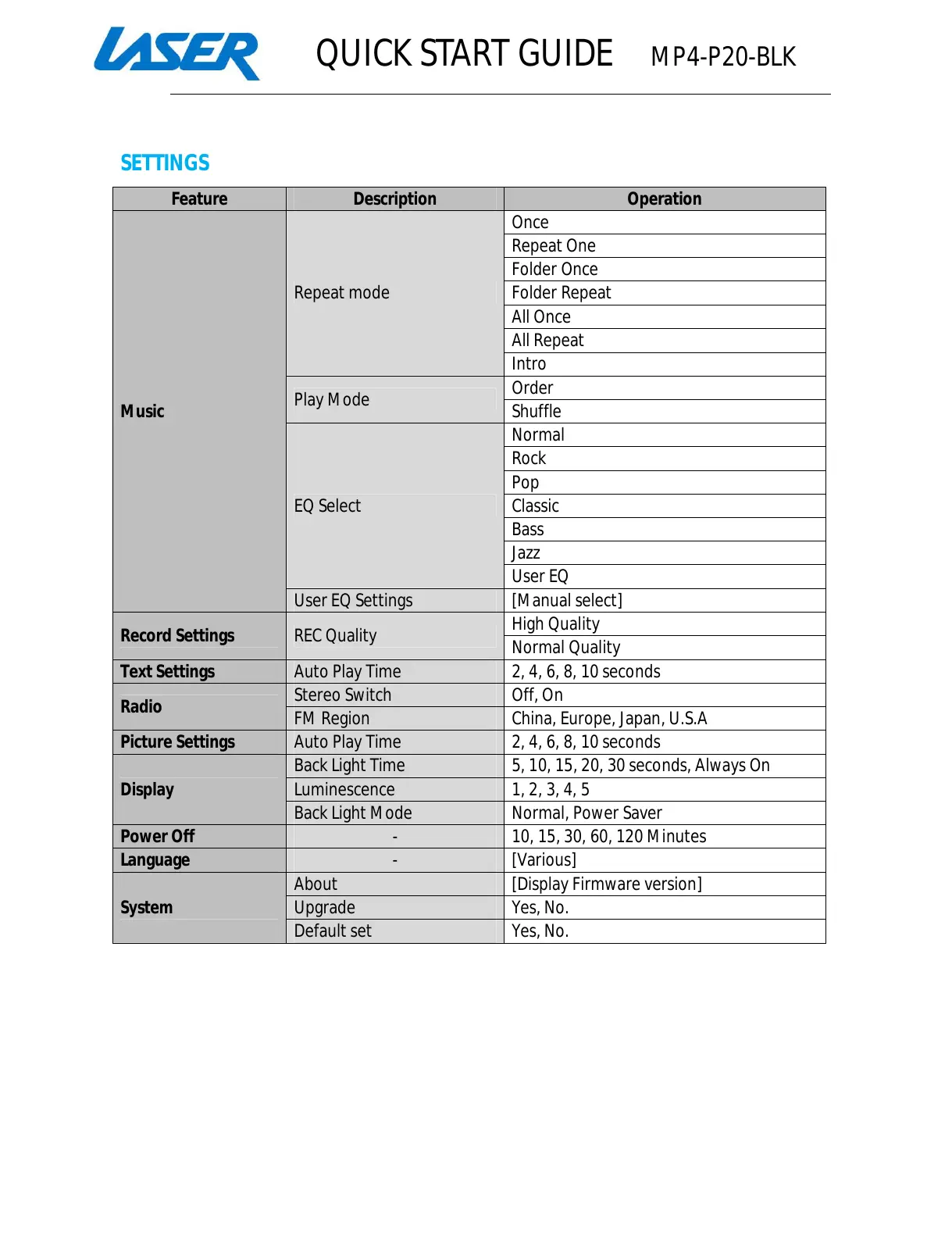
Feature Description Operation
Music
Repeat mode
Once
Repeat One
Folder Once
Folder Repeat
All Once
All Repeat
Intro
Play Mode
Order
Shuffle
EQ Select
Normal
Rock
Pop
Classic
Bass
Jazz
User EQ
User EQ Settings [Manual select]
Record Settings REC Quality
High Quality
Normal Quality
Text Settings Auto Play Time 2, 4, 6, 8, 10 seconds
Radio
Stereo Switch Off, On
FM Region China, Europe, Japan, U.S.A
Picture Settings Auto Play Time 2, 4, 6, 8, 10 seconds
Display
Back Light Time 5, 10, 15, 20, 30 seconds, Always On
Luminescence 1, 2, 3, 4, 5
Back Light Mode Normal, Power Saver
Power Off - 10, 15, 30, 60, 120 Minutes
Language - [Various]
System
About [Display Firmware version]
Upgrade Yes, No.
Default set Yes, No.



 To Next Page