LASER RAPIER II OPERATOR INSTRUCTION MANUAL
11
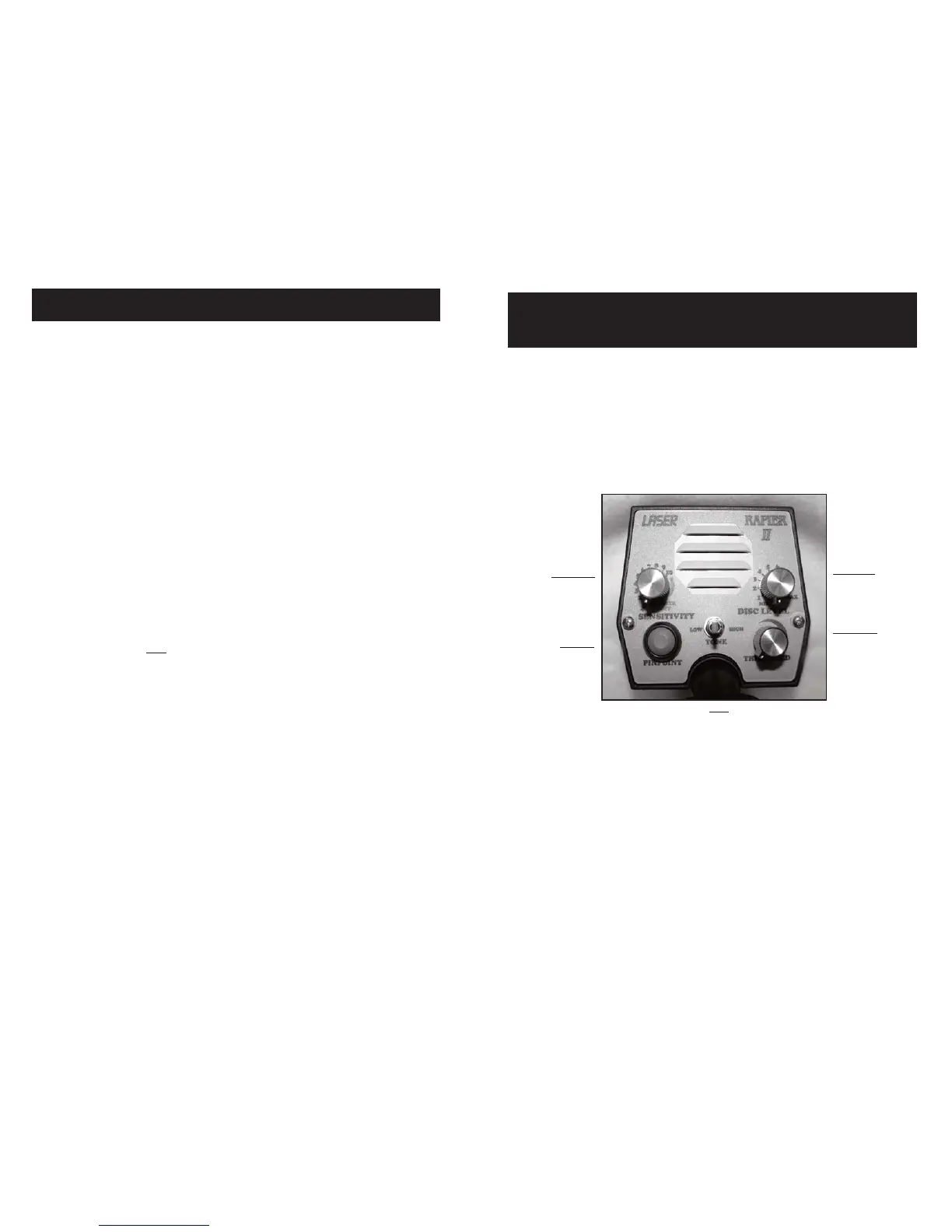
The Rapier II has only five controls, all mounted on the front
panel of the housing for fingertip adjustment. How these controls should
be set for peak performance will depend on the type of metal you are
searching for, search site conditions, and so forth. Use the information
in this section and the TUNING YOUR DETECTOR section as a basis
for setting the controls on your detector. Using your detector in the field
will allow you to learn fine tuning the detector’s operating controls
SENSITIVITY
ON/OFF-Battery Test – Sensitivity Control
As its name suggests, this is in fact a three-function control:
First, it is used to turn the power on and off. Rotating it clockwise past
the an initial “click” turns the detector on. Rotating it fully counter-
clockwise until it clicks disconnects the batteries from the circuit, turn-
ing the detector off. Secondly it activates an automatic battery test when
the detector is first turned on.
(NOTE: This test should be performed with the Mode switch in the
Discriminate position.)
Since the most troublesome adjustments of standard detectors
have been automated in the Rapier II, Tuning this detector is simply a
matter of:
➊ Setting the Sensitivity level using the SENSITIVITY control.
➋ Setting the Discrimination level using the DISC LEVEL control.
➌ Setting the Threshold level using the THRESHOLD and PINPOINT
control.
Selecting the Proper Operating Mode
The Rapier II offers two operating modes, Discriminate Mode
and Pinpoint mode. Both modes are also “mineral free.” This means the
detector’s circuitry has been factory preset to ignore all but the most ex-
treme ground mineral conditions.
The Discriminate Mode is “Silent Search.” This means that the
detector will make no sound until it encounters a metal target. This mode
requires that the searchcoil be slightly in motion for target detection.
The Pinpoin mode is “threshold based”. This means the detector
has a baseline hum, set by the threshold control, that will get louder
when it encounters any
metal target. If the coil stops moving, the target
will be tuned out. The Pinpoint mode provides simpler information than
the DISC mode. For more infomation on pinpointing see page 19.
Setting the Sensitivity Level
In lightly to moderately mineralized ground, you can usually set
the SENSITIVITY control as high as 8 to 10 (normal maximum set-
ting). In the right conditions, you can move the SENSITIVITY control
clockwise as far as possible until the detector just begins to “chirp” In-
termittently. If the chirping is too frequent, simply turn the control coun-
terclockwise just enough to cause the chirping to subside. Once set, this
control should not require readjusting unless site conditions change.
Occasionally, you may need to reduce the setting to eliminate
“false signals” casued by difficult conditions such as highly mineral-
ized ground on trashy sites or nearby sources of electrical interference.
These false signals are generally short, choppy sounds that can be eas-
ily distinguished from a good target response sound. Extreme conditions
such as wet salt sand may require you to lower your sensitivity setting
into the 2 to 5 range.
14
OPERATING TECHNIQUES
CONTROLS
OPERATING TECHNIQUES
DISC LEVEL
Discrimination
Level
Control
THRESHOLD
Threshold
Level
Control
SENSITIVITY
Sensitivity
Control
PINPOINT
QuickCheck
Pinpoint
Push-button
TONE
Tone
Selection
TUNING YOUR DETECTOR


 To Next Page