EasyManua.ls Logo

Laser SPK-F228 - User Manual

Laser SPK-F228
6 pages
Print Icon
To Next Page IconTo Next Page
Loading...
User Manual
SPK-F228
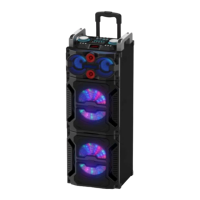
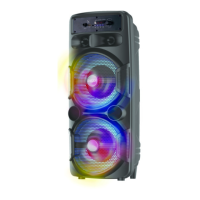
Portable Bluetooth Speaker
with LED and FM Radio

Questions and Answers

  • J
    jennifer85Aug 6, 2025
    Why is there no sound coming from my Laser SPK-F228?
    • M
      markhallAug 6, 2025
      If there's no sound from your Laser Speakers, there could be a couple of reasons. First, ensure that your audio source is properly connected and playing sound. Second, check the volume level on the speakers and make sure it isn't set too low. Adjust the volume as needed.
  • S
    samantha98Aug 13, 2025
    What to do if my Laser SPK-F228 Speakers sound distorted?
    • B
      Brooke LopezAug 13, 2025
      Sound distortion in your Laser Speakers can occur if the volume is set too high, so try turning it down. Also, radio reception might cause sound distortion. In this case, try relocating the speaker to another position.
  • M
    Michael ChaseAug 21, 2025
    How to fix Karaoke if it doesn't work on Laser SPK-F228?
    • A
      Anna WeberAug 21, 2025
      If the Karaoke function isn't working on your Laser Speakers, there are a few things to check: 1. Make sure the microphone is fully plugged into the socket. 2. Ensure the microphone switch is turned on. 3. Verify that the microphone volume knob is properly adjusted and not at the lowest position.
  • S
    Steven NguyenAug 29, 2025
    What to do if USB does not play on Laser SPK-F228 Speakers?
    • B
      Brittany WilliamsAug 29, 2025
      If your Laser Speakers aren't playing from a USB drive, it might be due to a few reasons: 1. The speakers only support MP3 files, so ensure your audio files are in the correct format. 2. The USB drive needs to be formatted to FAT32 or exFAT. If it is not, format the USB drive to the correct file system. 3. The USB drive may be corrupted. Try using another USB drive to see if that resolves the issue.

Summary

Front Panel Controls

Master Volume, LED, and Input Ports

Controls for volume, charging status, and connections for DC, AUX, USB, and microphone.

Front Panel Buttons and Display

Buttons for light control, station/playback functions, and the device's display screen.

Remote Controls

Basic Remote Operations

Controls for power, mode selection, and muting the audio output.

Playback and Navigation Controls

Functions for playing/pausing, skipping tracks, and selecting radio stations.

Advanced Remote Functions

Controls for equalizer, volume, repeat, number pad, and FM tuning.

TWS Functionality

Pairing Speakers for Stereo Sound

Instructions to wirelessly connect two speakers for True Wireless Stereo audio.

Disconnecting TWS Speakers

Procedure for unpairing previously connected TWS speakers.

Troubleshooting Guide

Audio Playback Issues

Solutions for common problems like no sound, low volume, or audio distortion.

Function-Specific Problems

Fixes for karaoke microphone input and USB media playback errors.

Safety Precautions

Environmental and Handling Safety

Warnings regarding surface placement, dust, foreign objects, and magnetic fields.

Usage and Repair Safety

Precautions against water exposure, unauthorized repair, and blocking ventilation.

Product Disposal Guidelines

Advice on the responsible disposal of the electronic product.

Warranty Information

Consumer Rights and Guarantees

Details on consumer rights and guarantees applicable to the product.

Product Details

Whats in the Box

List of all items included in the product packaging.

Features and Specifications

Summary of the product's capabilities and technical specifications.

Laser SPK-F228 Specifications

General IconGeneral
BrandLaser
ModelSPK-F228
CategorySpeakers
LanguageEnglish

Related product manuals