QUICK USER MANUAL SPK-SB120
2
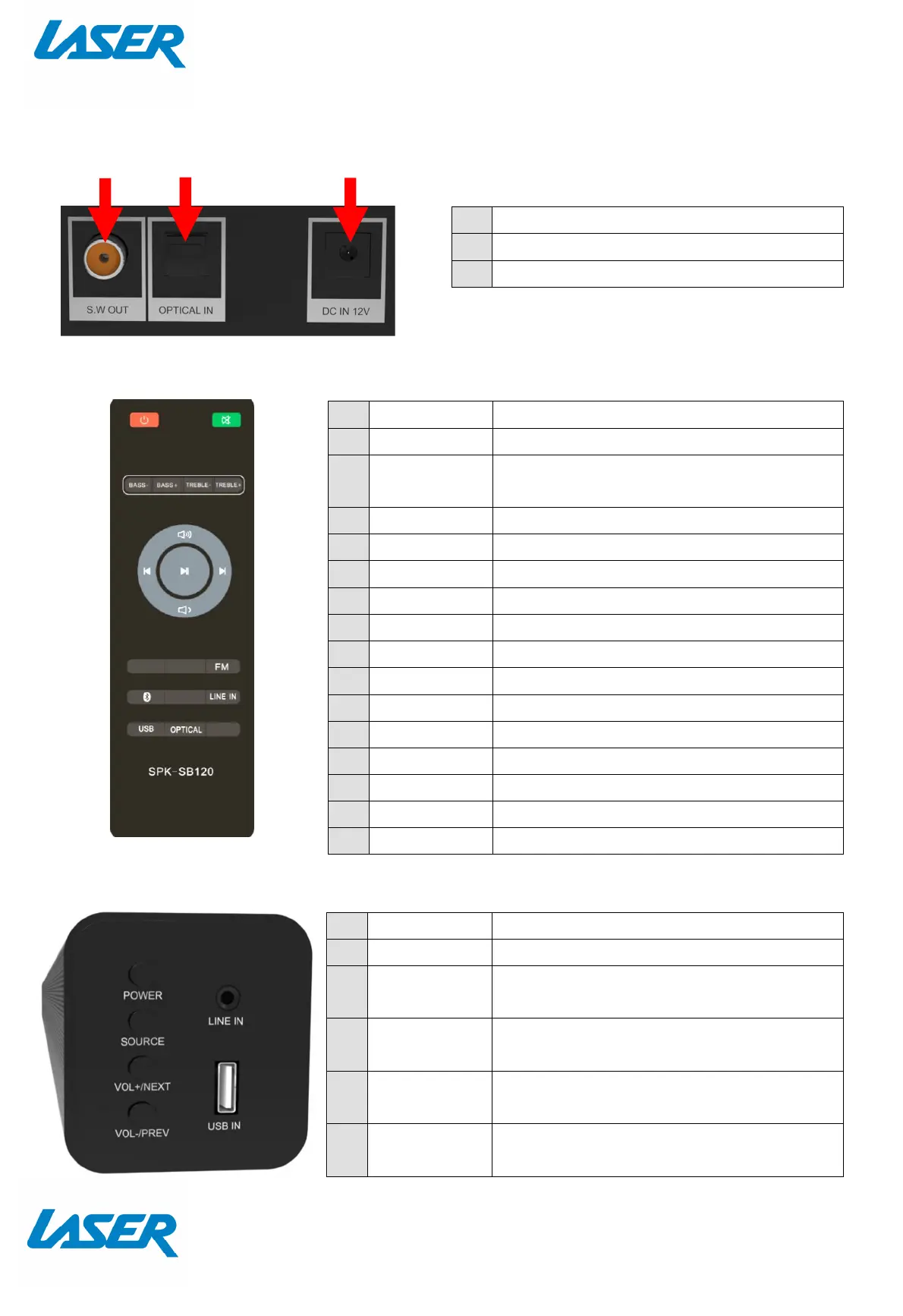
CONNECTIONS
THE REMOTE CONTROL
ON DEVICE CONTROLS / HARDWARE INPUTS
1 Output to subwoofer (not supplied)
2 Optical input (Audio)
3 DC In 12v (Power for speaker bar)
1 ON / OFF Turn Sound Bar On or Off
2 MUTE Mute or Unmute audio
3 BASS- Surround sound (sound effects
equaliser)
4 BASS+ Music sound (sound effects equaliser)
5 TREBLE- Movie sound (sound effects equaliser)
6 TREBLE+ News (sound effects equaliser)
7 VOL + Increase Volume (of sound bar)
8 CH - Previous music file / Radio station
9 PLAY/PAUSE
Pause or Play Audio while playing
10
CH + Next music file / Radio station
11
VOL - Decrease Volume (of sound bar)
12
FM Select Audio Input via FM Radio
13
BLUETOOTH
Select Audio Input via BLUETOOTH
14
LINE IN Select Audio Input via LINE IN
15
USB Select Audio Input via USB
16
OPTICAL Select Audio Input via OPTICAL INPUT
1 POWER Turn Sound Bar On or Off
2 SOURCE Toggle between audio input sources
3 VOL+ /NEXT
Increase volume of sound bar OR
select next song (or radio station)
4 VOL-/PREV
Decrease volume of sound bar OR
select previous song (or radio station)
5 LINE IN
Connect any audio device via a 3.5mm
headphone audio socket
6 USB IN
Connect your thumb drive via the USB
socket
1
3
8
4
5
6
7
10
9
12
14
15
16
13
1
2
3
4
5
6
2
11


 To Next Page