ATSC Converter Box
~~~~~~~~:~~Jlo.l~ratJ~
5.1.
Front Panel
CD
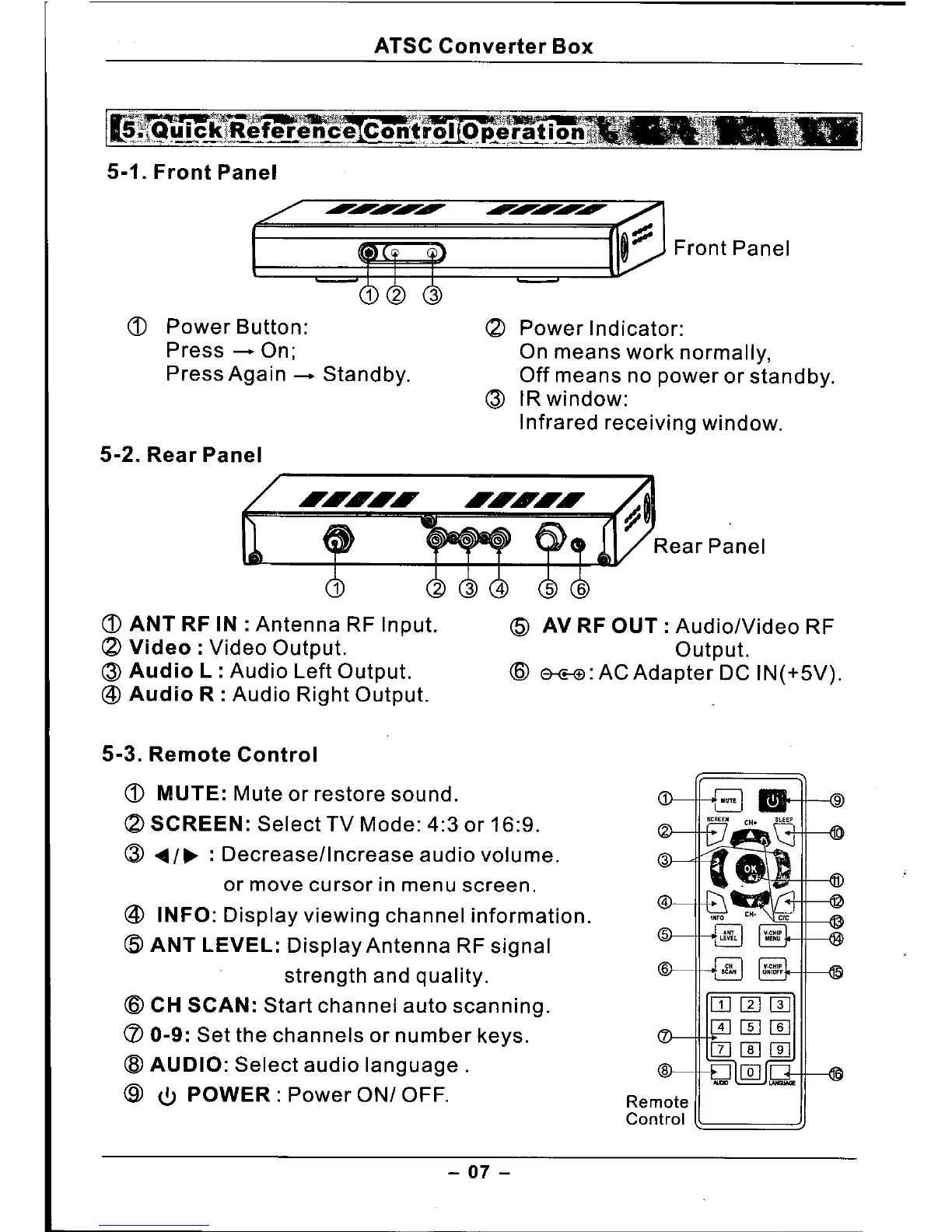
Power Button:
Press - On;
Press Again - Standby.
5-2. Rear Panel
(2)
Power Indicator:
On means work normally,
Off means no power or standby.
(3)
IR window:
Infrared receiving window.
CD
ANT RF IN: Antenna RF Input.
(2)
Video: Video Output.
(3)
Audio L : Audio Left Output.
@
Audio R : Audio Right Output.
@
AV RF OUT: AudiolVideo RF
Output.
(6)
&Co-<tl:ACAdapterDC IN(+5V).
5-3. Remote Control
CD
MUTE: Mute or restore sound.
(2)
SCREEN: Select TV Mode: 4:3 or 16:9.
(3) .•••/~ :
Decrease/Increase audio volume.
or move cursor in menu screen.
@
INFO: Display viewing channel information.
(5)
ANT LEVEL: Display Antenna RF signal
strength and quality.
<ID
CH SCAN: Start channel auto scanning.
(/) 0-9: Set the channels or number keys.
(8)
AUDIO: Select audio language.
@
<b
POWER: Power ON/ OFF.
Remote
Control
- 07 -



 To Next Page