ATSC Converter Box
@ SLEEP: Switch the sleep timer setting.
Qj)
OK: Use to confirm the channel selection and other operation.
@ C/C: Switch Close Caption Service or On/Off.
o
CH+/CH-: Select next / previous channel or move the highlight for
menu item.
9
V-CHIP MENU: Enter or exit the V-CHIP setting menu.
@
V-CHIP ON/OFF: V-CHIP on / off temporarily.
@ LANGUAGE: Select OSD language: English / Spanish / French.
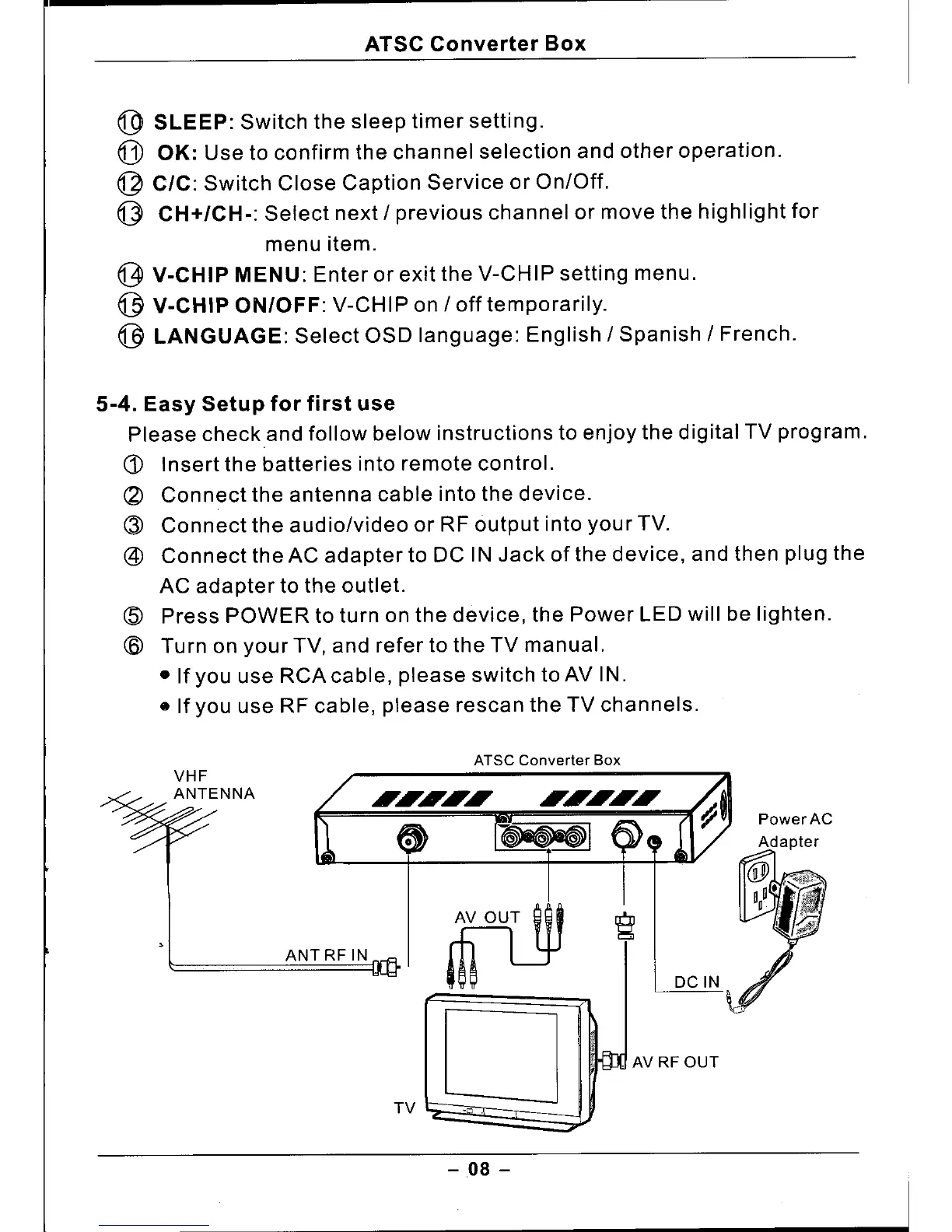
5-4. Easy Setup for first use
Please check and follow below instructions to enjoy the digital TV program.
(j)
Insert the batteries into remote control.
(2) Connect the antenna cable into the device.
(3) Connect the audio/video or RF output into your TV.
@ Connect the AC adapter to DC IN Jack of the device, and then plug the
AC adapter to the outlet.
(5) Press POWER to turn on the device, the Power LED will be lighten.
(6) Turn on your TV, and refer to the TV manual.
• If you use RCA cable, please switch toAV IN .
• If you use RF cable, please rescan the TV channels.
ATSC Converter Box
drUP
~
ANT RF IN
DC IN
0
_AVRFOUT
TV
- .08 -



 To Next Page