X-431 HTT Professional Automotive Diagnosis Handset
25
the vehicle information screen. See Fig. 5-2.
• To scan it again, tap “REPEAT”.
2) Input the VIN, and tap “OK”, the system will automatically identify the
vehicle model and directly navigate to the vehicle information page.
In general, vehicle identification numbers are standardized - all contain 17
characters. VIN characters may be capital letters A through Z and numbers
1 through 0; however, the letters I, O and Q are never used in order to avoid
mistakes of misreading. No signs or spaces are allowed in the VIN.
Tap “SKIP” to go to Local Diagnosis main menu screen.
5.2 Local Diagnosis
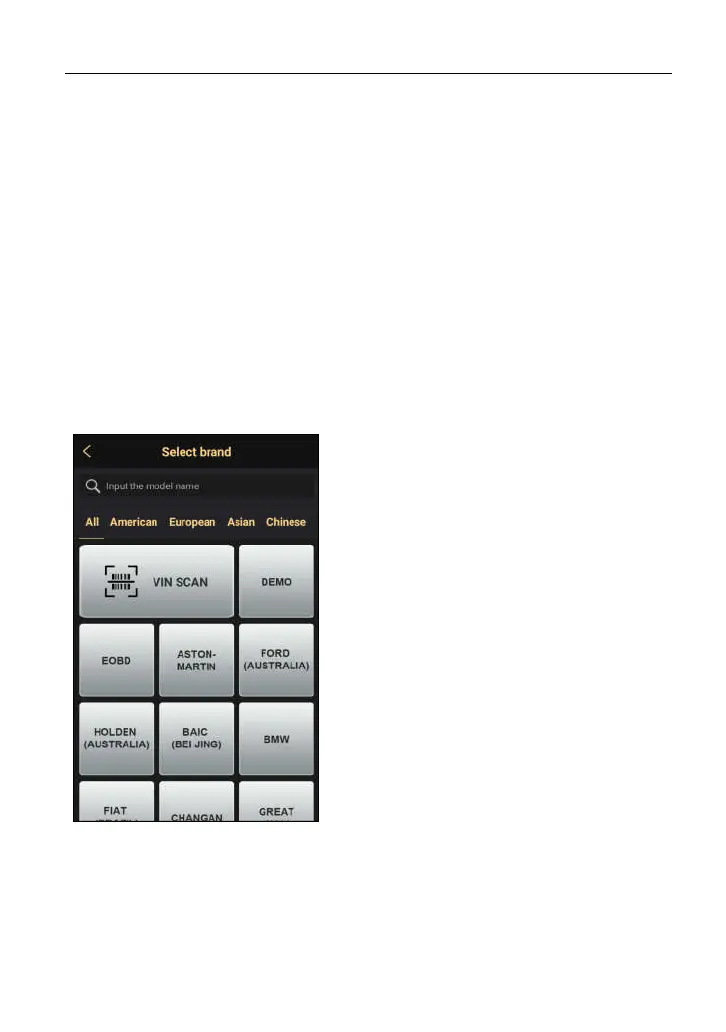
Tap “Diagnose” to enter the vehicle selection page.
Fig. 5-7
*Notes:
1. Input the vehicle model name in the search
bar directly to retrieve it or swipe the
screen from the bottom to select the desired
vehicle brand from the vehicle list.
2.
All
incorporates the vehicle models from
all regions. Tap American, European, Asian
or Chinese to switch to the corresponding
vehicles.
3. If you had a Gasoline & Diesel version of
X-431 HTT, a “Commercial vehicle” tab
will appear between Passenger vehicle and
History.
2 approaches are provided for you to access the vehicle diagnostic software.
Choose any one of the following ways:
1. VINSCAN enables you to access it more quickly.
In this case, automatic scan (Camera Scan) and manual input (Enter VIN) are



 To Next Page