X-431 HTT Professional Automotive Diagnosis Handset
32
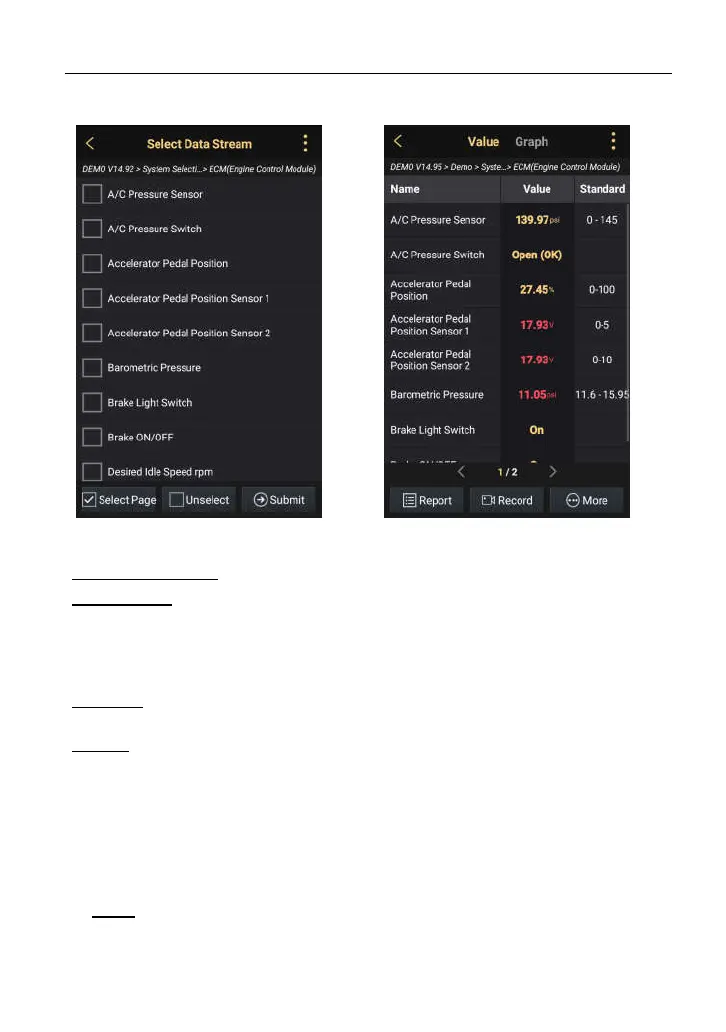
Fig. 5-18
On-screen Buttons:
Select Page: Tap it to select all
items of the current page. To
select certain data stream item,
just check the box before the item
name.
Unselect:
Tap it to deselect all
data stream items.
Submit: Tap it to confirm and
jump to the next step.
After selecting the desired items,
tap “Confirm” to enter the data
stream reading page. See Fig.
5-19.
Fig. 5-19
*Notes:
• If the value of the data stream item is out of
the range of the standard (reference) value,
it will display in red. If it complies with the
reference value, it displays in gold (normal
mode).
• If more than one page of data stream items
is displayed, an icon similar to 1/X appears
on the bottom of the screen. The indicator
1/X stands for the current page/total page
number. Swipe the screen from right to left
to switch to the next page.
By default, there are 2 types of display modes available for data viewing:
Value – this is the default mode which displays the parameters in texts and
shows in list format.
In Fig. 5-19,



 To Next Page