Legacy Mode
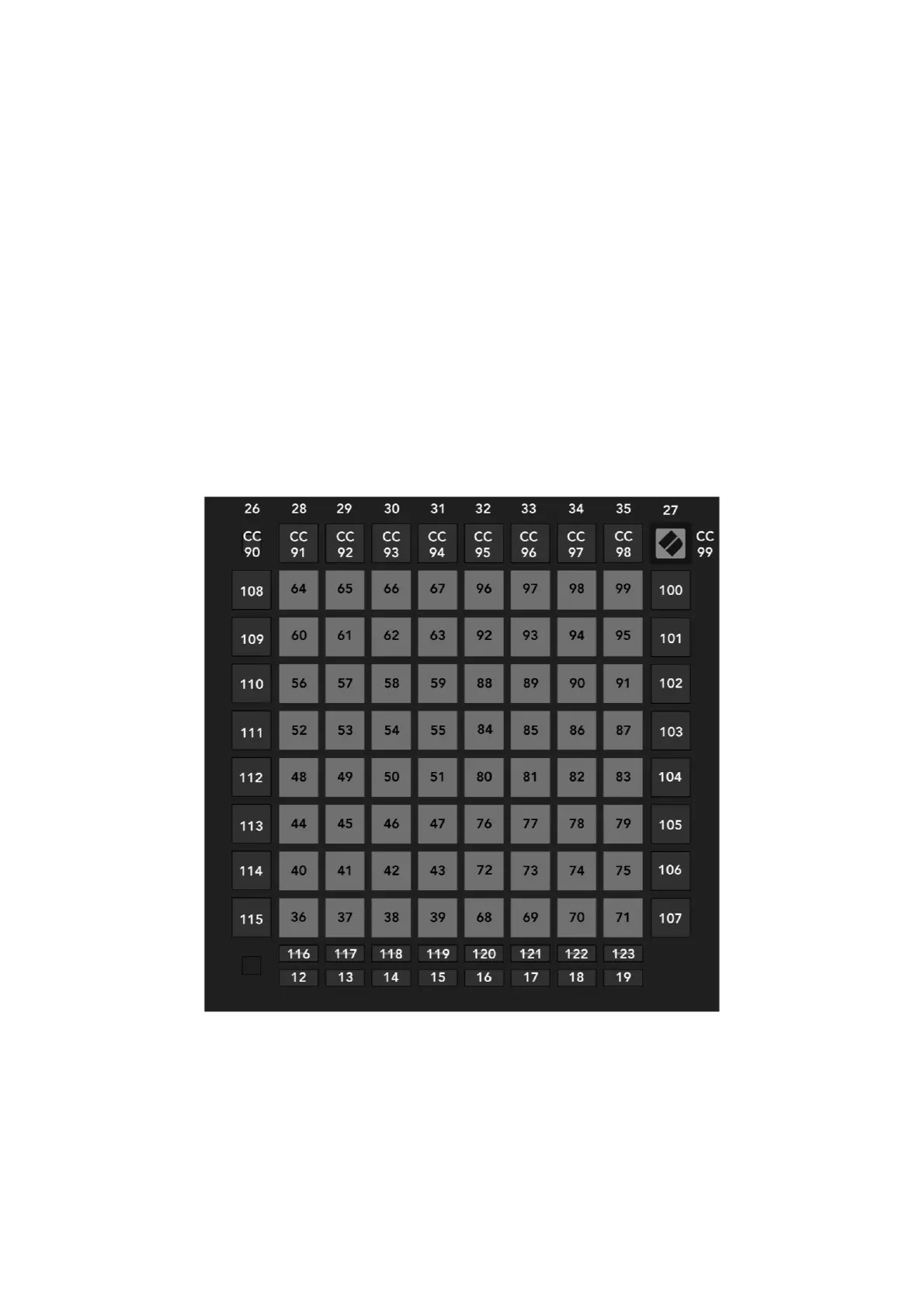
Legacy Mode re-introduces the User layout of the original Launchpad Pro. This brings a level
of backwards compatibility that allows you to interface with legacy applications and
lightshow performances designed for the original Launchpad Pro.
The layout is as seen below. Unspecified numbers represent note numbers, while CC numbers
(control change) are labelled as such. See the programmer’s reference guide for more
information on lighting pads.
Note that while the top row of buttons sends out CCs upon being pressed, note messages may
also be used to light them. This allows for the entire view to be lit using only note messages.
Pads & buttons may also be lit via SysEx messages in Legacy mode. The layout for doing so
matches that of Programmer Mode, which you can read more about in the Programmer’s
Reference Guide.
Above the note & CC values are shown in decimal format.


 To Next Page